
WoneNice USB Laser Scanner
4.5Editor score
Plug and play setup
Compatible with Mac and Linux
High scanning speed
This guide compares ten top barcode scanners for Square POS systems to help you find the best wired or wireless option for your business needs.
Finding the right barcode scanner for your Square setup is essential for smooth checkout operations. Whether you run a retail store or a mobile service, having a reliable scanner speeds up transactions and reduces errors at the register.
We evaluated ten highly rated scanners based on compatibility, scan speed, and ease of use. Our list includes wired and wireless models that work seamlessly with Square Stand and Register systems to keep your business running efficiently.
Each pick below highlights key features, pros, and cons to help you decide. Note that prices and availability may change over time, so always check current listings before making your final purchase decision today.
4.5Editor score

4.1Editor score
4.3Editor score
This table provides a side-by-side look at the key specifications and compatibility details of each scanner to help you compare them easily.


The Symbol Zebra LS2208 is a robust laser scanner designed for steady desktop use. With a high rating, it offers reliable performance for businesses that need consistent scanning without connectivity issues.
We may earn a commission when you buy through this link, at no additional cost to you.
Its USB connection ensures zero latency during checkout. The included gooseneck stand allows for hands-free scanning which is useful for busy retail environments where speed is key to customer satisfaction.
While it lacks wireless capability, the wired design minimizes interference. The laser technology works well on printed labels but may have trouble with reflective surfaces or phone screens used for digital coupons.
This scanner is ideal for fixed checkout counters where reliability matters most. If you need a straightforward device that integrates easily with Square and other POS systems, this is a solid choice.
The included stand keeps the scanner upright for quick access during peak hours.
Plug into USB and start scanning immediately with no driver installation needed.
We may earn a commission when you buy through this link, at no additional cost to you.
The NETUM Bluetooth Scanner offers three ways to connect making it versatile for different setups. It has a strong reputation for recognizing damaged or tightly spaced barcodes efficiently.
We may earn a commission when you buy through this link, at no additional cost to you.
Its CCD sensor can scan codes directly from screens which is great for digital wallets. The large battery supports continuous scanning for hours and it can store up to 100000 barcodes offline.
However it explicitly notes incompatibility with Square POS systems. You will need to configure settings using the manual barcodes which adds a step before first use but gives you control.
Consider this for businesses using other POS platforms that need wireless flexibility. While powerful it is not the right choice for Square users specifically.
Read barcodes directly from smartphone or tablet screens without extra hardware.
Store up to 100000 barcodes when out of Bluetooth range for later upload.
We may earn a commission when you buy through this link, at no additional cost to you.
The WoneNice USB Laser Scanner provides exceptional value for small businesses on a tight budget. It delivers fast scanning speeds and works with a wide range of operating systems including Mac and Linux.
We may earn a commission when you buy through this link, at no additional cost to you.
Setup is simple with plug and play functionality so you can start scanning quickly. The 200 scans per second rate keeps lines moving even during busy periods at the register.
While it lacks advanced wireless features it performs its core function well. The configurable options allow you to tailor output for your specific software needs without extra cost.
This is a great choice if you need a reliable wired scanner without spending much. It fits perfectly into any standard USB port and is easy to replace if needed.
Runs smoothly on Windows Mac and Linux with no extra drivers required.
Processes 200 scans per second to reduce wait times for customers.
We may earn a commission when you buy through this link, at no additional cost to you.
The ScanAvenger Wireless Scanner handles both 1D and 2D barcodes including QR codes which is essential for modern retail. It connects via Bluetooth or USB and does not require any additional software to function.
We may earn a commission when you buy through this link, at no additional cost to you.
The Next Gen charging stand holds the scanner and keeps it charged using a lighting connector. This convenience reduces downtime and ensures the device is ready whenever you need to process a sale.
It offers vibration feedback which helps in noisy environments where audio cues might be missed. While it covers most barcode types it does not support Maxicode which may be a limitation for some industries.
Choose this if you need QR code scanning and wireless freedom at a reasonable cost. The included stand adds value and makes it a complete package for inventory or sales tasks.
Scan QR codes and PDF417 codes easily for mobile tickets or IDs.
Dock the scanner to charge it automatically and keep your counter organized.
We may earn a commission when you buy through this link, at no additional cost to you.
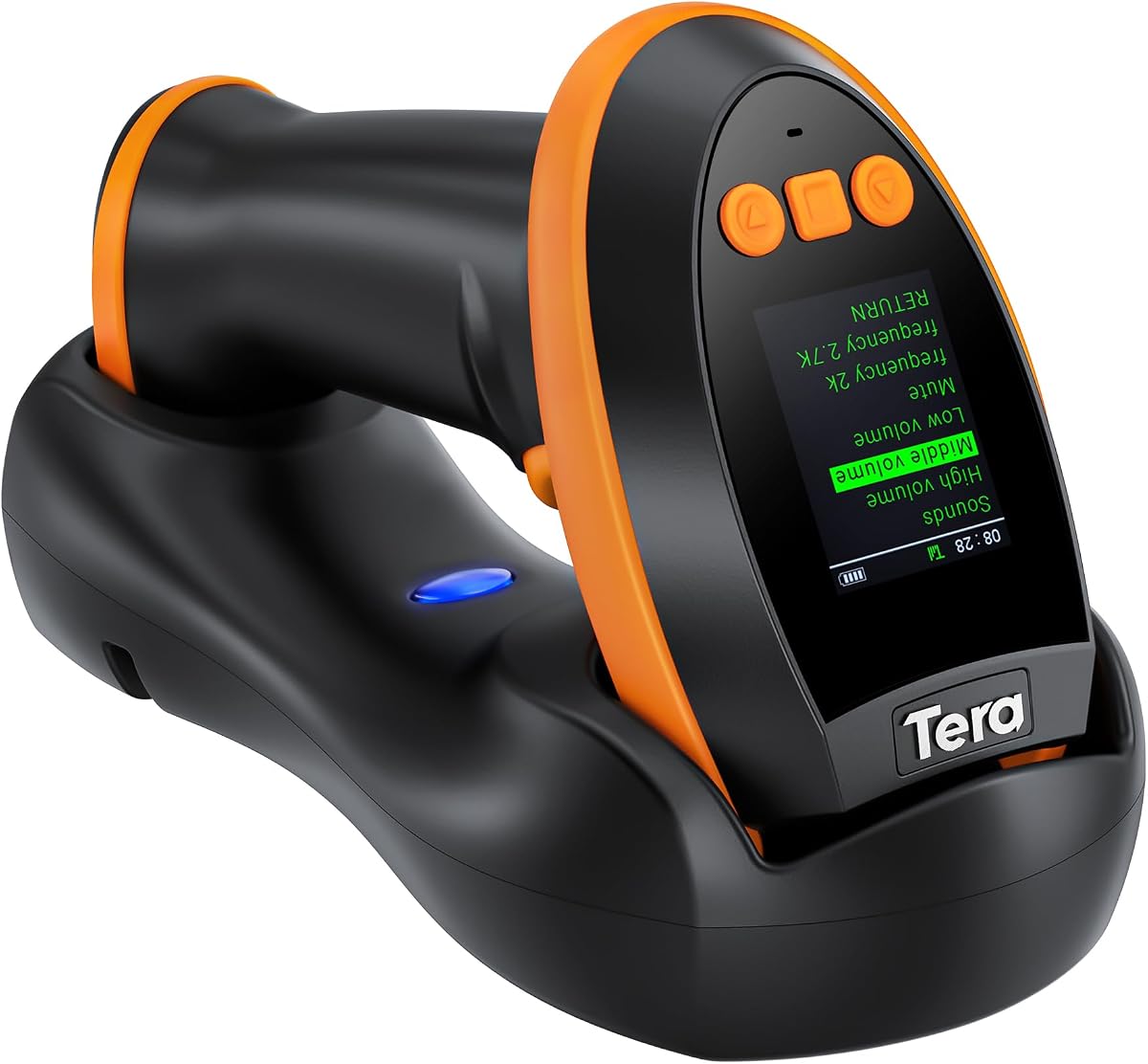
The Tera Barcode Scanner stands out with a built-in screen that lets you customize settings directly on the device. This premium feature removes the need for complex manual scans to configure preferences.
We may earn a commission when you buy through this link, at no additional cost to you.
Its global CMOS imaging technology excels at reading difficult codes on reflective or silver paper. It also handles underwater scans and dense formats like driver license barcodes with high accuracy.
The charging cradle houses the 2.4G receiver so there is no separate USB dongle to manage. This integrated design keeps your workspace tidy and simplifies the connection process for users.
If you need advanced customization and high performance this scanner is worth the investment. It combines flexibility with power making it suitable for complex retail or warehouse environments.
Adjust language volume and connection options directly via the scanner screen.
The 2.4G receiver is built into the cradle so no extra USB stick is needed.
We may earn a commission when you buy through this link, at no additional cost to you.
This bundle includes a receipt printer barcode scanner and cash drawer specifically designed for Square Stand and Register systems. It simplifies the setup process by providing all necessary hardware in one package.
We may earn a commission when you buy through this link, at no additional cost to you.
The thermal printer requires no ink or toner which saves on ongoing costs. The cash drawer connects to the printer and opens automatically when a sale is completed reducing manual effort.
While it is more expensive than buying components separately it ensures compatibility. The included warranty and tech support offer peace of mind for business owners relying on these daily tools.
Consider this if you are setting up a new checkout station and want a hassle-free experience. It eliminates the guesswork of matching third-party accessories to your Square hardware.
Get printer scanner and drawer together for a complete POS checkout setup.
The drawer opens automatically via the printer connection to speed up service.
We may earn a commission when you buy through this link, at no additional cost to you.
This scanner is explicitly marketed for compatibility with Square Stand Register and Terminal devices. It comes with a hands-free stand and USB cable to ensure it fits your setup perfectly.
We may earn a commission when you buy through this link, at no additional cost to you.
It uses the proven Symbol LS2208 base which is known for durability. The compatibility list confirms it works with Square hardware but not with mobile readers on iOS or Android phones.
The included stand allows you to keep the scanner upright and accessible during busy times. This is helpful for retail counters where hands-free operation speeds up the checkout process.
If you use Square Register this is a safe choice that avoids compatibility issues. It balances cost and function well for users needing a stationary scanner for their terminal.
Confirmed to work with Square Stand Register and Terminal without extra setup.
The hands-free stand keeps the scanner upright for quick repeated scanning.
We may earn a commission when you buy through this link, at no additional cost to you.
The Eyoyo EYH2 is designed to read barcodes from smartphone screens which is useful for digital wallets. It has a rugged build that can withstand drops from significant heights onto concrete.
We may earn a commission when you buy through this link, at no additional cost to you.
It operates silently if you prefer not to disturb customers with beep sounds. The USB connection is straightforward and it works with many common software packages like Excel and QuickBooks.
Note that it is not compatible with Square POS systems according to the product notes. Some dense barcode codes like driver licenses may be difficult to read compared to newer models.
Use this for environments where mobile payment screens are common. It is a durable option for businesses that need to scan phones regularly without risking equipment damage.
Scan digital coupons and wallets directly from customer smartphones.
Mute the scanner sound for a quieter customer experience in libraries.
We may earn a commission when you buy through this link, at no additional cost to you.
The NetumScan Desktop Scanner allows you to pass items over a fixed window for automatic scanning. This hands-free design speeds up high-volume processing and reduces worker fatigue.
We may earn a commission when you buy through this link, at no additional cost to you.
Its omnidirectional capability reads codes from any angle without needing precise alignment. The auto-sensing trigger activates only when an item moves under the window to save energy.
It includes an anti-slip base and anti-shock system to protect it from accidental drops. This durability makes it suitable for busy checkout counters where equipment handles frequent use.
Choose this for fast checkout lines where speed is more important than mobility. Just note it is not compatible with Square systems so check your POS requirements first.
Pass items over the window and the scanner reads them automatically without lifting.
Scan codes from any orientation thanks to omnidirectional capture technology.
We may earn a commission when you buy through this link, at no additional cost to you.
This scanner supports Bluetooth 2.4G wireless and wired connections providing flexibility for mobile use. It includes 16MB of memory to store up to 50000 barcodes for offline syncing.
We may earn a commission when you buy through this link, at no additional cost to you.
The ergonomic design weighs only 110g which reduces hand strain during long inventory sessions. It reconnects automatically when it is out of range and then comes back within signal.
Note that it is not compatible with Square or Shopify POS systems. The rating is lower than other models so review user feedback carefully before purchasing for your needs.
Use this for inventory tasks outside the store where you need portable scanning. The memory feature is valuable for syncing data later when you return to your computer.
Store 50000 codes offline to sync later when connection is available.
Resume Bluetooth connection automatically once back within range of device.
We may earn a commission when you buy through this link, at no additional cost to you.
Selecting the right scanner involves checking compatibility and features that match your workflow.
Ensure the product explicitly states it works with Square Stand or Register. Some models may list general POS support but fail with specific Square integrations.
Always verify the Square compatibility claim in the product details to avoid returns.
Choose between wired USB or wireless Bluetooth. Wired options offer stability while wireless models provide mobility for floor inventory checks.
Consider your layout to decide if a cable will be a hindrance or help.
If you scan QR codes or digital tickets you need a 2D scanner. Traditional laser scanners only read standard 1D barcodes.
Check the supported barcode list to ensure it covers your needs.
Look for high scans per second rates to keep checkout lines moving. Fast scanners reduce wait times and improve customer satisfaction.
High speed is critical for high-volume retail environments.
Inspect drop ratings and build materials. A scanner that can withstand drops will last longer in active stores.
Robust materials save money over time by reducing replacements.
Wireless scanners should have a battery that lasts through shifts. Look for rechargeable options with long runtimes.
Short battery life leads to downtime during busy periods.
A hands-free stand allows for quick access when scanning multiple items. If not included check if one can be purchased separately.
This accessory improves ergonomics and efficiency at the register.
Some models allow you to add prefixes or suffixes to codes. This can help integrate scans with your software systems.
Flexible configuration reduces manual data entry errors.
Connect the scanner to your Square Stand using the USB cable or pair via Bluetooth. Ensure your software is ready to receive input from the device.
Test the scanner by scanning a known barcode on a product. Verify that the data appears in the transaction screen correctly.
Keep the scan window clean with a soft cloth to ensure accuracy. If the scanner stops working check connections and try restarting the device.
Yes several scanners on this list are explicitly compatible with Square Register. Always check the compatibility notes before purchasing to ensure it fits your hardware.
1D scanners read standard linear barcodes while 2D scanners can read QR codes and stacked codes. Choose 2D if you need to scan digital coupons or mobile tickets.
Yes but you must confirm wireless compatibility. Some Bluetooth scanners may not pair correctly with Square Stand so look for verified wireless options.
Most USB scanners are plug and play and do not require drivers. Check the product details to confirm if software installation is needed for your OS.
Use a soft lint-free cloth to wipe the lens gently. Avoid harsh chemicals that could damage the scanner surface over time.
Check the connection and try restarting the device. Ensure the barcode is clean and not too small or reflective for the scanner to read.
We reviewed ten top scanners offering reliable options for Square users and other POS setups. Each pick balances price compatibility and features to suit different needs.
Prioritize compatibility with your Square hardware and the types of barcodes you scan daily. A good scanner should simplify your workflow not complicate it.
Remember to check current prices and availability before buying as offers may change. Pick the one that best fits your budget and operational needs for success.