
GOLDENMATE 2000VA/1600W Lithium UPS Battery Backup & Surge Protector, White
4.4Editor score
1600W Lithium Battery
Over 10 Year Lifespan
Automatic Voltage Regulation
This guide compares the top battery backup for workstation PC models to help you choose the best UPS for protecting your critical computer equipment and data.
Choosing the right battery backup for workstation PC is essential for protecting your hardware from power outages and surges. A quality uninterruptible power supply ensures your system stays online during short interruptions and allows safe shutdowns during longer ones.
We compared ten leading UPS models based on output capacity, waveform type, outlet count, and warranty coverage. Our analysis focuses on reliability, features like automatic voltage regulation, and value for professional workstations and home office setups.
Each pick highlights key specifications and real-world performance traits to help you match a unit to your power needs. Note that product availability and pricing can change frequently, so check current details before purchasing any item.
4.4Editor score

4.5Editor score

4.7Editor score
The table below summarizes key specifications for all ten models we reviewed to help you compare power output, outlet counts, and warranty terms side by side.




The CyberPower CP1500PFCLCD leads this review with strong power quality and reliable backup for workstations. Its 1500VA pure sine wave output is ideal for sensitive equipment with active PFC power supplies, earning it a solid 4.5 star rating from users.
We may earn a commission when you buy through this link, at no additional cost to you.
Key strengths include twelve outlets split between backup and surge protection plus USB ports for peripherals. The color LCD shows detailed battery and load data while AVR keeps stable power. A $500,000 equipment guarantee and free software add significant value.
Trade-offs involve higher weight and cost compared to basic models. Some users find the unit large for small desks. However these are acceptable for professional setups needing robust protection and clean power for critical hardware.
Buy this if you run a workstation or server needing sine wave quality and many outlets. It suits offices or labs where downtime costs more than the UPS itself. Final recommendation for those wanting top tier performance and warranty.
True sine wave output ensures compatibility with active PFC power supplies found in modern workstations.
Twelve outlets and USB ports let you protect a full station without extra extension strips.
We may earn a commission when you buy through this link, at no additional cost to you.
GOLDENMATE 2000VA stands out for using lithium iron phosphate technology that lasts over ten years. It delivers 1600W pure sine wave power with AVR and a strong 4.4 star rating for reliability and longevity.
We may earn a commission when you buy through this link, at no additional cost to you.
The lithium battery cuts long term costs and removes frequent replacements. Eight outlets and USB ports handle most setups. Real time LCD monitoring and safety limits protect equipment well. It suits users who want efficiency.
It is heavier due to the transformer and has fewer outlets. Some may prefer more plug options. Still the lifespan and clean power make it a smart budget choice for those planning long term use.
Choose this if you prioritize battery life and pure sine wave power. It fits workstations needing sustained backup without lead acid hassles. Final verdict for cost conscious professionals seeking modern battery tech.
LiFePO4 battery provides over 3000 cycles and ten years of service without replacement.
1600W capacity supports higher draw workstations and multiple devices comfortably.
We may earn a commission when you buy through this link, at no additional cost to you.
This model earns the highest rating with robust features and a five year battery warranty. The color LCD alerts on issues early and AVR stabilizes power without draining the battery for minor sags.
We may earn a commission when you buy through this link, at no additional cost to you.
Twelve outlets and USB ports suit complex setups. Optional management cards add remote control. A $500,000 guarantee supports equipment protection well. It fits offices needing strong warranty and clear status.
It uses simulated sine wave which may not suit all PFC supplies. Higher price reflects premium features. Still the warranty and rating justify cost for users valuing reliability and professional support.
Buy this if you need long warranty and expandable outlets for workstations. It suits environments where uptime and clear status matter most. Final premium pick for reliability focused buyers.
Five year battery warranty provides long term peace of mind compared to standard three year terms.
Optional network cards allow remote monitoring and control for server room or office use.
We may earn a commission when you buy through this link, at no additional cost to you.
This unit offers a color LCD and twelve outlets with USB at a mid tier price. Simulated sine wave suits many consumer and prosumer workstations and AVR stabilizes input without battery use for minor changes.
We may earn a commission when you buy through this link, at no additional cost to you.
Twelve outlets provide flexibility for multiple devices. The display shows battery and load details clearly. Management software aids monitoring. A 4.5 rating shows good user satisfaction.
It lacks true sine wave which some PFC supplies prefer. Higher wattage needs may require checking compatibility. Still it delivers reliable protection for standard workstations and networks.
Choose this for offices needing many outlets and clear status. It fits setups using standard power supplies. Final verdict for practical protection with good features.
Color LCD panel alerts to potential issues before equipment is affected reducing unexpected downtime.
Twelve outlets let you protect a full workstation and peripherals without extra strips.
We may earn a commission when you buy through this link, at no additional cost to you.
This model brings true sine wave power with ten outlets and USB. It earns a 4.2 rating and suits smaller workstations needing clean waveforms without large footprint. AVR protects battery during minor fluctuations.
We may earn a commission when you buy through this link, at no additional cost to you.
The tilting LCD shows detailed status easily. Ten outlets and two USB ports cover basic setups well. Management software helps with shutdowns and monitoring. Protection and compatibility are good.
Lower wattage may limit higher draw PCs. Some users may prefer more outlets. Still the sine wave makes it reliable for active PFC supplies in compact spaces.
Buy this for compact workstations needing sine wave protection. It fits tight desks with standard power. Final recommendation for clean power in smaller setups.
LCD screen tilts up to twenty two degrees for better viewing angles.
Pure sine wave ensures safe operation with active PFC power supplies in modern PCs.
We may earn a commission when you buy through this link, at no additional cost to you.
With a 4.6 rating this unit suits offices and home networks needing many outlets. Simulated sine wave covers most workstations and AVR keeps power stable. It includes phone line surge protection for added safety.
We may earn a commission when you buy through this link, at no additional cost to you.
Twelve outlets support full setups without extra strips. The LCD shows runtime and capacity clearly. Management software supports shutdowns. A solid choice for small teams and networks.
Lower wattage limits power PCs. Simulated sine wave may not suit all supplies. Still the rating and outlets show strong real-world performance for general use.
Choose this for networks and standard workstations needing many outlets. It fits environments where data and device protection matter. Final verdict for reliable general protection.
Prevents power surges on telephone and modem lines from damaging connected electronics.
Top 4.6 star rating shows strong user satisfaction with reliability and features.
We may earn a commission when you buy through this link, at no additional cost to you.
This model provides runtime and capacity info on its LCD plus nine outlets. Simulated sine wave suits standard workstations and AVR extends battery life. A 4.5 rating reflects solid trust.
We may earn a commission when you buy through this link, at no additional cost to you.
Nine outlets cover desktops and monitors. Management software handles safe shutdowns. AVR prevents battery use for minor surges. Equipment guarantee supports peace of mind.
Fewer outlets than twelve outlet models may limit large setups. Simulated sine wave fits most but not all. Still it delivers dependable protection for typical office PCs.
Buy this for standard workstations needing clear status. It fits setups with fewer devices. Final pick for practical and reliable UPS protection.
LCD displays estimated runtime and capacity to help you plan for outages.
AVR corrects minor fluctuations without switching to battery reducing wear.
We may earn a commission when you buy through this link, at no additional cost to you.
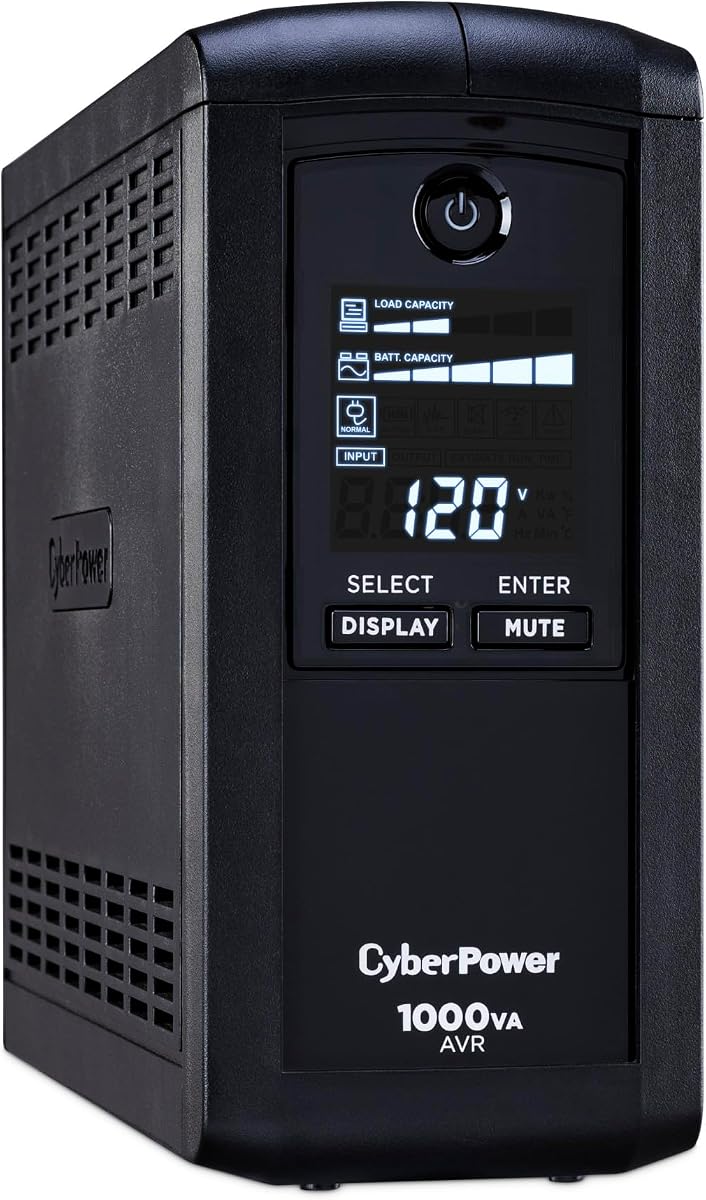
ECO mode shuts power to peripherals when your PC sleeps cutting energy use. It earns a 4.4 rating with twelve outlets and clear LCD. AVR stabilizes power to extend battery life for workstations.
We may earn a commission when you buy through this link, at no additional cost to you.
Automatic control reduces standby draw from monitors and routers. The display shows status and runtime clearly. Management software supports shutdowns. This suits energy conscious users.
Lower wattage limits high draw setups. Not all outlets support ECO. Still the ECO feature delivers savings for multi device setups without sacrificing core protection.
Choose this for energy efficient office setups. It fits workstations with peripherals that sleep. Final verdict for users saving power while keeping protection.
Automatically turns off outlets when computer sleeps reducing wasted electricity.
Provides ample connectivity for desktop and peripherals without extra power strips.
We may earn a commission when you buy through this link, at no additional cost to you.
Slim profile saves floor space while twelve outlets cover desktops and routers. Simulated sine wave suits home office and entertainment setups. A 4.5 rating shows reliable performance for standby protection.
We may earn a commission when you buy through this link, at no additional cost to you.
Wide spacing allows large adapters. Efficient charger reduces idle draw. Management software supports safe shutdowns. This fits tight desks and entertainment centers needing power backup.
Lower wattage and standby wave may limit high draw PCs. Still it delivers solid protection where space is tight and needs are moderate.
Buy this for compact workstations or home offices. It fits setups needing many outlets in a small footprint. Final pick for space aware users.
Slim profile fits under desks or on shelves without taking much room.
Four outlets are widely spaced to accommodate larger plugs.
We may earn a commission when you buy through this link, at no additional cost to you.
This entry unit gives LCD status and nine outlets at a low cost. Simulated sine wave covers basic workstations and AVR extends battery life. A 4.5 rating shows dependable performance for standard protection.
We may earn a commission when you buy through this link, at no additional cost to you.
Nine outlets handle desktops and monitors. Management software handles shutdowns. Equipment guarantee supports safety. It fits entry level workstations and home office PCs.
Lower wattage may limit high draw setups. Fewer outlets limit expansion. Still it delivers reliable standby backup for basic needs without extra cost.
Choose this for budget workstations needing LCD status. It fits small offices with few devices. Final verdict for affordable and clear UPS protection.
Affordable protection for standard workstations needing shutdown safety and surge guards.
LCD panel shows runtime and capacity for quick status checks.
We may earn a commission when you buy through this link, at no additional cost to you.
Selecting the right UPS involves matching power output, waveform type, and features to your workstation needs and environment.
VA and watt ratings define how much load a UPS can support. Calculate total draw of PC monitor and peripherals then pick a unit with 20 percent headroom. Higher wattage allows longer runtimes under load.
Choose a unit with capacity exceeding your load by 20 percent.
Active PFC power supplies in modern workstations need pure sine wave output. Simulated sine wave works for most but may cause humming or shutdowns on sensitive gear. Check power supply requirements before buying.
Use pure sine wave for any active PFC power supply.
Count outlets for PC monitor and peripherals plus any network devices. Ensure spacing accommodates large adapters. Some models offer USB ports for phone and tablet charging while protecting critical equipment.
Verify enough outlets for all devices without extra strips.
AVR adjusts input voltage without switching to battery which extends battery life during brownouts. Look for AVR if your area has frequent surges or low voltage. This feature saves the battery for actual outages.
Look for AVR to save battery during minor surges.
Included software can trigger safe shutdowns and log events via USB or serial. This prevents corruption during outages. Check compatibility with your OS and whether a management port is included.
Ensure software supports your OS for safe shutdowns.
LCDs with clear status and alerts help you monitor load and battery. Color screens may warn of issues before failure. A tilting display improves visibility under a desk.
Pick a model with a clear LCD or color display.
Most provide a three year battery warranty but some extend to five years. Higher connected equipment guarantees offer more financial protection if surge damage occurs. Keep registration for coverage.
Prefer longer battery warranty and higher equipment guarantee.
Lead acid batteries need replacement in three years while lithium options can last over ten years. Lithium adds cost but reduces long term expense. Consider expected usage and replacement costs.
Lithium offers longer lifespan but costs more upfront.
Plug the UPS into a wall outlet and connect your PC and peripherals. Use battery backed outlets for critical gear. Ensure the UPS is powered on before testing. A short test confirms it switches on outage.
Perform a self test every six months. Simulate an outage by unplugging the unit. If it stays on the battery is healthy. If it fails replace the battery or unit immediately.
Replace batteries every three years for lead acid or as recommended. Keep the unit away from heat sources and direct sunlight. Ensure ventilation around vents and run firmware updates from software for safety.
Runtime depends on load and battery capacity. A 1000VA unit may give ten minutes for a 500W load. Higher loads reduce time. Check manufacturer runtime charts and run load tests for your setup.
If your PC has active PFC power supply you should use pure sine wave. Simulated wave can cause instability. Check your PSU label. Most modern workstations and servers need pure wave for safe operation.
Count outlets and ensure total draw does not exceed wattage. Keep some outlets for peripherals. Do not plug high draw devices like laser printers. Use surge only outlets for noncritical gear.
Most UPS units allow user replacement. Open the rear panel and replace the sealed lead acid module. Follow safety steps and use exact part number. Disposal must follow local battery rules.
AVR corrects low and high voltage without using battery. You need it if your area has unstable power. This saves the battery for true outages and reduces wear on the UPS internal components.
Minimal maintenance is required. Replace batteries every three years. Keep vents clear. Run self tests. Ensure the unit is upright and ventilation. Software updates can fix safety and monitoring issues.
The UPS will shut down to protect hardware. Some units auto shutdown via software. Others beep before shutdown. Always save work frequently and enable safe shutdown in your power management settings.
Our top picks include pure sine wave and long life options to fit any budget. The CyberPower CP1500PFCLCD leads with power and outlets. GOLDENMATE offers lithium longevity. The BRG1500AVRLCD2 gives premium warranty.
Prioritize sine wave for active PFC power and enough outlets for your gear. AVR and management features add reliability for offices. Consider lithium if you plan long term use and want lower total cost.
Prices and stock change regularly so check current listings before purchase. Verify wattage needs and warranty terms to ensure coverage. Choosing the right UPS protects your hardware and data for years.