
CENMATE Aluminum 8 Bay Hard Drive Enclosure
4.3Editor score
USB 3.0 interface
Tool-free drive installation
Active cooling fans included
Choosing the right storage solution is critical for professionals and enthusiasts alike. An 8 bay hardware RAID enclosure offers massive capacity and data protection, making it ideal for video editors, photographers, and small businesses needing reliable external storage.
We evaluated ten leading models based on interface speed, build quality, cooling efficiency, and RAID flexibility. Our analysis includes Thunderbolt options for high-speed workflows and USB DAS units for cost-effective expansion without complex network setups.
Each pick highlights key strengths and potential trade-offs to help you decide. While rankings reflect overall value, your specific needs may vary. Prices and availability change frequently, so verify current details before purchasing to ensure you get the best deal.
4.3Editor score

5.0Editor score

3.7Editor score
As an Amazon Associate we earn from qualifying purchases.
The following table provides a side-by-side comparison of all ten selected enclosures. Review specifications such as interface type, maximum capacity, cooling methods, and unique features to find the model that best fits your workflow and budget requirements.



The SanDisk Professional G-RAID Shuttle 8-Bay stands out as a premier storage solution for professionals requiring massive capacity and speed. With a perfect rating and Thunderbolt 3 connectivity, it delivers read speeds up to 1900MB/s, making it ideal for editing 4K and 8K video content directly from the drive.
We may earn a commission when you buy through this link, at no additional cost to you.
This enclosure features eight removable Ultrastar hard drives providing a colossal 160TB capacity. The hardware RAID is pre-configured for RAID 5 offering balanced performance and data redundancy. It also supports daisy-chaining up to five additional devices and powers MacBooks via USB-C Power Delivery reducing cable clutter on your desk.
While the performance is exceptional, the cost is significant compared to basic USB enclosures. Additionally, you need a Thunderbolt port to access full speeds which might not be available on all older systems. However, for mission-critical workflows, the reliability and speed justify the investment.
If you are a video editor or photographer needing reliable portable storage without compromising on speed, this is the top choice. The combination of enterprise drives, hardware RAID, and Thunderbolt 3 ensures your data is safe and accessible when you need it most.
With speeds up to 2000MB/s write and 1900MB/s read this unit handles multi-stream editing effortlessly without lag or dropped frames.
Powered by Ultrastar drives known for durability and 24/7 operation reliability this enclosure ensures your critical footage stays protected.
We may earn a commission when you buy through this link, at no additional cost to you.
The CENMATE Aluminum 8 Bay Hard Drive RAID Enclosure offers a cost-effective way to expand storage with RAID capabilities. Rated well, it supports both 2.5 and 3.5-inch drives up to 20TB each allowing for a total of 160TB capacity. It is designed for individuals or small enterprises needing external storage without the cost of high-end Thunderbolt units.
We may earn a commission when you buy through this link, at no additional cost to you.
This enclosure supports eight different RAID modes including RAID 0, 5, and 10 via a physical switch and reset button. It comes with a 12V 20A power adapter ensuring stable power for high-speed transmission. The build features aluminum alloy and dual cooling fans to keep drives cool during intensive use.
Users should note that switching RAID modes requires disconnecting power and holding a reset button which can be tricky for non-technical users. Fan noise is also noticeable at 40-50 decibels making it less ideal for quiet home offices. Always backup data before changing modes as it formats drives.
For those on a budget who need RAID protection and high capacity, this is a solid option. It balances cost and features well though you should be comfortable with the manual setup process and noise levels before purchasing.
Eight RAID modes let you choose between performance and redundancy easily though setup requires careful attention to instructions.
Dual 2.9 inch fans and aluminum construction help prevent overheating during long transfers ensuring drive longevity.
We may earn a commission when you buy through this link, at no additional cost to you.
The CENMATE Aluminum 8 Bay Hard Drive DAS provides a straightforward way to manage multiple drives without complex RAID configurations. With a solid rating, it supports hot swapping allowing you to replace drives without powering down the unit. This is useful for users who need to frequently swap hard drives for different projects.
We may earn a commission when you buy through this link, at no additional cost to you.
It features a USB HOST port enabling daisy chain expansion up to three devices for a massive 480TB storage potential. The unit is compatible with Windows, Mac, and Linux without requiring drivers. It uses the same aluminum build and cooling fans as the RAID version to maintain drive safety.
One consideration is the need to test drives individually before loading them into the enclosure to avoid confusion about which drive is malfunctioning. The cooling fans operate at 40-50dB which might be bothersome in quiet environments. Ensure you have good ventilation around the unit.
If you prefer simple direct attached storage over RAID, this model is an excellent choice. It offers flexibility for expanding storage through daisy chaining and hot swapping while maintaining a reasonable price point for an 8-bay enclosure.
Swap drives on the fly without shutting down the system which saves time during large data migrations or project switches.
Connect up to three devices in a daisy chain allowing for nearly half a petabyte of total storage capacity.
We may earn a commission when you buy through this link, at no additional cost to you.
The OWC ThunderBay 8 is a high-performance enclosure designed for Thunderbolt 3 workflows. It supports up to 1,152TB capacity and allows daisy chaining six units together. This makes it ideal for professionals needing massive storage pools without compromising on transfer speeds. It is compatible with both Mac and Windows systems.
We may earn a commission when you buy through this link, at no additional cost to you.
Features include thumb screw release trays for quick drive swaps without tools. The enclosure is Thunderbolt certified ensuring reliable performance with Apple devices. It comes with a Thunderbolt cable ready for plug-and-play use. The design focuses on speed and flexibility rather than built-in hardware RAID.
You must provide your own drives which can add to the total cost. Also, without internal RAID, you rely on software RAID which might use more system resources. It is best for users who want pure speed and maximum capacity flexibility.
For Mac users and creative professionals using Thunderbolt 3 this unit delivers reliable high-speed storage. The ability to chain multiple units provides unmatched scalability for large-scale video production or media archiving projects.
Leverage Thunderbolt 3 speeds to transfer large files instantly without the bottleneck of standard USB connections.
Chain up to six units together to build a massive storage pool for your largest media libraries.
We may earn a commission when you buy through this link, at no additional cost to you.
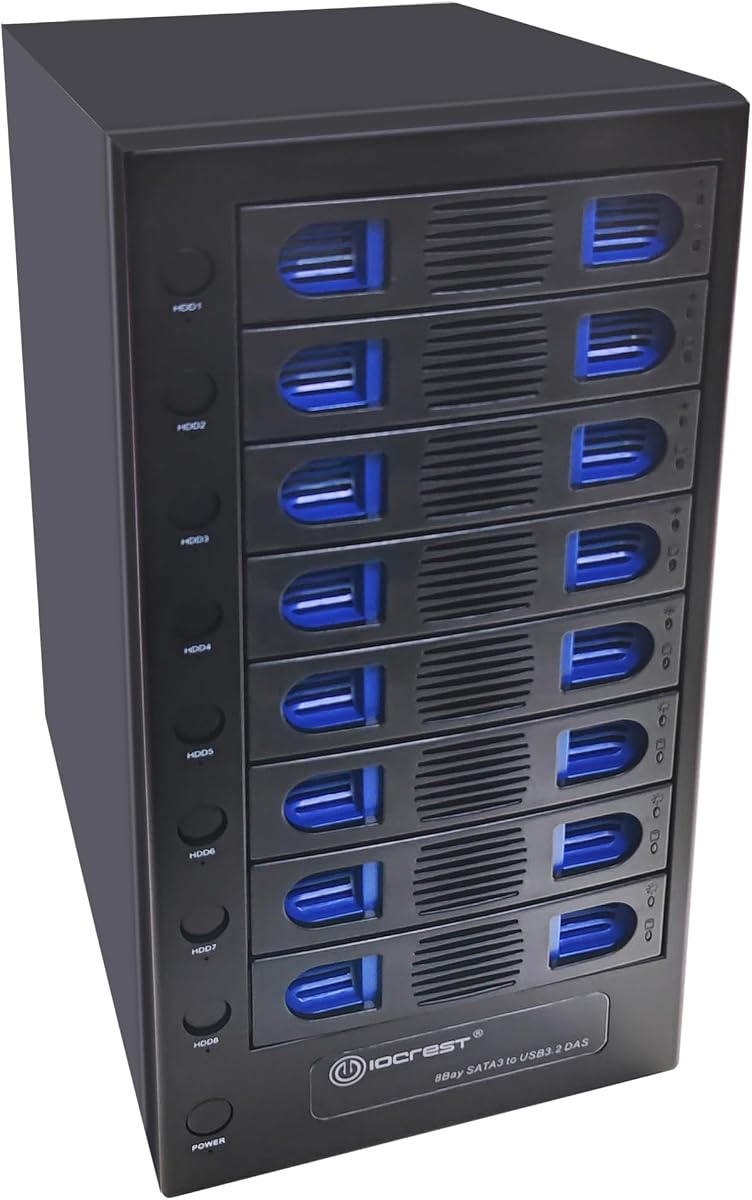
This CENMATE model upgrades the connection to USB 3.2 Gen 2 offering up to 10Gbps transfer speeds. It is perfect for users who want faster USB transfers without paying for Thunderbolt. The enclosure supports hot swapping and daisy chaining up to three devices for flexible storage expansion on a budget.
We may earn a commission when you buy through this link, at no additional cost to you.
It is compatible with various interfaces including USB 3.0, 3.1, 3.2, and Thunderbolt ports. The aluminum build and dual fans help manage heat during heavy use. With a 12V 20A adapter, it ensures stable power for all eight bays simultaneously.
The main limitation is the lack of hardware RAID so data protection relies on software or drive redundancy strategies. Also, the fan noise might be noticeable. However, for speed and compatibility, this unit stands out among USB DAS options.
If you need faster USB speeds than 5Gbps and prefer a simple plug-and-play setup this enclosure is a great fit. It balances cost and performance effectively for everyday high-capacity storage needs.
Achieve up to 10Gbps transfer rates which is significantly faster than standard USB 3.0 for quicker file access.
Supports multiple USB and Thunderbolt interfaces ensuring broad compatibility with modern and older computers.
We may earn a commission when you buy through this link, at no additional cost to you.
This enclosure stands out with its smart fan function controlled by a built-in thermal sensor. You can choose between auto and manual modes with three fan speed levels to balance cooling and noise. It supports up to 8x 22TB drives and includes independent switches for each bay to control power.
We may earn a commission when you buy through this link, at no additional cost to you.
The steel housing helps dissipate heat efficiently while keeping noise lower. It supports UASP and USB 3.0 speeds for fast data transfer. It is compatible with a wide range of operating systems including Windows, Mac, and Linux making it versatile for many users.
While it lacks RAID features the independent switches allow you to safely power down specific drives. The smart fan requires some setup to find the right speed level. Overall it offers good value for a DAS unit with advanced thermal management.
For users who want detailed control over their cooling and drive power, this is a solid choice. The ability to manage individual bays makes maintenance and data management easier for home servers or backup systems.
Built-in sensors automatically adjust fan speeds to keep drives cool without excessive noise.
Switch off specific drives without powering down the whole unit for safer drive swaps and maintenance.
We may earn a commission when you buy through this link, at no additional cost to you.
The OWC ThunderBay Flex 8 is a versatile dock combining storage with PCIe expansion. It supports Thunderbolt 4 and offers real-world speeds up to 2750MB/s. The top four bays accept U.2 NVMe drives which are faster than standard SATA. This makes it ideal for power users needing maximum performance.
We may earn a commission when you buy through this link, at no additional cost to you.
It includes front-mounted USB ports and card readers for convenient peripheral access. The PCIe slot allows you to add audio interfaces or networking cards. SoftRAID software is included for advanced RAID management and drive monitoring on Mac systems.
This unit is complex and pricey compared to basic enclosures. You need to manage both storage and PCIe expansion which might be overwhelming. However, for a compact workstation upgrade, the flexibility is unmatched in the 8-bay category.
Professionals needing a mix of storage and PCIe expansion in a single Thunderbolt unit should consider this. It consolidates multiple functions into one device saving desk space and improving workflow efficiency.
Add extra I/O cards directly to your dock to expand system capabilities without internal opening your computer.
Utilize U.2 NVMe SSDs for blazing fast access to frequently used projects and assets.
We may earn a commission when you buy through this link, at no additional cost to you.
The QNAP TL-D810TC4-US is designed as a direct attached storage expansion. It connects via USB 3.2 Type-C delivering up to 10Gbps speeds. It integrates well with QNAP NAS systems allowing you to expand storage without buying a whole new NAS device. It also works with Windows and Mac.
We may earn a commission when you buy through this link, at no additional cost to you.
You can monitor drive health and manage configurations using the free QNAP JBOD Manager utility. This provides a user-friendly way to handle storage pools. The tower design supports high-capacity 3.5-inch drives making it suitable for large backups and media libraries.
While it works best with QNAP NAS, it functions as a standalone DAS too. It lacks hardware RAID so you rely on software for redundancy. For QNAP users, it is an ideal expansion path to increase capacity efficiently.
If you already own a QNAP NAS and need more storage, this is the logical choice. It simplifies storage management and integrates smoothly with your existing ecosystem.
Use the dedicated utility to view system info and manage drives without needing complex setups.
Ideal for expanding storage repositories for media and surveillance data without new hardware investment.
We may earn a commission when you buy through this link, at no additional cost to you.
This NAS case is designed for DIY enthusiasts who want to build a custom storage server. It supports Mini ITX and Micro ATX motherboards and features hot-swap drive bays. The dual independent air ducts ensure drives and motherboard components are cooled separately for better thermal management.
We may earn a commission when you buy through this link, at no additional cost to you.
It includes three mute fans and front indicator lights to monitor disk status. The steel chassis protects drives from shocks and vibrations. It comes with necessary accessories like SATA cables and stands ready for assembly. You can customize the internals to fit your specific NAS OS.
You must provide your own motherboard CPU and power supply which adds complexity and cost. It is not a plug-and-play solution. But for control over specs and quiet operation, this chassis is excellent for home labs and media servers.
If you want a customized NAS experience with silent operation and flexibility this case is a great option. It is perfect for building Plex servers or private clouds where you want full hardware control.
Upper and lower air ducts separate heat sources ensuring steady temperatures even under heavy load.
Build your own system with full control over components for a tailored storage solution.
We may earn a commission when you buy through this link, at no additional cost to you.
The ICY DOCK MB998SK-B is a specialized solution for 2.5-inch drives. It fits into a single 5.25-inch drive bay making it great for desktop computers with limited space. The full metal construction and locking trays ensure security and durability. It supports both SATA and SAS drives.
We may earn a commission when you buy through this link, at no additional cost to you.
It is designed for internal installation using 15-pin SATA power connectors. This makes it ideal for turning a desktop into a compact storage server. The locking trays prevent accidental removal which is vital for data security. It supports high capacity 2.5-inch drives efficiently.
This unit is not an external enclosure but an internal cage. It requires opening your PC to install. For users needing a dense internal storage solution this is a robust and secure option. It focuses on physical security and space efficiency.
If you need secure internal storage for a workstation or server this cage is a solid choice. It protects your data physically and fits neatly into standard desktop chassis.
Locking trays prevent unauthorized removal of drives keeping your data physically secure.
Maximize internal storage density using a standard 5.25 bay slot without external cables.
We may earn a commission when you buy through this link, at no additional cost to you.
Selecting the right 8 bay enclosure depends on your interface needs, budget, and data protection requirements. Consider these factors to find a model that suits your workflow.
The interface determines how fast you can transfer files. USB 3.0 offers up to 5Gbps which is sufficient for general backups. USB 3.2 Gen 2 doubles this to 10Gbps for larger media files. Thunderbolt 3 and 4 provide the fastest speeds up to 40Gbps ideal for 4K video editing.
For most users USB 3.0 or 3.2 is enough unless you need real-time editing from the drive.
RAID (Redundant Array of Independent Disks) protects data by spreading it across drives. RAID 5 is common for balance of safety and space. DAS (Direct Attached Storage) is simpler but offers no redundancy. Choose RAID if data safety is critical.
If you want simplicity and speed without redundancy consider a DAS unit.
Check the maximum supported capacity per drive. Most 8 bay enclosures support up to 20TB or 22TB per drive totaling 160TB or 176TB. Ensure the enclosure supports your chosen drive size before purchasing.
Higher capacity support future-proofs your setup for growing storage needs.
Eight drives generate significant heat. Enclosures with active cooling fans are essential for safety. However fans can be noisy. Look for models with fan speed control or quiet operation if noise is a concern.
Effective cooling ensures drive longevity even in noisy environments.
Hot swapping allows replacing drives without powering down the unit. This is useful for servers or shared systems. If you frequently change drives this feature saves time and hassle.
Hot swap support is a convenience feature worth considering for active workflows.
Aluminum or steel enclosures dissipate heat better than plastic. Look for solid construction and good ventilation slots. Locking trays add security if the unit is accessible by others.
Robust build materials extend the life of your drives and enclosure.
Some enclosures support daisy chaining to connect multiple units. This allows for expanding total storage beyond a single device. Check if the model supports this feature if you need more capacity later.
Daisy chaining helps scale storage without buying entirely new systems.
Ensure the enclosure works with your operating system. Most support Windows and Mac but check for driver requirements. Some advanced features like JBOD management may be specific to certain brands.
Plug and play compatibility simplifies setup and daily use.
To set up the enclosure insert compatible hard drives into the bays. Ensure all screws or locking mechanisms are secured. Connect the power adapter and USB or Thunderbolt cable to your computer.
For RAID setups follow the manufacturer's instructions carefully. Usually this involves toggling a switch and holding a reset button while powering on. Always back up existing data before configuring RAID as formatting will occur.
Regularly check drive health using built-in software or tools. Keep the enclosure in a well-ventilated area to prevent overheating. Clean dust from fans periodically to maintain cooling efficiency.
Most enclosures support mixing 2.5 and 3.5-inch drives but mixing different capacities is generally not recommended for RAID. For DAS use it is fine but ensure compatibility with the enclosure's specifications.
Thunderbolt offers significantly faster speeds up to 40Gbps compared to USB 3.2's 10Gbps. Thunderbolt also supports daisy chaining more devices and powers high-demand peripherals more efficiently.
Most units come with standard AC power adapters. You do not need special outlets but ensure the power supply matches the voltage and amperage required by the device.
Most modern enclosures are plug-and-play on Mac without extra drivers. However advanced RAID or management features may require specific software provided by the manufacturer.
Always back up your data before setting up RAID. Ensure drives are functioning correctly before starting. Follow manufacturer instructions precisely to avoid accidental formatting errors.
In RAID 5 data is distributed across drives so one failure does not cause data loss. You can replace the failed drive and rebuild the RAID array without losing data.
Many are designed for continuous use especially those with enterprise-grade cooling. However check the specific model ratings and ensure adequate airflow for constant operation.
Yes, most enclosures allow you to replace or add drives. Check if the unit supports hot swapping for easier upgrades without shutting down.
We reviewed ten top models including Thunderbolt and USB options to suit various budgets and needs. Our top picks offer a balance of speed, reliability, and features.
Prioritize interface speed and RAID support based on your workflow. If you need maximum safety consider RAID hardware. If you want speed look for Thunderbolt compatibility.
Always check current prices and availability before purchasing. Storage technology evolves quickly so ensure the model you choose meets your long-term needs.