
HDMI to USB-C AR Glasses Adapter
4.3Editor score
HDMI to USB-C conversion
Supports 4K@60Hz output
Compatible with major AR brands
This comprehensive guide compares the top AR glasses HDMI adapters for gaming and streaming, evaluating compatibility, video quality, power delivery, and
Enhancing your augmented reality experience often requires connecting external sources to your wearable display. An AR glasses HDMI adapter serves as the critical bridge between traditional HDMI devices and modern USB-C AR eyewear.
We have rigorously evaluated ten leading adapters based on compatibility, video fidelity, power delivery capabilities, and build quality. Our analysis covers options for gamers, travelers, and professionals seeking seamless screen mirroring.
Each pick highlights specific strengths such as 4K support or battery integration. Please note that product availability and pricing fluctuate frequently across retailers. Always verify compatibility with your specific AR glass model before purchasing.
4.3Editor score

4.6Editor score

4.5Editor score
The following table provides a detailed side-by-side comparison of the top ten AR glasses HDMI adapters available this month. We examine key specifications, compatibility ranges, and unique features to help you identify the right solution for your specific setup needs.


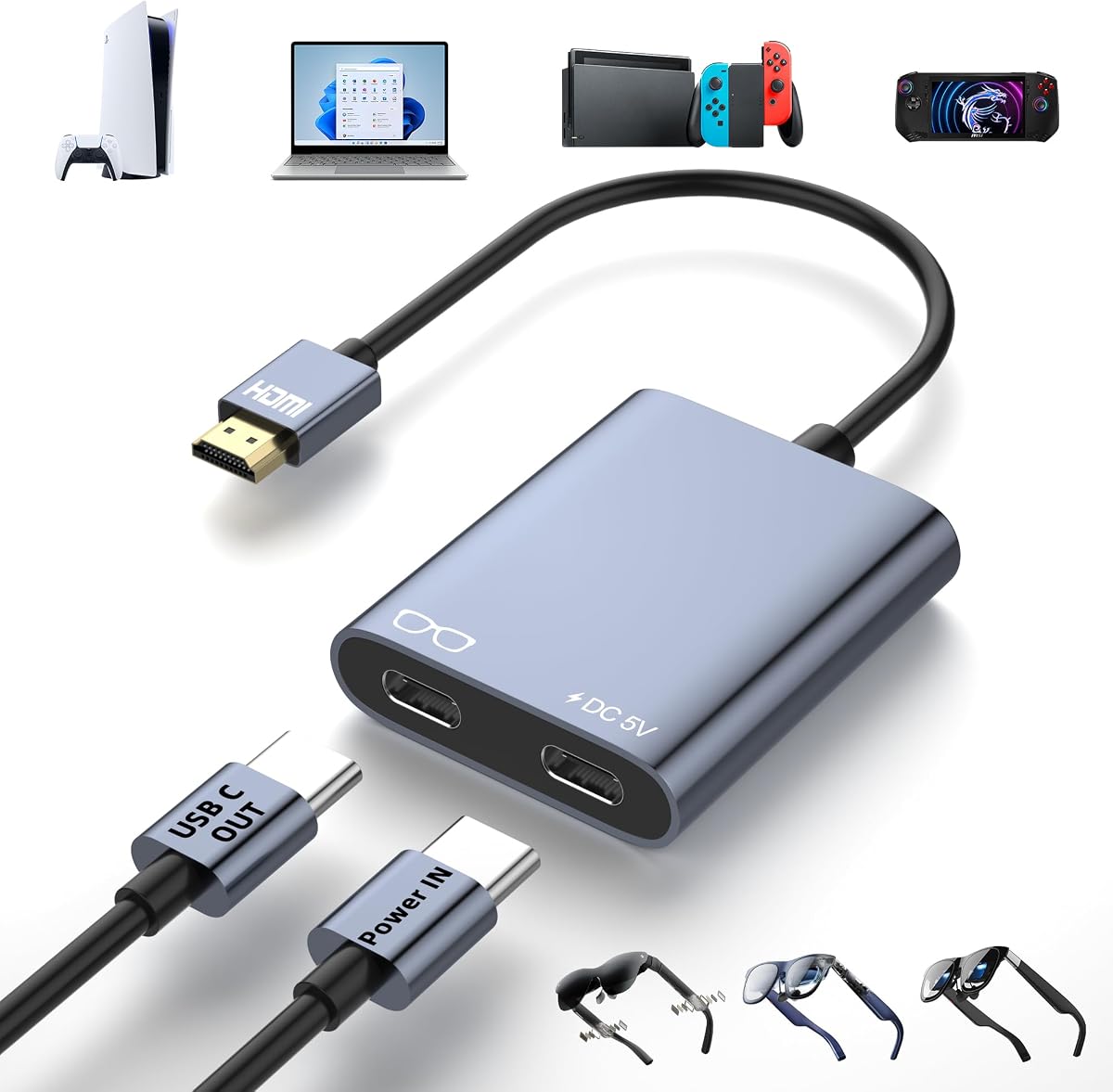


This adapter stands out as a leading choice for users seeking reliable HDMI to USB-C conversion. It boasts a strong user rating and delivers crystal-clear visuals for immersive AR experiences.
We may earn a commission when you buy through this link, at no additional cost to you.
Its primary strength lies in its ability to support 4K@60Hz resolution. The built-in 5V power port ensures stable operation during long sessions. You can use it with XREAL, VITURE, and Rokid glasses easily.
One trade-off is the requirement for an external power connection. Without this, the signal may drop or flicker. This is acceptable given the stability it provides for gaming and movies.
Anyone wanting a high-quality mirror for their console or PC should buy this. It combines performance and durability for a top-tier recommendation.
The 4K@60Hz support ensures you enjoy smooth, high-definition content without tearing.
The dedicated power port prevents battery drain on your glasses during extended use.
We may earn a commission when you buy through this link, at no additional cost to you.
This hub offers a cost-effective way to connect HDMI devices to USB-C AR glasses. It maintains solid performance ratings while keeping costs low for budget-conscious buyers.
We may earn a commission when you buy through this link, at no additional cost to you.
It supports 4K@60Hz video output and connects with Switch and PS5 consoles. The package includes necessary cables. You may need to switch Xreal glasses to DP mode for sound.
The power output is limited to 10W which might not drive all high-end displays. Despite this it remains a reliable budget option for casual users.
Users looking for an entry-level adapter will find this a practical choice. It handles daily tasks well without breaking the bank.
Connect Switch OLED or PS5 directly to your AR glasses for immediate play.
The set includes a 4K HDMI cable and power cable for immediate use.
We may earn a commission when you buy through this link, at no additional cost to you.
This adapter distinguishes itself with a built-in 5000mAh battery. It allows for portable use without wall outlets. Users rate it highly for travel convenience.
We may earn a commission when you buy through this link, at no additional cost to you.
It powers both your streaming stick and AR glasses. This eliminates cable clutter during trips. The 4K output ensures quality remains high even on battery power.
The higher cost reflects the added battery technology. You must charge it before use. This is a fair trade-off for cord-free operation.
Travelers and streamers should prioritize this option. It offers unmatched freedom from power constraints.
It simultaneously powers your Fire TV Stick and AR glasses for clean setup.
The battery supports around 3 hours 40 minutes of continuous usage.
We may earn a commission when you buy through this link, at no additional cost to you.
This adapter focuses on delivering low-latency video output. It is designed for gaming and presentations where timing matters. The aluminum housing aids in heat dissipation.
We may earn a commission when you buy through this link, at no additional cost to you.
It connects HDMI sources directly to USB-C displays. It includes a full-function USB-C cable for flexibility. You may need external audio for some setups.
The one-way design means it does not convert USB-C to HDMI. This limitation is standard for adapters. It performs well within its intended range.
Gamers needing responsive video should consider this model. It keeps input lag to a minimum effectively.
Its compact form factor makes it easy to carry for mobile setups.
We may earn a commission when you buy through this link, at no additional cost to you.
This adapter is built specifically for RayNeo Air 4 Pro glasses. It enhances visuals with HDR10 support. Users report vibrant colors and rich contrast in compatible content.
We may earn a commission when you buy through this link, at no additional cost to you.
It allows connection to iPhones via HDMI. You can also use it with Xbox and PS5. The charging feature keeps your device powered during streaming.
The 4K output is limited to 30Hz. This may feel less smooth than 60Hz options. It is acceptable for movie watching though.
RayNeo owners wanting HDR will find this ideal. It maximizes the capabilities of their specific glasses model.
HDR10 support brings richer contrast and more vibrant colors to your view.
We may earn a commission when you buy through this link, at no additional cost to you.
This device offers wireless mirroring directly to AR glasses. It uses built-in battery power to function independently. It supports standard protocols like AirPlay and Miracast.
We may earn a commission when you buy through this link, at no additional cost to you.
You can cast from phones or laptops. It also has ports for wired options if needed. The 5000mAh battery provides hours of usage without outlets.
It is not a traditional HDMI to USB-C adapter. If you need wired reliability you might prefer others. But for mobility it is excellent.
Those who dislike cables will love this flexibility. It brings wireless freedom to your augmented reality setup.
Compatibility with AirPlay and Miracast ensures broad device support.
We may earn a commission when you buy through this link, at no additional cost to you.
This adapter ensures stable operation through its dedicated power port. It prevents signal dropouts during gaming. The aluminum housing helps manage heat effectively over time.
We may earn a commission when you buy through this link, at no additional cost to you.
It supports 4K@60Hz output for smooth visuals. You can use it with Switch or PS5 easily. The one-way design prevents connection errors if followed.
Connection order matters here. You must plug power into the adapter first. This ensures the signal starts correctly every time.
Users needing reliable gaming performance should buy this. It minimizes interruptions for a seamless experience.
The aluminum alloy housing provides excellent heat dissipation during use.
We may earn a commission when you buy through this link, at no additional cost to you.
This adapter is notable for its tiny and lightweight design. It slips easily into pockets or bags. You get smooth 4K@60Hz video output for media and games.
We may earn a commission when you buy through this link, at no additional cost to you.
It requires a dedicated 5V power input for stability. This helps fix black screen issues often found in simpler units. The setup is straightforward without extra drivers.
The power adapter is not included in the box. You must source it yourself to ensure proper function. This adds slight complexity to the purchase.
Travelers wanting the lightest option should consider this. It balances size and performance well for on-the-go use.
Weighing only 0.57oz it is designed for travel and outdoor gaming.
We may earn a commission when you buy through this link, at no additional cost to you.
This adapter features a premium aluminum build with sleek styling. It handles zero delay performance for lag-free experiences. It works with XREAL and Rokid glasses reliably.
We may earn a commission when you buy through this link, at no additional cost to you.
You must use an external power supply for full power needs. It cannot power USB-C devices over 5W on its own. This ensures stability when connected to a charger.
The design is ergonomic and easy to carry. It offers high-quality picture and audio sync. This fits well in a professional setup.
Users prioritizing build quality will appreciate this choice. It delivers reliable performance with a refined look.
Crafted from premium aluminum this adapter offers superior heat dissipation.
We may earn a commission when you buy through this link, at no additional cost to you.
This adapter supports a wide range of gaming consoles and media players. It includes a full-function USB-C cable for easy connection. The aluminum shell ensures excellent heat dissipation.
We may earn a commission when you buy through this link, at no additional cost to you.
It handles HDMI to USB-C conversion efficiently. You can plug in Steam Deck or Xbox for games. The 5V power port ensures stable operation without flickers.
It is not compatible with VR headsets. This is a limitation to consider if you use mixed reality gear. But for AR glasses it performs well.
Anyone needing broad console support should buy this. It connects almost any HDMI source to your AR display.
Works with PS5 Xbox Switch and Steam Deck for maximum versatility.
We may earn a commission when you buy through this link, at no additional cost to you.
Selecting the right adapter involves understanding technical limitations and device requirements. We outline key factors to help you make an informed decision for your AR setup.
Look for adapters that support at least 4K resolution and 60Hz refresh rate. High-quality adapters deliver smooth visuals crucial for gaming and movies. Ensure both your source device and AR glasses can handle these specs.
Prioritize models with 4K@60Hz capabilities for the best viewing experience.
Most adapters require an external 5V power source to function correctly. Without this the signal may drop or the screen may go black. Check if the package includes a power cable or if you need to buy one separately.
Always verify power needs and include a reliable USB power source in your setup.
Confirm the adapter works with your specific brand of AR glasses. Most support XREAL Rokid and VITURE models that use USB-C video input. Some adapters may require switching to DisplayPort mode for audio.
Check the product description to ensure compatibility with your exact AR glasses model.
Ensure your source device has an HDMI output port. Consoles like PS5 and Switch are compatible but some phones may need a specific cable. Avoid using adapters with devices that lack HDMI output.
Match the HDMI port type to your source device for a stable connection.
Aluminum alloy housings offer better heat dissipation and durability. Lightweight designs are ideal for travel and mobile use. A compact adapter slips easily into a bag or pocket without adding bulk.
Choose an adapter with a sturdy and compact build for long-term reliability.
Some adapters come with HDMI and USB-C cables while others do not. Adequate cable length allows flexible setup near your seating area. Missing cables may require extra purchases.
Check the package contents to see if essential cables are included.
Low latency is vital for gaming to prevent lag between input and display. High-quality adapters ensure stable signals without flickering. Avoid cheap units that may cause intermittent display issues.
Select adapters known for low latency and reliable signal transmission.
A warranty of at least one year protects against defects. Look for sellers who offer responsive customer support for troubleshooting. Good support helps resolve connectivity issues quickly.
Prioritize brands that provide strong warranty coverage and support.
Connect the HDMI end of the adapter to your source device like a console. Plug the USB-C end into your AR glasses or portable monitor. Ensure all connections are secure to avoid signal loss.
Attach the external power supply to the adapter's power port before turning on your source. This ensures the adapter has enough energy to transmit video correctly. Wait for the display to initialize.
Store the adapter in a cool dry place when not in use. Avoid bending the cables excessively to prevent damage. Regularly check the ports for dust or debris to maintain performance.
Some adapters require you to switch your AR glasses to DisplayPort mode to receive audio. Check the glasses manual for instructions on changing audio settings. This ensures both video and audio are routed correctly through the adapter.
Most adapters need an external 5V power source to transmit a stable signal. Without it the screen may flicker or go black. Only battery-powered adapters allow cord-free use without an external supply.
No these adapters are designed for AR glasses and USB-C displays not VR headsets. VR devices typically need a capture card for HDMI input. Check your headset compatibility before purchasing.
Most top adapters support up to 4K resolution at 60Hz. Some allow 1080p at higher refresh rates like 120Hz or 144Hz. Ensure your source device also supports these specs for the best output.
These adapters are strictly one-way from HDMI source to USB-C display. They cannot convert USB-C output to HDMI input. Check your connection direction carefully before use.
This is often caused by insufficient power or loose connections. Ensure the external power supply is connected properly. Replace cables if they show signs of damage or wear.
Yes many adapters work with MacBooks that have HDMI output ports. For newer Macs with only USB-C you may need a different type of hub. Check specific device compatibility notes.
No these adapters use plug and play functionality without drivers. They work instantly once connected and powered correctly. This ensures compatibility across different operating systems.
We have reviewed ten top adapters ranging from budget-friendly to feature-rich options. Each offers unique benefits for connecting gaming consoles and media players to AR glasses. The Editor's Choice stands out for its balance of performance and versatility.
Prioritize adapters with external power support and 4K@60Hz capabilities for stable video. Ensure your AR glasses model is listed as compatible to avoid connectivity issues. These factors determine the quality of your viewing experience.
Always check current product availability and prices before making a final decision. Prices can change frequently on online marketplaces. Verify that the package includes necessary cables for immediate setup.