
Portable Printers Wireless for Travel N80 Bluetooth Thermal Printer
4.1Editor score
Inkless thermal technology
Bluetooth and USB support
Compact travel friendly size
Finding the right battery powered portable printers can transform how you handle documents on the go. Whether you need to print contracts in a car or photos at home, these devices offer freedom from power outlets. This guide explores the most reliable options available today.
We evaluated each model based on portability, print quality, connectivity, and battery life. Our team reviewed specifications and user feedback to ensure every recommendation meets real-world demands. You will find a mix of inkjet and thermal technologies suited for different needs and budgets.
Each pick includes detailed specs and honest insights into strengths and weaknesses. Prices for these devices fluctuate often so check current listings before buying. Use this guide to find a printer that fits your workflow and travel style perfectly.
4.1Editor score

4.2Editor score

4.3Editor score
As an Amazon Associate we earn from qualifying purchases.
This side-by-side comparison highlights key specs across all ten models. Review weight, connectivity options, and print types to find the best match for your specific needs.


The Canon PIXMA TR160 stands out for its vibrant color printing and easy connectivity. It is designed to fit into backpacks while delivering sharp text and photos. This model is ideal for those who need reliable output on the go.
We may earn a commission when you buy through this link, at no additional cost to you.
Its 5-Color Hybrid Ink System ensures rich details and borderless prints. You can connect via the Canon PRINT app or Apple AirPrint without a router. The OLED display helps monitor ink levels and settings quickly.
While it costs more than thermal options the print quality justifies the price for many users. Battery life may vary based on usage intensity so keep an eye on power. This trade-off is acceptable for high-quality needs.
If you value color and versatility this printer is a strong choice. It suits students professionals and anyone needing documents or photos. We recommend it for its balance of portability and performance.
The ink system delivers sharp black text and vibrant colors for professional results.
Connect directly to devices without a router for true portability anywhere.
We may earn a commission when you buy through this link, at no additional cost to you.
This HP model brings scanning and copying to your mobile toolkit. It includes a battery and supports large paper sizes up to legal. It is perfect for business users needing full functionality on the road.
We may earn a commission when you buy through this link, at no additional cost to you.
HP Fast Charge lets you power up in under 90 minutes while turned off. The HP Auto Wireless Connect simplifies setup without a router. It supports a wide range of paper sizes for diverse tasks.
Its weight and cost are higher than basic printers but the utility is unmatched. The one-year warranty adds peace of mind for business investments. This is a solid investment for frequent travelers.
Choose this if you need more than just printing in the field. It replaces multiple devices and saves space in your bag. We rate it high for its comprehensive feature set and reliability.
Scan and copy documents anywhere with this compact all-in-one design.
Recharge quickly with HP Fast Charge for minimal downtime during travel.
We may earn a commission when you buy through this link, at no additional cost to you.
The HP OfficeJet 200 is a dedicated mobile printer that balances size and performance. It fits easily into bags and supports business document sizes. It is a reliable choice for on-the-go printing needs.
We may earn a commission when you buy through this link, at no additional cost to you.
Its wireless setup is simple with HP Auto Wireless Connect. The included battery offers good value and the HP 62 cartridges yield high pages. This reduces frequent replacements and keeps you productive.
Lacking scan and copy functions limits it to printing tasks only. Ink costs can add up over time for heavy users. These factors are acceptable for those focused on text and photos.
This printer excels for travelers who need document output without bulk. It is sturdy and user-friendly for regular use. We recommend it for its balance of capability and portability.
Fits in bags and prints legal size documents for business travelers.
High yield cartridges reduce replacement frequency and keep costs down.
We may earn a commission when you buy through this link, at no additional cost to you.
This Epson model offers reliable color printing with flexible charging options. It supports external batteries for extended use and Wi-Fi Direct for simple connections. It is a strong choice for mobile color needs.
We may earn a commission when you buy through this link, at no additional cost to you.
You can charge via USB or AC adapter for convenience in various settings. The built-in battery performs well in a small package. It works with iOS and Android devices easily via wireless.
Epson requires genuine cartridges to avoid damage which can increase ongoing costs. The printer itself is affordable but supplies may add up. This is a trade-off for quality and reliability.
Choose this if you need color output and flexible power on the road. It is well-suited for professionals who value print fidelity. We appreciate its design and connectivity features.
Charge via USB AC or external battery for endless mobile printing options.
Connect via Wi-Fi Direct for easy printing from any mobile device.
We may earn a commission when you buy through this link, at no additional cost to you.
The Gloryang printer uses thermal tech to print without ink or ribbons. It comes with a carry case and paper rolls for immediate use. It is ideal for travel and quick document needs.
We may earn a commission when you buy through this link, at no additional cost to you.
Connect via Bluetooth to iOS or Android devices through the Jadens app. The built-in paper bin saves space and keeps things tidy. It supports thermal paper sizes up to 8.5 inches wide.
You must use specific thermal paper which limits compatibility with plain paper. It prints only in black and white which may not suit all needs. These constraints are acceptable for most mobile tasks.
This printer is great for students and professionals needing quick prints. It is light and fits easily into backpacks. We recommend it for its ease of use and value.
Print documents and designs without ink for a mess-free experience.
Includes carry case and paper rolls for instant mobile use.
We may earn a commission when you buy through this link, at no additional cost to you.
This A285M model supports multiple thermal paper sizes for versatility. It connects via Bluetooth or USB for flexible use cases. It is a compact solution for various printing needs.
We may earn a commission when you buy through this link, at no additional cost to you.
The printer handles sizes from 2 inches up to letter format. You can use a laptop with USB or mobile with Bluetooth. It is designed for outside work and business tasks.
Laptop users must download drivers which adds a setup step. It is limited to black and white thermal output. These are minor drawbacks given its price and portability.
Ideal for students and workers needing flexible paper sizes. It is light and easy to carry anywhere. We appreciate its adaptability and simple operation.
Support five thermal paper sizes for diverse document and label needs.
Connect via Bluetooth for mobile or USB for laptops.
We may earn a commission when you buy through this link, at no additional cost to you.
The D90E is a lightweight thermal printer aimed at students and pros. It supports letter size thermal paper and includes a travel case. It is designed for convenience and quick printing.
We may earn a commission when you buy through this link, at no additional cost to you.
You can connect via Bluetooth or USB with the Labelnize app. Paper jams are solved by pressing the power button to eject. It handles documents and classroom needs well.
It does not include a charging adapter so you must source one. It is limited to black and white prints on thermal paper. These are reasonable trade-offs for its price point.
Choose this for classroom travel or home office printing. It is compact and fits easily into bags. We rate it high for its practical design and value.
Auto eject feature resolves paper jams with a simple button press.
Comes with a travel case for safe transport anywhere.
We may earn a commission when you buy through this link, at no additional cost to you.
This JADENS model brings AI tools to thermal printing for creativity. It prints sharp text and images with a 203 DPI resolution. The battery lasts for hours of continuous printing.
We may earn a commission when you buy through this link, at no additional cost to you.
Use the app to generate images erase elements or translate text easily. It keeps files private by printing locally without cloud uploads. It is ideal for home school and travel use.
It works only with specific JD-166 paper which limits supply options. It is limited to black and white output which suits documents. These are acceptable constraints for its feature set.
Ideal for those who want creative tools on the go. It is lightweight and fits in any bag. We recommend it for its unique AI capabilities and performance.
Use AI image generation erasing and translation in the mobile app.
Print locally without uploading files to keep documents private.
We may earn a commission when you buy through this link, at no additional cost to you.
This N80 printer is a budget friendly option for travel and work. It prints clear text with high definition technology and supports tattoo paper. It is light enough for daily carry in bags.
We may earn a commission when you buy through this link, at no additional cost to you.
Connect via Bluetooth with the Nada Print app or USB for laptops. The battery supports hundreds of sheets per charge and it charges via USB-C. It is versatile for home and office use.
Laptop users must install a driver before connecting via USB. It is limited to black and white thermal printing. These are minor issues given its low price and features.
Choose this for cost-effective printing on the go. It is perfect for students or small businesses. We rate it high for its value and simplicity.
High definition 203 DPI ensures sharp text and images.
Supports tattoo transfer paper for creative and professional needs.
We may earn a commission when you buy through this link, at no additional cost to you.
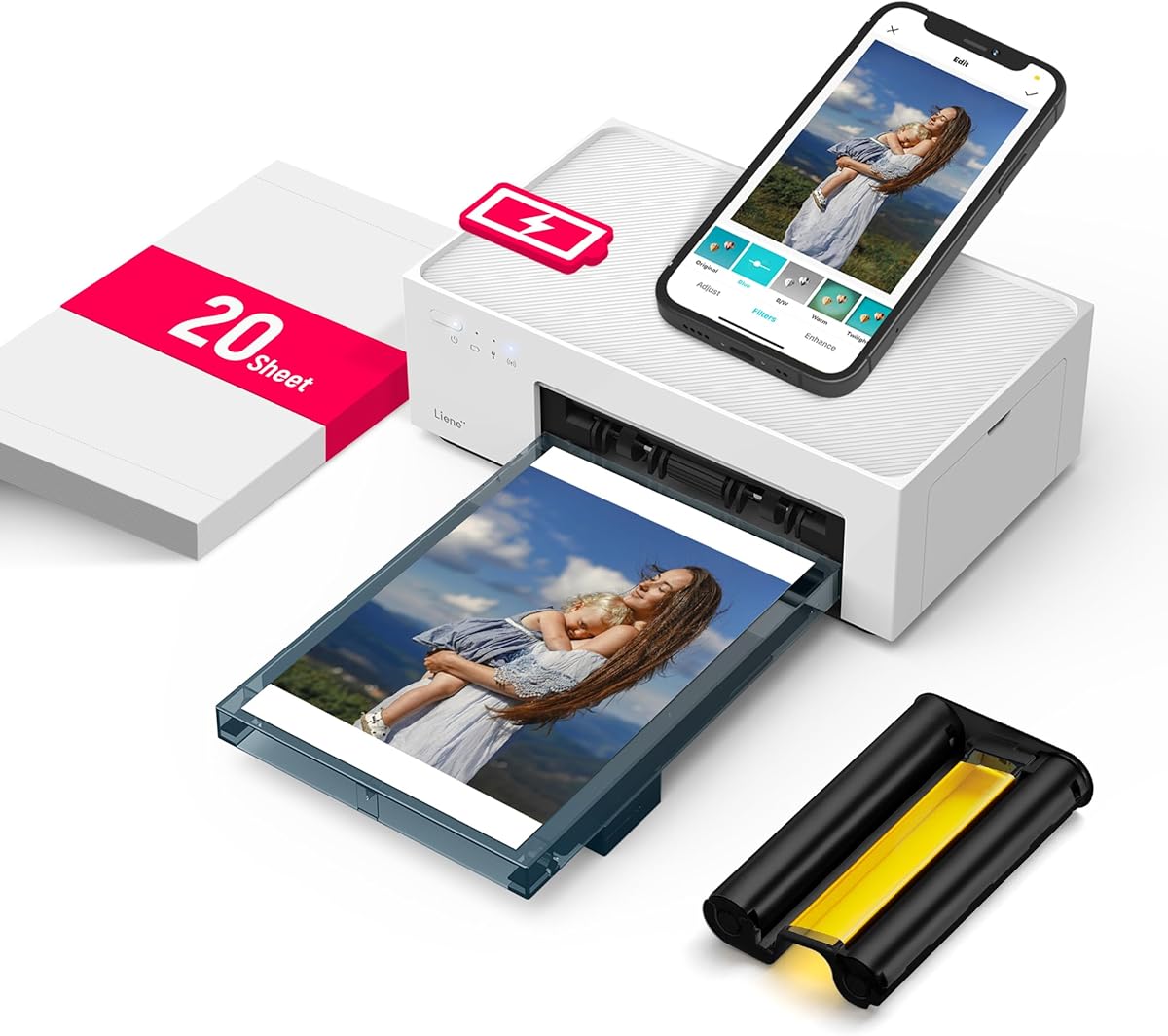
The Liene M200 delivers professional photo quality with dye sublimation. It supports full color output and protects prints from fading. It is perfect for preserving memories on the go.
We may earn a commission when you buy through this link, at no additional cost to you.
Connect via a built-in hotspot for fast stable WiFi connections. The magnetic design lets you place cassettes on top saving space. It allows up to five users to connect at once.
It prints only 4×6 photos which limits document use cases. Prints may cost more than standard thermal paper over time. These are acceptable trade-offs for high quality images.
Ideal for parents travelers and anyone needing photo prints. It is compact and easy to carry anywhere. We recommend it for its photo fidelity and unique design.
Dye sublimation penetrates paper for vibrant long-lasting images.
Built-in hotspot connects devices in seconds without home network.
We may earn a commission when you buy through this link, at no additional cost to you.
Choosing the right printer depends on your specific needs and usage patterns. This guide breaks down key factors to consider before making a purchase.
Inkjet printers produce full color prints and work with standard paper. Thermal printers are inkless and print only in black and white but cost less per page. Choose based on whether color is essential for your documents.
Consider if you need color photos or just text. Thermal is cheaper but inkjet offers versatility.
Look for lightweight units that fit in backpacks. Heavy models may be powerful but less convenient for travel. Check dimensions to ensure it fits your bag or case.
Aim for under 3 pounds for true portability on the go.
Check how many prints a charge supports. Some models have external battery options for extended use. Fast charging is a bonus for travelers who need quick power.
Ensure the battery matches your daily output needs.
Bluetooth and WiFi Direct are essential for mobile printing. USB support helps with laptop connections. Check app compatibility for your OS.
Choose devices with multi-OS support for flexibility.
Standard letter and legal sizes are useful for business. Thermal models often support smaller custom sizes. Check what widths your needs require before buying.
Ensure the printer supports the document sizes you print most.
Thermal printers save on ink but use special paper. Inkjets have lower per-page costs for high volume. Check cartridge availability before purchasing.
Consider total cost of ownership not just the upfront price.
Rugged designs suit construction or outdoor use. A one-year warranty protects your investment. Read reviews for build quality feedback.
Invest in models with proven reliability for frequent use.
Look for scanners or AI tools if needed. Magnetic designs save space on tables. Consider what extras add real value.
Only pay for features you will actually use regularly.
Start by charging the battery fully before first use. Connect via the recommended app or cable and test a page. Ensure paper is loaded correctly to avoid jams.
Keep the printer in a cool dry place when not in use. Clean the print head regularly for thermal models to avoid clogs. Use only compatible paper to protect the device.
Update firmware and drivers regularly for best performance. Store accessories like cases and cables safely. If traveling remove paper rolls to avoid moisture damage.
Most models offer direct Bluetooth or WiFi Direct so a router is not required. You can connect directly to your phone or laptop for wireless printing without internet.
Yes thermal models often use less power since they do not require ink cartridges. This can extend battery life compared to inkjet units.
Only models with color inkjet or dye sublimation technology produce full color photos. Thermal printers are limited to black and white output.
Battery life varies but many models support hundreds of prints per charge. Some have removable batteries for longer usage on extended trips.
Yes thermal printers require specific thermal paper rolls. Standard copy paper will not work with these devices.
Most support both systems through dedicated apps. Check app requirements to ensure your device is supported.
Inkjet models with scan and copy features are ideal. They handle contracts and provide full office tools on the road.
Prices range from budget thermal units to premium inkjet options. Consider your needs and ongoing costs before buying.
We explored ten models that cater to different needs and budgets. The Canon PIXMA TR160 leads in color quality while thermal options save on ink. Each model offers unique strengths for travelers.
Prioritize battery life and connectivity for your workflow. Choose thermal for cost and inkjet for versatility. Select based on your most frequent printing tasks.
Prices for these devices change often so check current listings. Use this guide to find a printer that fits your daily needs perfectly.