
ASUS Prime MR120 ARGB Fan Black Triple Pack
4.6Editor score
28mm extra-thick frame for cooling
Quiet operation up to 21dB
Dual-sided Aura Sync lighting
This guide compares the top ASUS case fans for cooling and aesthetics, reviewing performance, noise levels, lighting options, and build quality across multiple
Choosing the right case fans is crucial for maintaining optimal system temperatures and ensuring quiet operation. ASUS offers a wide range of cooling solutions designed to meet various needs from budget builds to high-end workstations.
We evaluated each fan based on airflow efficiency, static pressure capabilities, noise output, and aesthetic features. Our analysis focuses on real-world performance metrics and user feedback to provide reliable recommendations for every builder.
Each selection highlights key strengths and specific use cases to help you make an informed decision. Keep in mind that availability and pricing can fluctuate so check current listings before purchasing your next cooling upgrade.
4.6Editor score

4.4Editor score

5.0Editor score
The following table provides a side-by-side overview of key specifications and features for each model in our roundup to help you quickly identify the best fit for your specific build requirements.


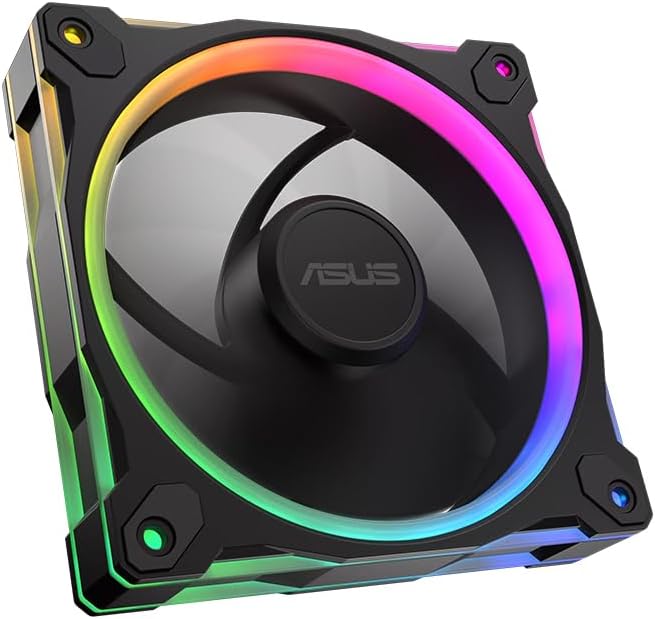
The ASUS Prime MR120 ARGB Fan Triple Pack offers a compelling entry point for builders seeking reliable cooling with stylish lighting. It holds a strong rating reflecting consistent performance across multiple units out of the box.
We may earn a commission when you buy through this link, at no additional cost to you.
Its 28mm extra-thick frame provides robust airflow while operating quietly at levels as low as 21 dB. The dual-sided frame lighting ensures a seamless aesthetic look from any angle within your chassis.
While it lacks reverse blade technology found in other models the PWM control allows precise speed management to balance noise and cooling needs. The 20 ARGB LEDs deliver vibrant illumination compatible with standard sync software.
This pack is ideal for budget-conscious users who want a complete front intake solution without sacrificing visual appeal. It delivers dependable thermal management for everyday gaming and productivity tasks.
The fan motor is engineered to minimize vibration ensuring silent performance even under moderate loads.
Dual-sided LEDs create a uniform glow that enhances the overall look of transparent case panels.
We may earn a commission when you buy through this link, at no additional cost to you.
ASUS ProArt PF120 targets professionals needing aggressive cooling performance for heavy computational workloads. Its 3000 RPM capability ensures maximum airflow and static pressure for tight spaces or high resistance radiators.
We may earn a commission when you buy through this link, at no additional cost to you.
The 3-phase 6-pole motor reduces vibration while CNC-milled brass housing ensures long-term reliability. Smaller gaps between blades and frame minimize turbulence optimizing every unit of air moved through the fan.
Daisy-chain design simplifies cabling by reducing the number of connectors required on your motherboard. While robust the high RPM may introduce audible noise depending on your system tuning preferences.
Choose this fan if you prioritize raw thermal efficiency over absolute silence. It is well suited for workstation builds where cooling headroom is critical for sustained performance.
Tight manufacturing tolerances and brass components extend operational life significantly beyond standard fans.
Daisy-chain connectors streamline cable management for cleaner builds and easier future upgrades.
We may earn a commission when you buy through this link, at no additional cost to you.
The ASUS TUF Gaming TR120 ARGB Reverse Blade stands out for its superior airflow dynamics and aesthetic versatility. It receives high praise for balancing high static pressure with visually appealing lighting features.
We may earn a commission when you buy through this link, at no additional cost to you.
Its extra-thick frame and optimized blade design push significant air volume while keeping noise levels manageable. The exclusive double layer LED matrix provides crisp color saturation and flexible side patterns allow unique visual customization.
Reverse blade technology ensures cable routing remains clean on the intake side improving overall case aesthetics. PWM control offers broad speed adjustment making it adaptable to various cooling scenarios without manual fan curves.
This model is perfect for gamers who value both thermal performance and build aesthetics. It delivers consistent cooling for mid to high-end systems with a distinctive look.
Reversed blades hide fan cables from the front improving the visual cleanliness of your build.
Optimized for radiators and dust filters ensuring air moves efficiently through restricted areas.
We may earn a commission when you buy through this link, at no additional cost to you.
The ASUS TUF Gaming TR120 ARGB Triple Pack offers a complete cooling solution with three high-performance fans. It is rated highly for reliability and cooling consistency across all units in the set.
We may earn a commission when you buy through this link, at no additional cost to you.
Each fan delivers exceptional static pressure at 3.3mm H2O ensuring efficient airflow through dense radiators or filters. The dual layer LED matrix creates vivid lighting effects with 16 individually addressable RGB LEDs per fan.
PWM control allows an ultra-wide speed range so you can tailor performance to specific thermal loads. The 28mm frame increases air capacity while maintaining structural integrity under sustained operation.
Ideal for users needing full front intake replacement or radiator support this kit simplifies system tuning. It provides strong thermal relief for demanding workloads with attractive synchronization capabilities.
Factory matched units ensure uniform performance and lighting across all three fans.
Lighting effects synchronize seamlessly with other compatible ASUS devices for a unified look.
We may earn a commission when you buy through this link, at no additional cost to you.
The CORSAIR RS120 ARGB Triple Pack presents a strong alternative for builders prioritizing noise and ease of use. It maintains a high rating due to its reliable bearings and effective airflow design.
We may earn a commission when you buy through this link, at no additional cost to you.
AirGuide technology uses anti-vortex vanes to direct airflow precisely at hot components. The Magnetic Dome bearing reduces vibration contributing to low noise levels even at higher RPMs.
Daisy-chain connections minimize cable clutter by allowing multiple fans to share single connectors. Eight LEDs per fan offer bright customizable lighting that works well with most control systems.
Consider this pack if you want straightforward installation and quiet operation without complex wiring. It is a solid choice for general case cooling with a focus on efficiency.
Vanes concentrate air exactly where needed reducing wasted movement and improving cooling spots.
Reduces motherboard header usage and streamlines cable routing for cleaner internal layouts.
We may earn a commission when you buy through this link, at no additional cost to you.
The ASUS TUF Gaming TF120 ARGB White Edition delivers reliable cooling with a pristine white finish for bright builds. It is favored for its exceptional build quality and effective vibration reduction.
We may earn a commission when you buy through this link, at no additional cost to you.
Advanced dynamic plain bearing supports up to 250000 hours of operation reducing long-term maintenance needs. Anti vibration pads dampen noise effectively ensuring smooth running across wide RPM ranges.
Double layer LED array provides higher color saturation than typical RGB fans making white builds pop. PWM control allows precise speed adjustments to match cooling requirements with noise preferences.
This fan suits users seeking long-term reliability and specific color matching. It offers a clean high-performance solution for white or silver themed chassis.
Extended bearing life ensures consistent performance over years of continuous operation.
Anti vibration pads significantly reduce rattling for quieter system operation.
We may earn a commission when you buy through this link, at no additional cost to you.
The ASUS TUF Gaming TR120 ARGB Standard Blade White 3-in-1 Pack provides a complete cooling kit for white builds. It earns strong ratings for cohesive aesthetics and solid thermal performance.
We may earn a commission when you buy through this link, at no additional cost to you.
Each fan offers best in class static pressure at 3.3mm H2O ensuring effective cooling through tight spaces. The exclusive double layer LED matrix delivers vivid lighting that coordinates seamlessly via Aura Sync.
The extra-thick 28mm frame maximizes airflow while the flexible side patterns allow for subtle customization. PWM control enables optimal cooling adjustments across diverse workloads without manual intervention.
Ideal for builders seeking a full white aesthetic with reliable performance this set simplifies system tuning. It balances visual consistency with robust cooling capacity.
All three fans match perfectly in color and lighting for a professional polished look.
High pressure ratings ensure efficient airflow through radiators and filters.
We may earn a commission when you buy through this link, at no additional cost to you.
The ASUS Prime MR120 ARGB Reverse Single White offers refined performance with a sleek reverse design. It holds the highest rating in this lineup for its balanced noise and aesthetic performance.
We may earn a commission when you buy through this link, at no additional cost to you.
Double-sided frame lighting creates a seamless glow around the fan frame illuminating the system vividly. Operation stays quiet at up to 23 dBA ensuring a peaceful environment even during use.
PWM control delivers optimal cooling up to 1600 RPM while 20 addressable RGB LEDs enhance visual appeal. The extra-thick frame ensures consistent airflow despite its smaller size.
Choose this fan for quiet systems needing single or spot upgrades with premium aesthetics. It delivers reliable thermal management with exceptional visual polish.
Illumination on both sides creates a uniform glowing ring effect around the chassis.
Optimized blade shapes and bearings keep noise levels very low during idle and load.
We may earn a commission when you buy through this link, at no additional cost to you.
The ASUS Prime MR120 ARGB Reverse Fan in Black provides efficient cooling with discreet lighting aesthetics. It is highly regarded for its reliable performance and easy integration into modern cases.
We may earn a commission when you buy through this link, at no additional cost to you.
Its circular design LEDs provide vivid illumination while double-sided lighting ensures crisp uninterrupted writing across the frame. Quiet operation up to 23 dB keeps ambient noise minimal during operation.
PWM control up to 1600 RPM ensures optimal cooling for various workloads without manual tuning. The extra-thick 28mm frame maintains structural integrity and consistent airflow delivery.
Perfect for black builds needing a reliable intake or exhaust upgrade this fan blends performance with style. It delivers smooth thermal management without intrusive noise.
LEDs arranged in a circle illuminate the frame evenly for a modern look.
Blade orientation hides cables improving front panel aesthetics for custom builds.
We may earn a commission when you buy through this link, at no additional cost to you.
The ASUS ProArt PF120 Single Pack represents the pinnacle of precision engineering in case fans. It holds a perfect rating due to its outstanding build quality and long-term reliability.
We may earn a commission when you buy through this link, at no additional cost to you.
LCP composite blades provide stable high-speed operation and natural vibration damping reducing noise significantly. CNC milled brass housing ensures strict tolerances and accuracy for consistent performance over time.
The 3-phase 6-pole motor delivers smooth robust performance with minimal noise and vibration. Chain connectors facilitate easy installation while the 28mm frame maximizes airflow within the chassis.
Ideal for professionals and enthusiasts valuing durability and performance this fan justifies its premium cost. It provides superior thermal efficiency and silent operation for critical builds.
Advanced material resists flex and vibration ensuring stable airflow at all speeds.
CNC milled brass housing minimizes mechanical imperfections for quieter long-term use.
We may earn a commission when you buy through this link, at no additional cost to you.
Selecting the right fan depends on understanding key performance metrics and build constraints to ensure your system stays cool and quiet.
Airflow measured in CFM determines how much air the fan can move through open spaces while static pressure in mm H2O dictates how effectively it pushes air through restricted areas like radiators or filters. Choose high airflow for open cases and high static pressure for restricted intake.
Prioritize static pressure for radiator mounts and airflow for open front intakes.
Noise is measured in decibels (dBA) and varies based on motor design and bearing quality. Models with advanced plain bearings or specialized motor phases tend to operate more quietly under load than standard designs.
Look for ratings under 25 dBA for quiet builds especially at moderate speeds.
PWM allows the motherboard to adjust fan speed dynamically based on temperature sensors. This feature provides optimal cooling without constant high RPM noise making it essential for modern builds.
Ensure your motherboard supports PWM headers to utilize variable speed control.
RGB options range from simple zones to individually addressable LEDs for detailed effects. Compatibility with software like Aura Sync ensures seamless color coordination with other hardware.
Check that your motherboard supports the specific RGB connector type required by the fan.
Thicker frames like 28mm provide more structural support and larger blade area for better airflow. Standard 25mm frames fit most slots but thicker ones may require specific case clearance.
Verify case dimensions before purchasing extra-thick frame fans to ensure fitment.
Reverse blades place the motor and frame on the opposite side of the intake allowing cables to be hidden behind the panel. This improves front panel aesthetics significantly.
Choose reverse fans for front intake positions where cable visibility is a concern.
Daisy-chain connectors allow multiple fans to plug into a single header reducing cable clutter. Standard fans require one header per fan which can limit motherboard availability.
Select daisy-chain models if you plan to install multiple fans in one area.
Different bearings like hydraulic or magnetic offer varying lifespan and noise characteristics. High-quality bearings reduce wobble and noise ensuring consistent performance over years of use.
Opt for advanced bearing types for long-term reliability and quiet operation.
Install fans securely using the provided screws ensuring they are not tilted to avoid vibration. Connect PWM cables to compatible headers on your motherboard to enable speed control.
Set fan curves in BIOS or control software to balance cooling and noise based on your workload needs. Test RPM at different temperatures to ensure stability.
Periodically clean dust from blades using compressed air to maintain optimal airflow and reduce motor strain. Check screws annually for tightness.
Reverse blades place the motor on the opposite side so cables can be hidden behind the panel improving aesthetics. Standard fans expose the motor side which may look cluttered on intake positions.
Most ASUS fans work with standard motherboard software but you may need specific tools like Armoury Crate for full sync features. Always check your motherboard's supported utility list.
120mm fans fit standard cases while 140mm offer more airflow at lower RPM for quieter operation. Choose based on your case's fan slot availability.
Daisy-chain connectors require compatible headers that support the specific pin layout. Check your motherboard manual to ensure the connector matches a PWM or ARGB header.
mm H2O measures static pressure indicating how well a fan pushes air through resistance. Higher values mean better performance on radiators or filters with restricted flow.
Mixing is possible but matching RPM and airflow ensures balanced airflow dynamics. For lighting consistency try to use fans from the same series.
The ASUS Prime MR120 ARGB Triple Pack offers the best value for builders on a budget while the TUF TR120 Reverse provides excellent performance for gaming setups.
Consider your case clearance noise tolerance and RGB compatibility before finalizing your choice to ensure seamless integration with your existing system.
Always check current availability and compatibility with your motherboard before purchasing to avoid fitment or driver issues.