
TP-Link Archer C3200
4.0Editor score
Tri-Band technology
6 high-performance antennas
1GHz dual-core CPU
This guide compares ten top AC3200 Tri Band WiFi Routers for speed and coverage to help you find the best network solution for your home needs.
Modern homes demand robust networking solutions capable of handling multiple devices simultaneously without sacrificing speed. AC3200 Tri Band WiFi routers offer the bandwidth necessary for streaming, gaming, and remote work across various connected devices.
We evaluated ten leading models based on performance, security features, ease of use, and overall value. Our analysis focuses on real-world capabilities like tri-band technology, processor power, and coverage area to ensure reliable connectivity.
Each selection highlights specific strengths such as advanced security, parental controls, or budget-friendly pricing. Keep in mind that product availability and pricing fluctuate frequently, so verify current details before making your final purchasing decision today.
4.0Editor score

4.2Editor score

4.2Editor score
The following table provides a side-by-side comparison of all ten selected AC3200 Tri Band WiFi routers. Review the key specifications and features to identify which model aligns best with your specific networking requirements and household size.


The ASUS RT-AC3200 stands out as a top contender for households requiring robust security and high-speed connectivity. With a rating of 4.2 stars, it offers a comprehensive suite of features including lifetime network protection and versatile USB ports.
We may earn a commission when you buy through this link, at no additional cost to you.
Its Smart Connect technology automatically assigns devices to the best frequency band, ensuring optimal performance without manual intervention. The built-in AiProtection powered by Trend Micro provides continuous security updates, shielding your network from evolving online threats effectively.
While the price is higher than some competitors, the inclusion of lifetime security and robust parental controls justifies the investment for many users. The ASUSWRT interface simplifies advanced network management, though it may require a learning curve for beginners.
This router is ideal for tech-savvy users and families prioritizing security and performance. Its ability to handle multiple devices seamlessly makes it a reliable choice for demanding home networking environments.
AiProtection provides continuous network scanning and threat blocking without additional subscription costs.
Automatically distributes devices across bands to prevent congestion and maintain high speeds.
We may earn a commission when you buy through this link, at no additional cost to you.
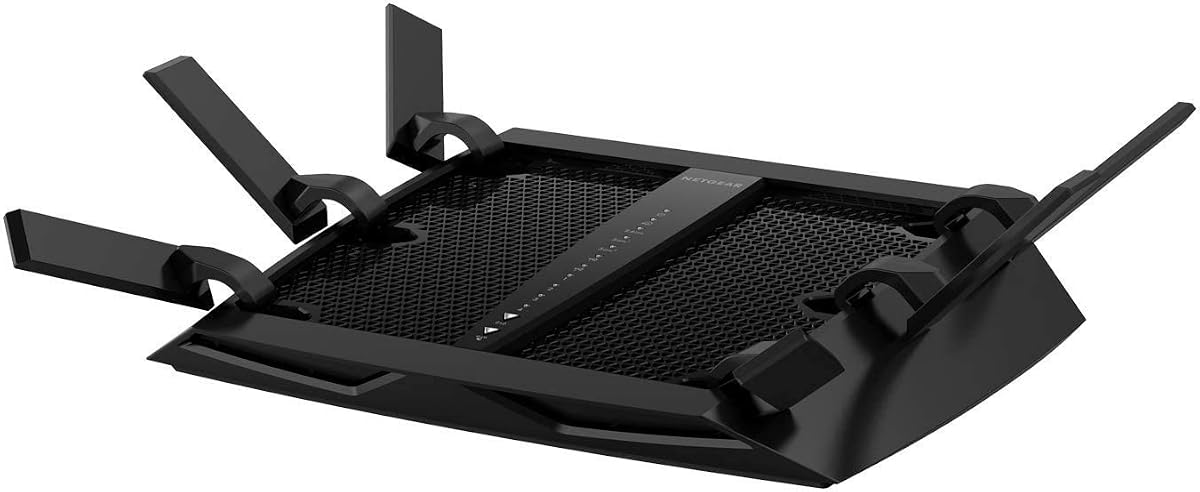
The NETGEAR Nighthawk X6 is engineered for expansive homes that demand extensive coverage and high capacity. Rated at 4.2 stars, it supports up to 50 devices and covers up to 3500 square feet with its six high-performance antennas.
We may earn a commission when you buy through this link, at no additional cost to you.
Its Dynamic QoS feature prioritizes bandwidth for critical applications like gaming and streaming, ensuring a lag-free experience. The inclusion of ARM security offers a trial period for enhanced protection, making it a strong choice for security-conscious users.
The physical size of this router is substantial, which may not suit smaller spaces or minimalistic setups. However, its performance capabilities and extensive range make it a powerful solution for large properties with many connected devices.
Ideal for large families or power users, this router delivers consistent performance across multiple rooms. Its ability to handle heavy network loads ensures smooth operation even during peak usage times.
Six amplified antennas maximize signal strength to eliminate dead zones in large homes.
Dynamic QoS ensures critical tasks get priority bandwidth to prevent lag and buffering.
We may earn a commission when you buy through this link, at no additional cost to you.
The TP-Link Archer C3200 offers exceptional value for budget-conscious consumers seeking tri-band performance. With a rating of 4.0 stars, it delivers reliable connectivity using six high-performance antennas and beamforming technology to optimize signal strength.
We may earn a commission when you buy through this link, at no additional cost to you.
Smart Connect ensures devices connect to the best band automatically, simplifying network management for users. While it lacks some advanced security features found in premium models, its core functionality supports 4K streaming and gaming effectively.
The intuitive interface and Tether app make installation straightforward, even for non-technical users. A two-year warranty adds peace of mind, ensuring support is available should any issues arise during normal usage.
This model is perfect for small to medium households needing robust performance without a high price tag. It balances cost and capability effectively, making it a popular choice for many home networks.
Delivers essential tri-band features at a price point accessible to most buyers.
The Tether app guides users through setup quickly without needing technical knowledge.
We may earn a commission when you buy through this link, at no additional cost to you.
The Linksys EA9200 is designed to handle device-heavy homes with a powerful 1 GHz dual-core CPU. Rated at 4.0 stars, it offers speeds up to 3.2 Gbps and allows remote network control via the Smart Wi-Fi app.
We may earn a commission when you buy through this link, at no additional cost to you.
The Network Map feature provides a clear visualization of connected devices, making it easy to manage your network. Its gigabit ports and USB support ensure compatibility with a wide range of wired and external storage devices.
While it lacks the extensive security suites of competitors, its raw processing power ensures smooth data handling. The design is functional but may appear dated compared to newer models on the market today.
Ideal for homes with many connected gadgets, this router offers stability and speed. The remote control capability is a significant advantage for users who need to manage their network while away from home.
Manage your home network settings from anywhere using the Smart Wi-Fi app.
The dual-core CPU handles multiple high-bandwidth tasks without performance drops.
We may earn a commission when you buy through this link, at no additional cost to you.
The TP-Link AXE5400 represents the future of home networking with its WiFi 6E capability. Rated at 4.3 stars, it leverages the 6 GHz band for near-zero latency and speeds up to 5400 Mbps for ultra-fast performance.
We may earn a commission when you buy through this link, at no additional cost to you.
This router is EasyMesh compatible, allowing you to extend your network seamlessly without dead zones. The inclusion of VPN server and client support adds flexibility for secure remote access and data protection across your network.
Users with older devices may not fully utilize the 6 GHz band yet, but this router is a forward-looking investment. Its thermal design ensures stable performance during extended usage, even under heavy load conditions.
Best suited for tech enthusiasts and homes preparing for future devices, this model offers cutting-edge speed. The Editors' Choice award highlights its strong balance of performance and innovation in the current market.
Access the new 6 GHz band for less interference and faster wireless speeds.
Extend your WiFi range with compatible routers or extenders using EasyMesh technology.
We may earn a commission when you buy through this link, at no additional cost to you.
The TP-Link Archer C3200 Renewed offers the core features of the full model at a reduced cost. With a rating of 4.2 stars, it provides tri-band connectivity and Smart Connect to optimize your network efficiently.
We may earn a commission when you buy through this link, at no additional cost to you.
Renewed products undergo inspection and testing to ensure they meet functional standards. This model delivers the same 3200Mbps combined speed and six high-performance antennas, making it a practical choice for cost savings.
While the warranty may be limited compared to new items, the value proposition remains strong. Users should verify the condition and return policies before purchase to ensure satisfaction with the refurbished unit.
This option is ideal for budget-focused buyers who do not require brand-new hardware. It provides access to proven tri-band performance without the premium price often associated with new routers.
Access high-end router features at a significantly lower price point than new units.
Renewed products are tested to ensure they function like new for everyday use.
We may earn a commission when you buy through this link, at no additional cost to you.
The ASUS RT-AC3200 Renewed brings the benefits of AiProtection and MU-MIMO to a budget-friendly option. With a rating of 4.2 stars, it delivers optimized streaming and gaming performance with reliable network management.
We may earn a commission when you buy through this link, at no additional cost to you.
AiProtection provides ongoing security updates which is rare for refurbished units. This ensures your data remains safe without extra monthly fees, adding significant value to the purchase price.
MU-MIMO technology allows for simultaneous data streaming to multiple devices, improving overall network efficiency. While the physical condition may vary, the functional performance meets the needs of most households effectively.
Ideal for users seeking advanced security without a premium price, this model is a solid choice. It combines essential features with cost efficiency for a versatile home networking solution.
AiProtection identifies and blocks threats automatically to keep your network safe.
MU-MIMO communicates with multiple devices at once to reduce network congestion.
We may earn a commission when you buy through this link, at no additional cost to you.
The Netgear R8000-100PAS offers high-end specs with its tri-band technology and dual-core processing. Rated at 3.8 stars, it supports combined speeds up to 3.2Gbps and features six high-performance antennas for extended range.
We may earn a commission when you buy through this link, at no additional cost to you.
Smart Connect ensures devices are intelligently assigned to the best band for optimal performance. The desktop design fits well in home offices, though the physical size is notable for smaller spaces.
User feedback indicates mixed experiences regarding setup and stability compared to newer models. However, for those seeking raw speed and capacity without the latest features, it remains a viable option.
Best suited for users prioritizing bandwidth over the latest software updates, this router delivers consistent throughput. The strong hardware foundation ensures reliable operation for standard home networking tasks.
Six antennas and a dual-core processor provide a stable foundation for heavy usage.
The vertical desktop form factor saves desk space while ensuring proper ventilation.
We may earn a commission when you buy through this link, at no additional cost to you.
The TP-Link Archer C3200 provides solid performance for streaming and gaming across multiple devices. With a rating of 4.3 stars, it uses beamforming and MU-MIMO to optimize signal strength and efficiency.
We may earn a commission when you buy through this link, at no additional cost to you.
Its three 2.4 GHz antennas and two 5 GHz antennas create superior coverage within the home. The router ensures lag-free experiences by balancing traffic efficiently across available frequency bands.
While the design is straightforward, it prioritizes function over form for reliable connectivity. Users benefit from easy installation and straightforward network management without needing technical expertise.
This model is a reliable middle-ground option for average households. It balances performance and ease of use effectively, making it suitable for general internet activities.
Beamforming focuses the signal directly to devices for a stronger and stable connection.
MU-MIMO improves network efficiency by talking to multiple devices at the same time.
We may earn a commission when you buy through this link, at no additional cost to you.
The Netgear Renewed R8000 brings high-end performance to a more accessible price point. With a rating of 4.1 stars, it offers speeds up to 3.2Gbps and Smart Connect for seamless device management.
We may earn a commission when you buy through this link, at no additional cost to you.
Its powerful 1GHz dual-core processor ensures smooth handling of multiple connections without lag. The refurbished status allows for significant savings compared to purchasing a new unit directly from the manufacturer.
Users should be aware that refurbished products may have minor cosmetic signs of use. However, functional testing ensures they meet operational standards for daily use in home environments.
Ideal for budget-conscious tech enthusiasts, this model offers premium hardware at a reduced cost. It delivers strong range and speed for those looking to maximize value in their network upgrade.
Access powerful dual-core processors and tri-band capabilities at a budget-friendly price.
Smart Connect keeps your network optimized automatically without manual band switching.
We may earn a commission when you buy through this link, at no additional cost to you.
Selecting the right router involves understanding your home size, device count, and specific needs like gaming or security.
Tri-band routers provide three separate frequency bands: one 2.4GHz and two 5GHz. This configuration reduces congestion by allowing you to move high-bandwidth devices to a separate 5GHz band while leaving others on the first 5GHz or 2.4GHz bands. For households with many smart TVs, consoles, and phones, this separation is crucial for maintaining high speeds.
Look for a router that supports simultaneous tri-band operation to ensure you are utilizing all available bandwidth for your devices effectively.
The physical coverage of a router depends heavily on the number and power of its antennas. Models with six antennas often provide better range and penetration through walls than those with fewer. Consider the square footage of your home and whether you need extended range features like beamforming to target signals to specific devices.
Ensure the router supports beamforming or MU-MIMO technologies to optimize signal strength and handle multiple connections simultaneously.
The internal processing power determines how well a router handles multiple data streams. A dual-core CPU is essential for AC3200 class routers to manage traffic efficiently without lag. RAM capacity affects the number of simultaneous connections the router can maintain without performance drops.
Prioritize models with at least a 1GHz dual-core processor and ample RAM for smooth operation under heavy loads.
Modern routers offer built-in security suites to protect against malware and hacking attempts. Features like Trend Micro's AiProtection or NETGEAR's Armor provide automatic updates and threat blocking. These services are essential for safeguarding smart home devices and personal data from external threats.
Check if the router includes a lifetime or subscription-based security service to ensure ongoing protection for your network.
USB ports allow you to connect external storage or printers directly to the router. This feature enables file sharing across the network without needing a dedicated computer. Look for both USB 2.0 and 3.0 ports for backward compatibility and faster transfer speeds.
Ensure the router supports file sharing protocols like Samba or FTP for easy access to connected storage devices.
Parental controls help manage internet access for children by filtering content and setting time limits. Advanced models allow scheduling and monitoring of online activities through a user-friendly app. This feature is vital for families wanting to ensure a safe online environment for younger users.
Choose a router with intuitive parental control tools that are easy to configure and manage from a mobile app.
A user-friendly interface simplifies network setup and management. Apps that allow remote control and network monitoring are highly valuable for non-technical users. Look for features like one-click setup and clear dashboards to manage connected devices easily.
Prioritize routers with well-designed mobile apps that provide full control over network settings without needing a PC.
A solid warranty and reliable customer support can save you money and frustration if issues arise. Most manufacturers offer one to three-year warranties, but premium models often extend this. Technical support should be accessible via chat, phone, or email for quick resolution of problems.
Verify the warranty duration and support options before purchasing to ensure long-term reliability and assistance availability.
Proper placement is essential for optimal performance. Position the router in a central location, elevated off the floor, and away from obstructions like metal objects or microwaves. This ensures the signal distributes evenly throughout your home without significant dead zones.
Regularly update the router's firmware to patch security vulnerabilities and improve performance. Most modern routers support automatic updates, but checking manually every few months ensures you have the latest features and fixes available for your device.
Keep the router clean and free from dust by periodically wiping it with a soft cloth. Ensure the ventilation holes are not blocked by objects or fabric to prevent overheating, which can degrade performance and shorten the device's lifespan.
The main benefit of a tri-band router is reduced congestion. By providing three separate frequency bands, it allows you to dedicate specific bands to high-bandwidth devices like streaming boxes or gaming consoles, while others use the remaining bands. This separation ensures smoother performance across all devices simultaneously.
No, AC3200 refers to the maximum theoretical combined speed across all bands. Real-world speeds are influenced by distance, obstacles, and internet service provider limits. You will likely experience speeds lower than the maximum theoretical rate, but still faster than standard dual-band routers.
No, these routers are compatible with most standard broadband modems provided by your ISP. You simply connect the router to the modem via an Ethernet cable. Just ensure your modem supports the speed tier you subscribe to for optimal internet performance.
Yes, Tri-Band routers are fully backward compatible with older devices that use 2.4GHz or 5GHz frequencies. They automatically detect and connect older devices to the appropriate band, so you do not need to replace all your electronics to benefit from the router.
Most routers include parental control features accessible through their web interface or mobile app. You create profiles for family members, set time limits, and filter content categories. Some models offer scheduled internet access, allowing you to turn off Wi-Fi during specific times like bedtime.
Beamforming focuses the Wi-Fi signal directly toward your connected devices instead of broadcasting it evenly in all directions. This targeted approach improves signal strength and range for devices further away, resulting in faster and more stable connections throughout your home.
Our top picks highlight the versatility available in the AC3200 category, from budget-friendly options to high-performance premium models. Whether you prioritize security, speed, or value, there is a router on this list to suit your needs effectively.
Consider your home size and the number of connected devices when making your final decision. Investing in a router with strong processing power and advanced features like MU-MIMO or Smart Connect ensures your network remains reliable as your technology needs grow over time.
Prices and availability are subject to change, so double-check current offers before purchasing. Review the specific warranty and support details to ensure you are confident in your choice for long-term network stability.