
Amazon Basics AC-Powered Computer Speakers
4.3Editor score
Direct wall outlet power
Front volume control knob
Built-in headphone jack
AC powered computer speakers deliver consistent performance without draining your device battery. They provide enough wattage to fill a room with clear audio for work or entertainment needs.
We analyzed ten top models based on power output, sound clarity, and connectivity options. Our comparison highlights wired and wireless capabilities alongside build quality and user controls for every budget.
Each pick shows key specs and real-world performance details to guide your decision. Remember that prices change frequently so check current listings before purchasing your preferred model today.
4.3Editor score

4.6Editor score

4.6Editor score
As an Amazon Associate we earn from qualifying purchases.
This side-by-side comparison lists all ten selected products with their core specifications and direct purchase links for easy evaluation of power and sound capabilities.


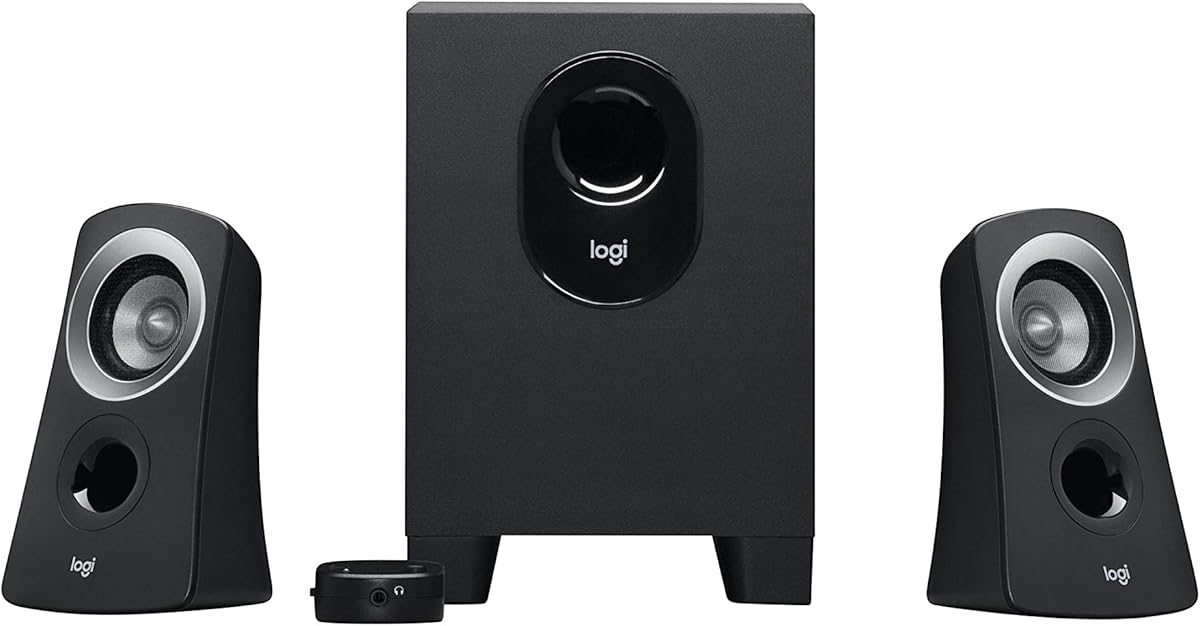


This model offers a straightforward entry into powered audio for desktop users. With a strong 4.3 star rating it delivers reliable sound without complex setup requirements.
We may earn a commission when you buy through this link, at no additional cost to you.
The direct wall outlet plug ensures consistent power delivery for steady performance. A simple front knob handles power and volume adjustments while a headphone jack sits handy on the front.
Build quality is functional but basic with plastic construction typical of budget speakers. The frequency range covers most listening needs though deep bass is limited compared to larger systems.
Ideal for students or office workers needing clear audio without high costs. It is the best pick for those prioritizing simplicity and affordability over advanced audio features.
The plug and play design removes hassle from installation so you can start listening immediately after connecting power and audio cable.
By drawing power directly from the wall outlet you avoid fluctuations that can occur with USB powered alternatives ensuring consistent volume levels.
We may earn a commission when you buy through this link, at no additional cost to you.
This system brings Bose engineering to desktop audio with a focus on clarity. Users praise its ability to maintain crisp sound even when volume levels are turned up high.
We may earn a commission when you buy through this link, at no additional cost to you.
The auxiliary input allows you to connect extra devices like phones for versatile listening. Volume control sits on the right speaker for easy access during daily computer use.
While it costs more than basic models the consistent performance justifies the investment for many users. The design fits neatly on desks without taking up excessive space.
Buy this if you value audio fidelity and brand reliability in a standard setup. It is a solid step up from entry level options for serious listening needs.
Connecting an iPhone or iPad via the auxiliary input expands your audio sources beyond the computer for a richer media experience.
The drivers are tuned to prevent distortion at higher volumes ensuring that dialogue and music remain clear regardless of loudness settings.
We may earn a commission when you buy through this link, at no additional cost to you.
This speaker system focuses on delivering a realistic audio experience for movies and music. Its design blends into modern office setups with a clean contemporary look.
We may earn a commission when you buy through this link, at no additional cost to you.
Dual inputs make it easy to connect multiple audio sources simultaneously without constant switching. The speakers provide balanced sound that enhances both video calls and entertainment.
As an older model it may lack some modern connectivity options found in newer units. Still the core audio performance remains strong for general desktop listening environments.
Choose this if you prefer classic design and solid sound over the feature. It remains a reliable choice for users wanting a stable audio foundation.
Having dual inputs means you can switch between devices easily without unplugging cables every time you want to change your audio source.
The sleek finish complements various desk styles making it a good choice for users who care about the visual look of their workspace.
We may earn a commission when you buy through this link, at no additional cost to you.
This system offers high fidelity audio in a compact two-piece design. The TrueSpace technology creates a wide natural soundstage that fills the room effectively.
We may earn a commission when you buy through this link, at no additional cost to you.
A dedicated control pod allows you to mute volume or add headphones instantly without touching the computer. Active equalization balances frequencies for a natural listening tone.
It eliminates the need for a separate bass module saving desk space while still delivering full sound. This makes it ideal for professional environments where space is limited.
Invest in this if you demand premium audio quality and sleek design. It is the top pick for users willing to pay for superior engineering and clarity.
The TrueSpace digital processing creates the illusion of a larger speaker system making the audio experience more immersive for movies and music.
Having a separate pod for volume and mute lets you adjust settings easily without navigating through computer software menus constantly.
We may earn a commission when you buy through this link, at no additional cost to you.
These speakers bring studio monitor quality to desktop setups with impressive clarity. The silk dome tweeter and full range unit deliver natural sound reproduction across frequencies.
We may earn a commission when you buy through this link, at no additional cost to you.
You get dual AUX inputs so you can connect a computer and phone at once. Bass and treble controls are on the side allowing EQ adjustments without software tools.
The wood finish adds a premium look that stands out compared to plastic units. While heavier than some models the build quality ensures durability and acoustic performance.
Pick this if you want versatile connectivity and sound control. It is the best balance of features build quality and price for serious listeners.
Connecting two devices via AUX at the same time means you do not need to swap cables when switching between your PC and mobile device.
Side knobs allow you to adjust bass and treble to suit your music taste ensuring the sound matches your personal preferences.
We may earn a commission when you buy through this link, at no additional cost to you.
This model delivers powerful audio for its size with 24 watts of total RMS power. The wood enclosures help minimize resonance for clearer audio output.
We may earn a commission when you buy through this link, at no additional cost to you.
You receive all necessary cables so setup is quick and simple. Dual AUX inputs allow easy switching between devices without constant plugging and unplugging efforts.
It offers a great value for users wanting a studio monitor feel on a budget. While the bass is limited by size it provides rich sound for daily listening tasks.
Buy this if you need a space saving yet powerful option. It suits users who want high quality audio without sacrificing desk space.
The 24 watt output ensures loud enough volume for small rooms while maintaining clarity without distortion at moderate levels.
Having RCA and 3.5mm cables included means you can start using the speakers right out of the box without buying extra accessories.
We may earn a commission when you buy through this link, at no additional cost to you.
This compact system is perfect for small workspaces where space is limited. It delivers clear stereo sound suitable for basic tasks and media viewing.
We may earn a commission when you buy through this link, at no additional cost to you.
Front panel controls include volume and power with an LED indicator. A headphone jack sits on the right speaker for private listening when needed.
It is powered by an included AC adapter ensuring stable performance without taxing your computer ports. The lightweight build makes it easy to move around.
Ideal for office cubicles or home desks with limited room. Choose this for reliable basic audio at a very low price.
The small footprint fits on narrow desks or workstations without crowding your keyboard or monitor area.
Front access to volume and power means you do not need to reach behind the speakers to adjust settings during use.
We may earn a commission when you buy through this link, at no additional cost to you.
This system adds a dedicated subwoofer for deeper bass impact. It delivers 25 watts of RMS power ensuring strong audio for music and games.
We may earn a commission when you buy through this link, at no additional cost to you.
A control pod sits on your desk for easy access to volume and power settings. The subwoofer is compact yet provides noticeable low end compared to two speaker systems.
Setup requires running a cable to the subwoofer which adds some cable management to your desk. However the resulting audio depth is worth the extra step.
Pick this if you want richer bass for gaming or movies. It is a great mid-range choice for users wanting more than just stereo speakers.
The subwoofer adds a physical thump to sound effects that stereo speakers alone cannot produce enhancing immersion.
A dedicated pod puts all controls on your desk surface so you do not need to bend down to adjust the subwoofer.
We may earn a commission when you buy through this link, at no additional cost to you.
These speakers bring modern features like Bluetooth 5.0 and RGB lighting to desktop audio. They deliver balanced stereo sound with passive radiators for fuller mids.
We may earn a commission when you buy through this link, at no additional cost to you.
You can switch between two EQ modes easily with a button press. The ambient lighting adds atmosphere but can be turned off for focused work sessions.
The dual connection options support both wired and wireless use flexibly. While a newer brand the 4.2 rating indicates solid performance for the price.
Buy this if you want wireless flexibility and a custom look. It suits gamers and streamers wanting style alongside clear audio.
Bluetooth 5.0 ensures stable wireless connections to laptops and phones without signal dropouts.
One button EQ modes let you switch sound profiles instantly without needing software adjustments.
We may earn a commission when you buy through this link, at no additional cost to you.
This system delivers powerful 15W per speaker output for room filling audio. It is designed with gaming in mind offering three EQ presets for different media.
We may earn a commission when you buy through this link, at no additional cost to you.
Six customizable lighting modes create an immersive desk setup. Front panel controls make it easy to adjust settings without reaching to the back.
It supports Bluetooth and AUX inputs plus a USB port for versatile connections. The robust build ensures stable performance during long gaming sessions.
Ideal for gamers wanting high volume and visual flair. Choose this for a complete audio visual desktop experience.
Dedicated EQ presets for gaming ensure sound effects stand out clearly for better situational awareness.
Six RGB modes bring your gaming setup to life with dynamic colors that match your environment.
We may earn a commission when you buy through this link, at no additional cost to you.
Choosing the right speakers requires balancing power output and connectivity with your specific needs. This section breaks down key factors to consider.
Higher wattage generally means louder and clearer sound especially at high volumes. Look for RMS ratings rather than peak numbers to ensure consistent performance.
Check the wattage matches your room size to avoid under or over powering your setup.
Consider if you need wired only or Bluetooth wireless capabilities. Dual inputs let you connect multiple devices without constant switching.
Ensure your computer has the necessary ports or plan to get adapters.
Larger drivers typically produce better bass response while tweeters handle high frequencies well. Look for specifications that mention balanced audio.
Read user reviews to confirm the sound matches your expectations.
Wood enclosures usually offer better acoustic properties than plastic ones. Consider the aesthetic fit for your workspace environment.
Check dimensions to ensure they fit comfortably on your desk.
Front panel controls allow easy access for volume and power adjustments. A dedicated pod adds convenience for mutes and headphones.
Ensure controls are accessible to avoid reaching behind speakers often.
Set a clear budget range before shopping to narrow your choices. Higher prices often reflect better build quality and sound fidelity.
Compare feature sets to get the most value for your money.
Connect the power adapter directly to a wall outlet to ensure stable electricity. Plug the audio cable into your device's headphone or audio output port.
Adjust volume controls on the speakers to avoid distortion by keeping levels moderate. Use EQ settings if available to balance sound for your specific content.
Dust the speaker grills regularly with a soft dry cloth to maintain clear sound. Keep them away from direct sunlight and heat sources to prevent damage.
AC powered speakers draw energy directly from a wall outlet which ensures consistent power delivery and stronger output. This prevents power fluctuations that can occur with USB connections and allows for louder volume.
Yes most AC powered speakers use standard 3.5mm jacks which are compatible with Mac computers. Bluetooth models offer wireless pairing options for devices with support.
Systems with dedicated subwoofers provide deeper bass for music and movies. However 2.0 systems can still deliver balanced sound depending on the drivers and room size.
Many models offer dual AUX inputs or Bluetooth alongside wired connections. This allows you to switch between phones and computers without unplugging cables manually.
Use a soft dry cloth to wipe dust off the exterior and grills. Avoid using liquids directly on the speakers and unplug them before cleaning to ensure safety.
Well maintained speakers can last for many years with consistent use. Proper handling and avoiding volume limits helps prevent driver damage over time.
We reviewed ten models ranging from budget options to premium sound systems. Each offers distinct advantages depending on your priorities for power and style.
Prioritize wattage and connectivity that match your daily usage. Consider build quality to ensure durability for long term use.
Remember to check current prices and availability before purchasing. Prices change frequently so verify listings to get the best deal.