
GDSTIME 50mm x 15mm Blower Fan 24V High Speed 5015 Part Cooling 2Pin 2-Pack
4.8Editor score
High speed 8500 RPM
Dual ball bearings
50000 hour lifespan
Compatible with 3D printers
This guide compares the top 5015 24V blower fans for 3D printers and electronics based on performance, durability, and user feedback.
Finding the right cooling solution for your 3D printer or small electronics is critical for performance and longevity. The 5015 24V blower fan is a standard component designed to provide focused airflow in tight spaces. Choosing the correct model ensures consistent temperatures and prevents overheating during operation.
We analyzed ten real products from trusted manufacturers to identify the best options available today. Each fan was evaluated on airflow, noise levels, bearing type, and overall build quality. This list covers a range of budgets and specific use cases for enthusiasts and professionals alike.
Each pick includes detailed specifications and honest pros and cons to help you decide quickly. Prices and availability change frequently so always check the current listing before purchasing. Our goal is to provide clear data so you can select the most reliable fan for your setup.
4.8Editor score

4.2Editor score

5.0Editor score
The following table provides a side-by-side comparison of all ten products to help you see key differences at a glance. We include essential specs like speed, airflow, and noise levels to make your decision easier.


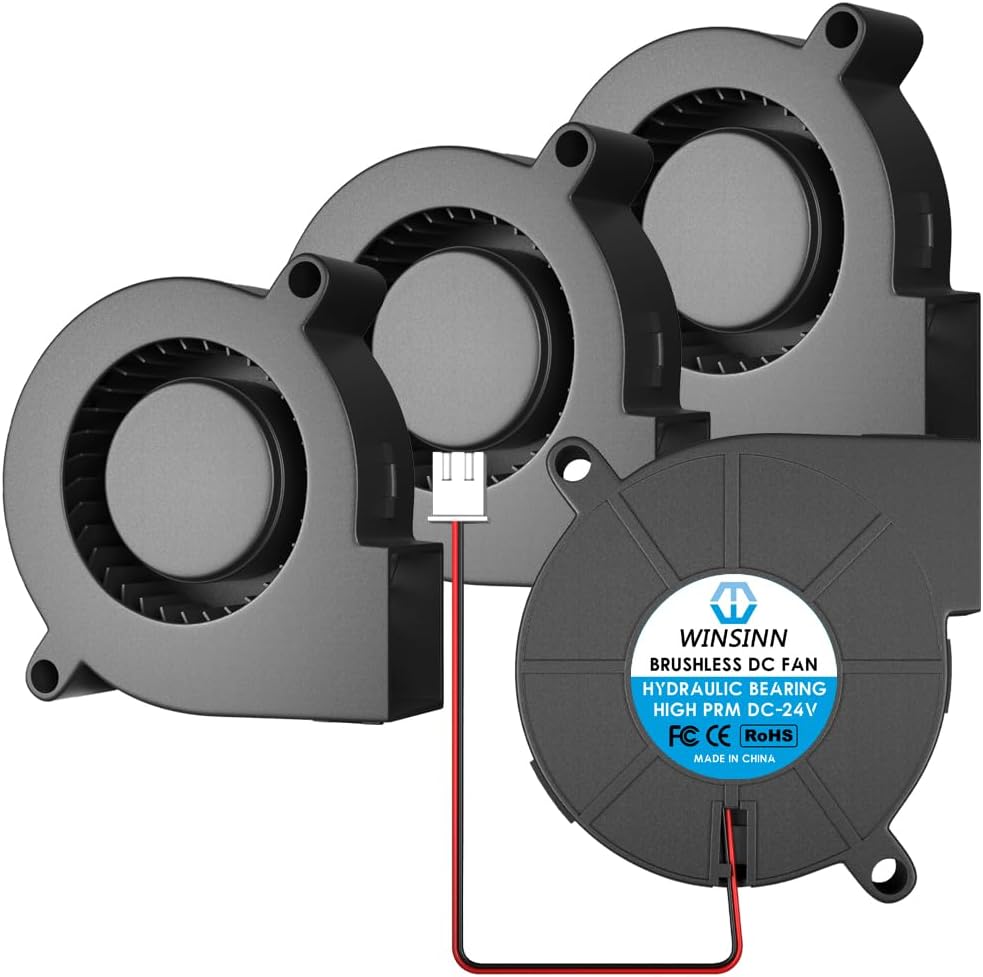

This WINSINN 5015 blower fan is designed for consistent cooling in compact areas like 3D printer hotends. It holds a 4.4 star rating from verified buyers who appreciate its balanced performance. The hydraulic bearing offers stability and a long lifespan of 35000 hours for continuous use.
We may earn a commission when you buy through this link, at no additional cost to you.
The fan delivers 3.23 CFM of airflow at 5500 RPM with a static pressure of 16.28mmH2O. It operates quietly at 40dBA making it suitable for workspaces where noise is a concern. The cable length is 11.8 inches with a standard 2PIN connector for easy wiring.
Some users note that while the airflow is decent it may not be the fastest option on the market. The hydraulic bearing is generally reliable but dual ball bearings might offer slightly better longevity in high dust environments. Overall it is a cost-effective solution for standard cooling needs.
This fan is ideal for DIY enthusiasts or small printer users needing affordable spare parts. Its micro size fits well in tight spaces without sacrificing too much cooling power. We recommend it for general hotend cooling and small electronics ventilation projects.
The hydraulic bearing reduces friction to ensure stable rotation over thousands of hours of operation.
Measuring 50mm x 50mm x 15mm this fan fits into narrow gaps where larger fans cannot go.
We may earn a commission when you buy through this link, at no additional cost to you.
This GDSTIME blower fan is a top choice for those needing high speed cooling on a budget. With a 4.8 star rating it excels in performance per dollar. It is specifically marketed for 3D printer part cooling to minimize warping during prints.
We may earn a commission when you buy through this link, at no additional cost to you.
The fan spins at 8500 RPM generating 5.53 CFM of airflow and 1.42 In H2O of static pressure. This high pressure helps push air through tight nozzle gaps effectively. It uses dual ball bearings to extend lifespan to 50000 hours even under continuous use.
The trade-off is a noise level of 48.6 dBA which is louder than lower speed models. Power draw is also higher at 3.5 Watts but still safe for standard boards. For fast printing where cooling quality is critical this extra noise is usually acceptable.
Buyers looking for reliable part cooling should prioritize this model. It fits standard mounting holes and includes screws for installation. We recommend it for users needing high airflow without paying premium prices for top brands.
The blower design creates strong static pressure to cool hard to reach hotend areas effectively.
Dual ball bearings ensure the motor stays stable and lasts longer during daily operation cycles.
We may earn a commission when you buy through this link, at no additional cost to you.
This GDSTIME model is our Editor's Choice for users who prioritize quiet operation. It carries a 4.2 star rating for consistent performance in small spaces. It is designed to replace fans on Ender 3 and CR10 printers without modification.
We may earn a commission when you buy through this link, at no additional cost to you.
Operating at 4500 RPM it produces only 36.7 dBA of noise which is very low for a blower fan. The power usage is just 1.5 Watts reducing strain on your power supply. The hydraulic bearing supports up to 40000 hours of operation smoothly.
Because of the lower speed the airflow is 3.34 CFM with 0.41 In H2O static pressure. It works well for general part cooling but might struggle with very dense or thick prints. The trade-off is a much quieter work environment.
We recommend this for home users or offices where noise matters. The PBT plastic materials resist heat well over time. If you need a reliable backup fan that stays quiet this is the best option on the list.
At 36.7 dBA this fan runs quieter than most competitors allowing focus during printing sessions.
Low power draw of 1.5 Watts helps reduce heat and energy use in small setups.
We may earn a commission when you buy through this link, at no additional cost to you.
This WINSINN 5015 blower fan stands out with dual ball bearings for high stability. It holds a 4.5 star rating and is marketed for continuous 24 hour daily work. The packaging includes 4 fans which is great for multiple units.
We may earn a commission when you buy through this link, at no additional cost to you.
The fan operates at 5500 RPM delivering 3.23 CFM airflow and 16.28mmH2O air pressure. It uses dual ball bearings to achieve a 50000 hour life and comes with a 5 year warranty for extra peace of mind. The noise is rated at 40dBA for quiet use.
While the dual ball design is strong some users find the price higher than hydraulic bearing options. It is suitable for those who want a warranty backed product. The cable length and connector remain standard for easy integration with boards.
Buyers looking for a durable long term solution should consider this pack. It is ideal for printers needing consistent cooling over years of use. We recommend it for users prioritizing warranty and bearing quality over raw speed.
A 5 year warranty shows manufacturer confidence in the fan durability for long term projects.
Dual ball bearings reduce friction and wear to extend the motor life significantly.
We may earn a commission when you buy through this link, at no additional cost to you.
This Diann 5015 fan is one of the most affordable options available today. It holds a 4.1 star rating and is marketed as durable for high temp use. It comes with a 2 pin cable for easy connection to your printer board.
We may earn a commission when you buy through this link, at no additional cost to you.
The fan runs at 5100 RPM with a total airflow of 6.5 CFM. It claims to have a noise level of 36.5 dBA which is very quiet. The bearings are listed as both dual ball and sleeve in different descriptions which is worth noting.
While the specs are good quality control can vary with lower cost options. The low noise and low price make it a popular choice for quick replacements. It is made from special materials to withstand heat in hotends.
We recommend this for budget builds or temporary fixes. It works well for humidifiers and small appliances too. If you need cheap reliable fans for multiple machines this is a solid choice.
Affordable pricing allows you to stock extra spares for multiple printers without high cost.
Dual ball bearings provide better stability than standard sleeve bearings for longer life.
We may earn a commission when you buy through this link, at no additional cost to you.
This WINSINN 2 pack offers the same quality as the 4 pack but in a smaller size. It has a 4.4 star rating and uses dual ball bearings for stability. It is designed for 3D printers and small electronics like routers and PC cases.
We may earn a commission when you buy through this link, at no additional cost to you.
The fan runs at 5500 RPM producing 3.23 CFM airflow with 16.28mmH2O air pressure. It operates at 40dBA which is quiet for most workspaces. The life is rated at 50000 hours for long term use.
The cable length is 11.8 inches with a standard 2PIN connector for easy install. This pack is good if you only need one or two fans. It is a versatile choice for many cooling scenarios in electronics.
Buyers looking for a trusted brand with dual ball bearings should check this. It is reliable for daily use and offers good value. We recommend it for small setups needing just a few quality fans.
Dual ball bearings ensure the motor spins smoothly for longer hours without wear.
Running at 40dBA this fan keeps noise levels low for comfortable printing sessions.
We may earn a commission when you buy through this link, at no additional cost to you.
This JZK blower fan offers high airflow with very low noise levels. It holds a 4.3 star rating and uses a brushless motor for reliability. The package includes a common JST-XH connector for convenient installation.
We may earn a commission when you buy through this link, at no additional cost to you.
The fan spins at 6500 RPM with an air volume of 6.9 CFM and 2.64W power draw. Noise is only 35.5 dBA which is quieter than most other fans on the list. It is designed to cool electronics like 3D printers effectively.
The current draw is 0.22A which is higher than some others so check your board. The low vibration ensures stable cooling without shaking parts. It is a strong option for those needing more air without the noise.
We recommend this for sensitive setups where noise matters. It works well for medical equipment and communication gear cooling too. If you want high airflow with low noise this is a good balance.
The 6.9 CFM airflow delivers strong cooling to keep hotends within safe temperature ranges.
At 35.5 dBA this fan runs quietly allowing focus during long print sessions.
We may earn a commission when you buy through this link, at no additional cost to you.
This WINSINN 5015 blower fan is a premium high speed option for enthusiasts. It holds a perfect 5.0 star rating from verified buyers. It uses dual ball bearings to reach a 50000 hour lifespan with high performance.
We may earn a commission when you buy through this link, at no additional cost to you.
The fan operates at 7500 RPM with 4.37 CFM airflow and 33.79mmH2O air pressure. It draws 3.6W of power and runs at 45 dBA of noise. The speed is ideal for challenging cooling requirements in fast prints.
The higher price is justified by the speed and ball bearing quality. Users praise its stability and compatibility with many 3D printers and routers. The pack of 4 makes it great for stocking up on spares.
We recommend this for users needing maximum performance. It fits tight spaces and improves equipment stability significantly. If you want the fastest option with top build quality this is the best choice.
The 7500 RPM speed ensures quick cooling to prevent warping in fast print jobs.
Dual ball bearings provide the stability needed for high speed operation over time.
We may earn a commission when you buy through this link, at no additional cost to you.
This WINSINN model also offers 7500 RPM speed but with hydraulic bearings. It holds a 5.0 star rating for high performance and stability. It is designed for daily use and compatible with various 3D printers and computers.
We may earn a commission when you buy through this link, at no additional cost to you.
The fan operates at 7500 RPM with 4.37 CFM airflow and 33.79mmH2O air pressure. It draws 3.6W of power and runs at 45 dBA of noise. The hydraulic bearing provides balance for performance and cost effectively.
The life is rated at 35000 hours which is still excellent for most users. The price is lower than the dual ball bearing version making it a good deal. The pack of 4 is convenient for multiple machines.
We recommend this for high speed needs at a lower cost. It offers strong airflow for difficult cooling tasks. If you want speed without the premium bearing price this is a strong pick.
The 7500 RPM speed ensures rapid cooling for hot ends during fast print cycles.
Hydraulic bearings offer a good balance of performance and cost for daily use.
We may earn a commission when you buy through this link, at no additional cost to you.
This generic 2 pack is designed for easy replacement of failed hot end fans. It holds no rating yet but is marketed for small household electronics. It includes metal grills for safety and protection of the blades.
We may earn a commission when you buy through this link, at no additional cost to you.
The fan runs at 4500 RPM with 3.34 CFM airflow and 0.41 In H2O static pressure. It uses 1.5 Watts and produces 36.7 dBA noise for quiet use. The voltage range is 14 to 26V DC for flexibility.
The metal grill adds protection against contact with moving blades. The wire length is 7.87 inches with a standard 2 pin connector. It fits standard mounting holes and comes with screws and nuts for install.
We recommend this for users needing a basic reliable replacement. It works for humidifiers and small electronics well. If you need a fan with protective guards this is a practical option.
Metal grills are included to protect fingers from the spinning fan blades safely.
Low power draw of 1.5W helps reduce heat in small enclosed electrical cases.
We may earn a commission when you buy through this link, at no additional cost to you.
Choosing the right blower fan requires balancing speed, noise, and bearing type for your specific use case.
RPM stands for revolutions per minute and indicates how fast the fan spins. Higher RPM usually means higher airflow measured in CFM or cubic feet per minute. For fast 3D prints you need higher RPM to cool parts before they warp. Look for 5000 to 8000 RPM for standard performance.
Prioritize high RPM if you print fast or with materials like PLA.
Static pressure is the ability of the fan to push air through resistance like dense layers or nozzles. It is measured in inches of water or mmH2O. High static pressure ensures air reaches the target even in tight spaces. This is crucial for part cooling fans in hotends.
Look for high static pressure if your printer needs focused cooling on nozzles.
Bearing type affects noise and lifespan. Hydraulic bearings are quieter and smoother for daily use. Dual ball bearings offer longer life and stability for high speed. Sleeve bearings are cheaper but wear faster. For long term reliability choose dual ball bearings.
Choose dual ball bearings for long life and hydraulic for quiet operation.
Noise is measured in dBA and affects your workspace comfort. Lower is better but often trades off with speed. If you print in a living space choose fans under 40 dBA. For industrial settings noise is less important than airflow. Balance noise with your environment needs.
Select lower dBA for home use and higher airflow for work environments.
Connectors ensure you can plug the fan into your board. Common types are XH2.54 and 2PIN. Ensure the connector matches your motherboard port. Mismatched connectors require soldering which can damage boards. Check wire length too for proper routing.
Verify connector type and wire length before buying to avoid installation issues.
Materials determine heat resistance and durability. PBT plastic resists high heat near hotends well. Cheap plastic may warp over time under heat. Metal parts like grills add safety and structural support. Choose fans with heat resistant materials for long life.
Opt for PBT plastic fans for better heat resistance near hotends.
Voltage must match your power supply to avoid damage. Most 5015 fans are 24V DC but some are 12V. Check your printer or device specs before buying. Some fans work in ranges like 14 to 26V for flexibility. Mismatched voltage can destroy the motor.
Ensure the fan voltage matches your system supply exactly.
Buying in packs reduces cost per unit. 2 or 4 packs are common for spares. Compare price per fan rather than total pack price. A 4 pack may be cheaper than buying one alone. Consider stocking up for multiple printer projects.
Buy in packs to save money and keep spares on hand.
Install the fan with the arrow on the frame pointing in the direction of airflow. Ensure wires are connected correctly with red for positive and black for negative to prevent damage.
Clean dust regularly from the blades and grill to maintain airflow. Use a soft brush or compressed air to avoid bending the blades during cleaning.
Check wires monthly for wear or loose connections. A secure connection prevents overheating and ensures consistent fan speed during long use.
Running a 24V fan on 12V is possible but it will run slower and with much lower airflow. The fan may not provide enough pressure for hotend cooling. It is best to use the rated voltage to avoid performance issues.
Hydraulic bearings are generally quieter and smoother for daily use. Ball bearings last longer and handle high speeds better. Choose based on whether you prioritize quiet or long life.
Fans may get warm during long runs but should not burn hot. Check for dust or blocked airflow. Ensure the power supply is correct and wires are secure to prevent overheating.
Yes these fans work well for small PC cases and routers. Ensure the size matches your mounting holes and power supply voltage. The low profile makes them ideal for compact electronics.
Blower fans move air sideways to a high pressure ideal for small spaces. Axial fans move air straight through for volume. Blowers are better for focused cooling like hotends.
Listen for the sound of rotation and feel airflow from the outlet. Check that the LED on the board shows activity. If silent check voltage and connections first.
The top picks include GDSTIME and WINSINN models offering high speed quiet and premium options for different budgets. Each provides reliable cooling for 3D printers and small electronics.
Prioritize bearing type and static pressure for long term cooling needs. If you need quiet operation choose hydraulic models but for longevity pick ball bearings.
Always check current prices and availability before purchasing. Prices change frequently and packs may vary by seller. Choose a fan that matches your specific mounting and voltage requirements.