
Samsung 49" Odyssey OLED G9
4.3Editor score
QD-OLED technology
0.03ms response time
Infinite contrast ratio
Finding the right display is crucial for immersive sim racing experiences. A large ultrawide monitor expands your field of view significantly compared to standard screens.
We evaluated ten top models based on resolution, refresh rate, curvature, and panel technology. Our analysis focuses on performance metrics that matter most to competitive and casual racers alike.
Each selection highlights specific strengths for simulation gaming and multitasking capabilities. Keep in mind that availability and specific offers can change frequently online.
4.3Editor score

4.6Editor score

4.1Editor score
As an Amazon Associate we earn from qualifying purchases.
The following table provides a side-by-side comparison of all ten selected monitors. We highlight key specifications that directly impact racing performance and visual fidelity.





The Raywego 49 Inch monitor offers an exceptional entry point into super ultrawide sim racing setups. With a 165Hz refresh rate and DQHD resolution it balances performance and clarity effectively for most modern gaming PCs.
We may earn a commission when you buy through this link, at no additional cost to you.
Its 1500R curvature wraps around your peripheral vision to enhance immersion during intense racing scenarios. The VA panel provides deep contrast which helps distinguish details in shadowy tracks or night races without losing clarity in bright environments.
While the stand lacks height adjustment which limits ergonomic customization for some users the display performance remains robust. Adaptive Sync technology minimizes tearing ensuring smooth visual feedback which is critical for timing gear shifts or braking points accurately.
We recommend this monitor for sim racers seeking high fidelity without breaking the budget. It delivers the panoramic view necessary for competitive play while maintaining a versatile design suitable for general productivity and media consumption.
The expansive 32:9 aspect ratio eliminates the need for multiple screens while providing seamless track visualization.
Reduced tearing and stuttering ensures that your visual feedback matches your controller inputs precisely during high-speed laps.
We may earn a commission when you buy through this link, at no additional cost to you.
Samsungs 49 inch Odyssey OLED G9 stands out with its QD-OLED panel technology that delivers unmatched visual fidelity. The ability to render true black levels makes night racing sessions exceptionally immersive and detailed compared to traditional LCD panels.
We may earn a commission when you buy through this link, at no additional cost to you.
With a near-instant 0.03ms response time this monitor eliminates motion blur that can hinder reaction times during tight cornering or overtaking maneuvers. The QD-OLED color technology ensures trackside environments appear vibrant and lifelike enhancing the realism of the simulation.
Thermal modulation and burn-in prevention features are essential for users who display static HUDs or dashboards for long periods. These safeguards help maintain the longevity of the display while preserving image quality through extended usage sessions.
This model is ideal for enthusiasts who prioritize visual quality above all else. Although the price is higher the experience of seeing deep shadows and crisp details on a curved screen is a significant upgrade for serious sim racers.
The QD-OLED layer enhances color volume and accuracy ensuring that track markings and liveries stand out vividly.
Fast pixel response ensures that fast-moving scenery remains sharp and clear even during high-speed straights or rapid braking.
We may earn a commission when you buy through this link, at no additional cost to you.
The 240Hz refresh rate on this Samsung G9 model sets a new standard for high-speed competitive racing simulations. It delivers incredibly smooth motion that minimizes input lag and ensures every visual cue is captured with precision.
We may earn a commission when you buy through this link, at no additional cost to you.
The 1000R curvature is the most aggressive in the market offering a wrapped experience that envelops your entire field of vision. This design choice maximizes immersion and is particularly effective for driving titles where peripheral awareness is crucial.
DisplayHDR 1000 support allows for exceptional brightness in daylight scenes and detailed shadow rendering in darker environments. While this brightness enhances realism it also requires a capable graphics card to drive the full resolution and refresh rate simultaneously.
We suggest this monitor for players who demand the fastest possible refresh rates and immersive curvature. It is built for those who want to maximize their setup with high-end visuals and responsive performance for serious racing.
High refresh rates ensure fluid motion that keeps pace with rapid gameplay changes providing a competitive edge.
High brightness levels allow sunlight and headlight effects to appear natural and impactful without washing out the image.
We may earn a commission when you buy through this link, at no additional cost to you.
The INNOCN 49C1R combines high resolution with versatile connectivity options that support diverse setups. Its 5K2K resolution delivers sharp details which is beneficial for reading dashboard telemetry and road markings during racing sessions.
We may earn a commission when you buy through this link, at no additional cost to you.
With a 120Hz refresh rate this monitor provides smooth motion that balances well with the high pixel count. The inclusion of USB-C power delivery allows for simpler cabling especially if you are using a laptop or compact desktop setup.
The 1800R curve offers a moderate immersive feel without the extreme wrap of other models. This makes it easier to align with your viewing distance and reduces distortion for users who prefer a slightly flatter experience.
This model is well suited for users who value connectivity and resolution over maximum refresh speed. It offers a robust platform for gaming and productivity ensuring you can multitask with ease while enjoying a clear wide view.
High pixel density ensures text and dashboard elements remain legible and sharp even during high-speed movement.
USB-C connectivity reduces cable clutter and supports single cable power and video transmission for streamlined desk setups.
We may earn a commission when you buy through this link, at no additional cost to you.
The Samsung G9 G91F model brings balanced performance features that appeal to a broad audience of sim racers. Its 144Hz refresh rate ensures fluid motion which is sufficient for most racing games without requiring extreme hardware.
We may earn a commission when you buy through this link, at no additional cost to you.
The 1000R curvature provides a highly immersive viewing experience that places you directly in the center of the action. This design helps minimize eye strain and keeps your focus on the track without needing to turn your head.
DisplayHDR 600 support offers improved dynamic range allowing for better contrast between dark and bright areas of the screen. This feature enhances the realism of lighting effects such as sunset skies or headlights in darker environments.
We recommend this monitor for those seeking a reliable premium experience at a slightly lower cost than top-tier OLEDs. It offers a comprehensive package of speed, curvature, and visual quality that supports competitive racing and general use.
A well-rounded refresh rate and response time combination ensures smooth gameplay across various simulation titles.
The deep curve design wraps around your field of view to heighten focus and reduce distractions during races.
We may earn a commission when you buy through this link, at no additional cost to you.
The CRUA 49 Inch monitor offers an affordable entry into super ultrawide gaming without sacrificing key performance specs. With a 165Hz refresh rate it delivers smooth visuals that are essential for tracking fast-moving cars and maintaining control.
We may earn a commission when you buy through this link, at no additional cost to you.
Its 1500R curvature creates an immersive viewing experience that enhances focus during gameplay. The wide color gamut ensures that track environments look vibrant and engaging which helps maintain visual interest during long racing sessions.
While it lacks some premium features like high-end HDR support or advanced ergonomic adjustments it delivers excellent value for the price. The high contrast ratio helps distinguish track details in various lighting conditions effectively.
This model is ideal for racers on a budget who still want a wide curved display for sim racing. It provides the core benefits of immersion and speed making it a strong choice for those new to the ultrawide format.
A competitive refresh rate and color performance at a lower price point makes this a top contender for cost-conscious buyers.
The curved design reduces eye movement needed to see track edges improving comfort during extended gaming sessions.
We may earn a commission when you buy through this link, at no additional cost to you.
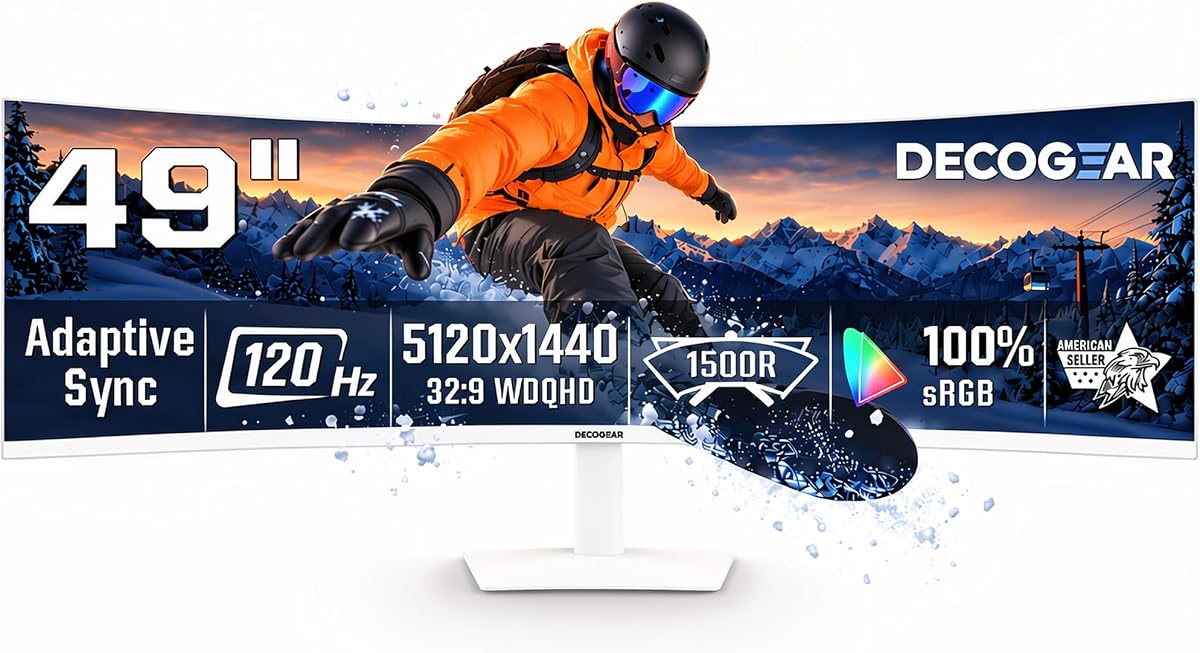
The Deco Gear 49 Inch monitor blends high resolution with practical features like KVM and built-in speakers. This makes it a versatile choice for users who switch between racing and work tasks without needing multiple monitors.
We may earn a commission when you buy through this link, at no additional cost to you.
With a 5K2K resolution the clarity is impressive for reading detailed telemetry and map overlays during sessions. The 120Hz refresh rate provides smooth motion that keeps up with standard racing titles while ensuring text remains crisp.
The 1500R curvature offers a comfortable field of view that reduces strain during long sessions. Features like USB-C power delivery simplify your setup allowing you to power laptops and connect peripherals easily.
We suggest this model for users who need a hybrid monitor for both gaming and productivity. It supports multitasking effectively while offering a wide immersive screen for gaming that does not compromise on clarity.
KVM functionality allows you to control multiple devices with one mouse setup saving desk space and complexity.
High pixel count ensures that small interface elements and distant track details remain clear and readable.
We may earn a commission when you buy through this link, at no additional cost to you.
The ASUS ROG XG49VQ focuses heavily on user comfort and visual stability during long gaming sessions. Its eye care technology reduces flicker and blue light which helps minimize fatigue during marathon racing weekends.
We may earn a commission when you buy through this link, at no additional cost to you.
With a 144Hz refresh rate this monitor delivers fluid motion that is reliable for fast-paced gameplay. The 1800R curvature provides a wide field of view that supports immersion without the extreme bend of more aggressive models.
The ergonomic stand allows for full adjustment so you can find the perfect viewing angle for your setup. This adjustability is crucial for maintaining good posture and preventing neck strain during extended use.
We recommend this model for users who prioritize eye comfort and adjustability in their setup. It offers a balanced mix of performance and features that support long-term usage without compromising on visual quality.
Advanced filters and flicker-free backlighting reduce strain allowing for longer comfortable viewing sessions.
Adjustable stands support healthy posture by allowing you to position the screen at the ideal height and angle.
We may earn a commission when you buy through this link, at no additional cost to you.
The Z-Edge 5K 49 Inch monitor combines high refresh rates with excellent color accuracy for a competitive edge. Its 240Hz capability ensures ultra-smooth motion which helps in tracking fast-moving objects and timing inputs precisely.
We may earn a commission when you buy through this link, at no additional cost to you.
With 99% sRGB color coverage colors appear accurate and vibrant enhancing the realism of track visuals. The high resolution ensures that dashboard elements and distant track details are crisp and easy to read during races.
The 1ms response time minimizes ghosting and blurring which is crucial for competitive racing where split-second decisions matter. This speed supports rapid changes in scenery without visual artifacts disrupting your focus.
This model is recommended for competitive players who need top-tier refresh rates and clarity. It offers a premium experience for those who demand maximum performance from their display during intense simulation sessions.
High sRGB coverage ensures accurate representation of track and car colors enhancing the immersive quality of the game.
Fast pixel transitions prevent motion blur allowing for clear visuals even during rapid acceleration or cornering.
We may earn a commission when you buy through this link, at no additional cost to you.
The Samsung G93SC offers OLED benefits with high refresh rates and fast response times. Its QD-OLED panel delivers deep blacks and vibrant colors which enhance the visual quality of night races and dynamic lighting.
We may earn a commission when you buy through this link, at no additional cost to you.
With a 240Hz refresh rate the motion clarity is exceptional allowing for smooth tracking of fast objects. This high speed combined with the OLED response time ensures that visual feedback remains immediate and free of motion blur.
G-Sync compatibility helps synchronize the display with your GPU to reduce tearing and stuttering. This results in a smoother experience which is vital for maintaining focus during competitive online racing sessions.
We recommend this monitor for users who want OLED quality at a higher refresh rate. It provides a premium visual experience for those willing to invest in advanced technology for their sim racing setup.
Self-emissive pixels provide perfect blacks and high contrast making night scenes and shadows appear realistic.
Synchronization with GPU output ensures fluid visuals without screen tearing allowing for uninterrupted gameplay.
We may earn a commission when you buy through this link, at no additional cost to you.
Selecting the right monitor involves balancing resolution, refresh rate, curvature, and panel technology to fit your racing style and hardware.
Resolution determines how sharp and detailed the image appears on screen. For sim racing, a DQHD or 5K2K resolution ensures dashboard instruments and track markings remain readable even at high speeds. Higher resolution improves immersion by eliminating pixelation in distant scenery.
Choose higher resolution if you have a powerful GPU to render extra detail without sacrificing frame rates.
Refresh rate dictates how many times per second the image updates. A higher refresh rate like 144Hz or 240Hz provides smoother motion which helps in tracking fast cars and judging braking points. Smooth motion reduces motion blur and enhances reaction times.
Prioritize high refresh rates if you compete in fast-paced races or use motion simulation platforms that rely on fluid visuals.
Curvature wraps the screen around your vision to simulate a cockpit environment. A tighter curve like 1000R increases immersion but may require more desk depth. Moderate curves like 1500R or 1800R offer a balance between immersion and viewing comfort.
Select a curve that matches your seating distance and personal preference for peripheral vision wrapping.
Panel types like VA, IPS, or OLED affect color accuracy and contrast. VA panels provide deep blacks and high contrast ratios suitable for dark environments. OLED offers perfect blacks and instant response but comes at a higher cost and risk of burn-in.
Choose VA or IPS for longevity and contrast, or OLED if you want the absolute best visual fidelity.
Response time is how quickly pixels change color which impacts motion clarity. Low response times like 1ms or less minimize ghosting ensuring tracks remain sharp. Input lag must be low to ensure your controller actions match the screen instantly.
Look for response times below 2ms and features like Adaptive Sync to minimize latency and tearing.
Connectivity options determine how easily you can link your PC or consoles. DisplayPort 1.4 and HDMI 2.1 support high resolutions and refresh rates. USB-C hubs allow simplified connections for laptops or integrated audio.
Verify your graphics card output matches the monitor's supported ports to maximize performance.
Adjustable stands help position the screen at the ideal eye level to reduce strain. VESA mounting allows for wall or arm mounts if desk space is limited. A sturdy build ensures stability during intense gameplay sessions.
Prioritize adjustable stands and VESA compatibility for long-term comfort and desk flexibility.
HDR support expands dynamic range for brighter highlights and darker shadows. Color gamut coverage like sRGB or DCI-P3 ensures realistic track colors. Accurate color reproduction enhances immersion by matching real-world lighting.
Opt for DisplayHDR certified models with wide color coverage for better visual realism.
Position your monitor at eye level and ensure it is centered directly in front of your seat to maximize immersion without straining your neck. Adjust the height and tilt so the top edge aligns with your eye line.
Use display calibration tools or built-in settings to adjust brightness and contrast to match your room lighting. Proper calibration reduces eye fatigue and ensures colors look accurate during gameplay.
Keep the screen clean with a microfiber cloth and avoid harsh chemicals. Check for firmware updates from the manufacturer to improve performance or fix bugs related to sync and responsiveness.
Yes, a 49 inch ultrawide monitor provides a wide field of view that enhances immersion and helps with peripheral awareness during races. It is particularly effective for sim racing where seeing the track edges and other cars is important.
DQHD and 5K2K resolutions offer excellent clarity for reading dashboards and track details. Higher resolution helps with immersion but requires a powerful graphics card to maintain high frame rates in simulation games.
Curvature wraps the screen around your vision to create a cockpit-like feel that increases focus and immersion. Tighter curves offer more wrap but may distort straight lines slightly, so choose based on your preference.
Yes, driving high resolution and high refresh rates requires a strong graphics card and sufficient CPU power. Ensure your system can render the game at the desired settings to avoid performance drops or stuttering.
You can use multiple monitors, but a single ultrawide eliminates bezels which can distract during gameplay. Ultrawide monitors provide a seamless viewing experience that often feels more natural for racing.
Yes, they are excellent for productivity and multitasking thanks to the large screen real estate. You can run multiple windows side by side which is helpful for streaming or managing dashboards while racing.
We selected the Raywego 49 Inch for its balance of speed and clarity. The Samsung OLED models offer unmatched contrast. The CRUA model provides budget-friendly immersion.
Prioritize resolution and refresh rates that your hardware can support for smooth gameplay. Match the curve to your desk depth and seating distance for maximum comfort.
Check current prices and availability to ensure you get the best deal today. The right display will transform your sim racing experience significantly.