
Bambu Lab P2S Combo
4.7Editor score
Fast P2S printing speed
Advanced AMS 2 Pro
Smart adaptive airflow
Discover the top 3D printer for figurines and models. We compare speed, precision, multi-color support, and ease of use for makers and professionals.
Choosing the right 3D printer for figurines and models requires balancing detail, speed, and ease of use. Whether you are a hobbyist or a professional, the right machine brings your designs to life with stunning accuracy.
We evaluated ten top models based on print quality, speed, material compatibility, and user experience. Our analysis focuses on FDM printers capable of producing intricate figurines with vibrant colors and smooth finishes.
Each pick below highlights key strengths and ideal use cases for different budgets. Prices and availability change frequently, so check the current listings before making your final decision for your creative workspace.
4.7Editor score

4.7Editor score

4.4Editor score
This table compares the key specifications and features of all ten selected printers to help you find the perfect match for your figurine and model printing needs.





The Bambu Lab A1 delivers exceptional precision and speed for 3D printing figurines and models. Its high acceleration and auto calibration ensure detailed prints with minimal user intervention.
We may earn a commission when you buy through this link, at no additional cost to you.
Features like active flow rate compensation and quiet operation make it ideal for home studios. The easy-to-use touchscreen simplifies setup, allowing you to focus on creativity.
While the AMS lite requires a separate purchase for multi-color printing, the core unit performs flawlessly. Open frame design may limit high-temp filament use without upgrades.
This printer is perfect for enthusiasts seeking professional quality without complexity. It stands out as a top choice for detailed figurine production.
Active flow compensation ensures every layer adheres perfectly, vital for fine details on figurines.
Fully automatic calibration removes manual hassles, guaranteeing consistent results across every print job.
We may earn a commission when you buy through this link, at no additional cost to you.
The P2S Combo combines high speed with advanced multi-color capabilities via AMS 2 Pro. It offers professional-grade results with intelligent features like AI detection and adaptive airflow.
We may earn a commission when you buy through this link, at no additional cost to you.
Set up in minutes and enjoy filament drying and smart airflow for advanced materials. The workflow integration with Bambu Studio ensures smooth production from design to print.
While expensive, the convenience and performance justify the cost for serious creators. Multi-color printing is seamless with the included AMS system.
Best for professionals wanting top-tier speed and color options. It excels at detailed models with complex material needs.
Adaptive airflow balances cooling and heat retention, optimizing prints for varied filament types and conditions.
AMS 2 Pro enables vibrant prints with built-in drying, ensuring flawless results without manual filament swaps.
We may earn a commission when you buy through this link, at no additional cost to you.
The AD5X offers impressive multi-color printing at a budget-friendly price. Its IFS technology and auto leveling make it accessible for beginners wanting detailed models.
We may earn a commission when you buy through this link, at no additional cost to you.
High-speed printing and a large build volume enable quick prototyping of larger figurines. The 300°C nozzle supports diverse materials for varied projects.
Setup may require careful calibration initially but yields consistent quality. The value proposition is strong for hobbyists seeking color flexibility.
Ideal for cost-conscious creators wanting advanced features. It delivers solid performance for intricate 3D models without high costs.
IFS technology allows four simultaneous colors, bringing vibrant designs to life affordably.
Fully automatic leveling guarantees perfect bed alignment every time, reducing print failures.
We may earn a commission when you buy through this link, at no additional cost to you.
Designed for industrial use, the Creator 5 Pro offers multi-toolhead printing and near-zero waste. It excels at producing robust parts with advanced filaments.
We may earn a commission when you buy through this link, at no additional cost to you.
The 65°C chamber supports materials like ABS and PA, while CoreXY ensures stability at high speeds. Filtration keeps the environment clean and safe.
Complexity may deter casual users but benefits professionals. The near-zero waste reduces operational costs significantly.
Best for industrial designers needing reliable, eco-friendly printing. It handles complex material needs with precision.
Active heated chamber prevents warping, allowing use of high-performance engineering filaments for durable models.
Toolhead changer eliminates flush waste, saving material and time during multi-color projects.
We may earn a commission when you buy through this link, at no additional cost to you.
The P1S combines speed and reliability in an enclosed design. It handles advanced filaments well with auto leveling and fast printing speeds.
We may earn a commission when you buy through this link, at no additional cost to you.
Setup takes only 15 minutes, making it beginner-friendly. Support for engineering materials allows for durable models and functional parts.
While multi-color requires separate AMS, the core performance is strong. Enclosed design ensures consistent thermal conditions.
Ideal for users needing reliable advanced filament support. It offers a balance of speed and quality for various projects.
Enclosed body maintains thermal stability, essential for successful prints with ABS and ASA.
500 mm/s speeds ensure quick turnaround without sacrificing detail on complex models.
We may earn a commission when you buy through this link, at no additional cost to you.
Snapmaker U1 features a rapid 5s tool changer for multi-material and multi-color printing. It minimizes waste with smart tooling systems.
We may earn a commission when you buy through this link, at no additional cost to you.
CoreXY ensures speed and precision. The software supports flexible and rigid materials, enabling complex projects like soluble supports.
Setup is simple with guided tools. High cost may be a barrier for some hobbyists.
Best for users needing mixed-material capabilities. It streamlines complex prototyping workflows effectively.
5-second changer cuts downtime, allowing fast multi-color and multi-material transitions.
Combines rigid and flexible materials seamlessly, expanding creative possibilities for figurines.
We may earn a commission when you buy through this link, at no additional cost to you.
The SPARKX i7 introduces AI photo-to-3D model generation for personalized figurines. It offers quick setup and multi-color printing with reduced waste.
We may earn a commission when you buy through this link, at no additional cost to you.
Large build volume allows full-size projects. AI detects failures to improve success rates significantly.
Setup is nearly plug-and-play. AI features may require adjustments for precise results.
Best for creators wanting personalized design tools. It simplifies the process from idea to finished print.
Upload portraits to generate unique 3D models instantly, perfect for custom gifts.
AI camera detects print issues in real-time, alerting you to prevent wasted filament.
We may earn a commission when you buy through this link, at no additional cost to you.
The Adventurer 5M Pro delivers high-speed printing with a quick-swap nozzle. Dual filtration ensures a clean workspace and safe printing environment.
We may earn a commission when you buy through this link, at no additional cost to you.
Auto leveling and one-click printing make it user-friendly. Filtration and quiet operation suit home use.
Build volume limits large models. Material range is slightly restricted compared to industrial units.
Ideal for home users prioritizing safety and simplicity. It balances performance with convenience.
Dual filtration captures particles and fumes, maintaining a safe printing environment.
Quick-swap nozzle allows changes in seconds, minimizing downtime during projects.
We may earn a commission when you buy through this link, at no additional cost to you.
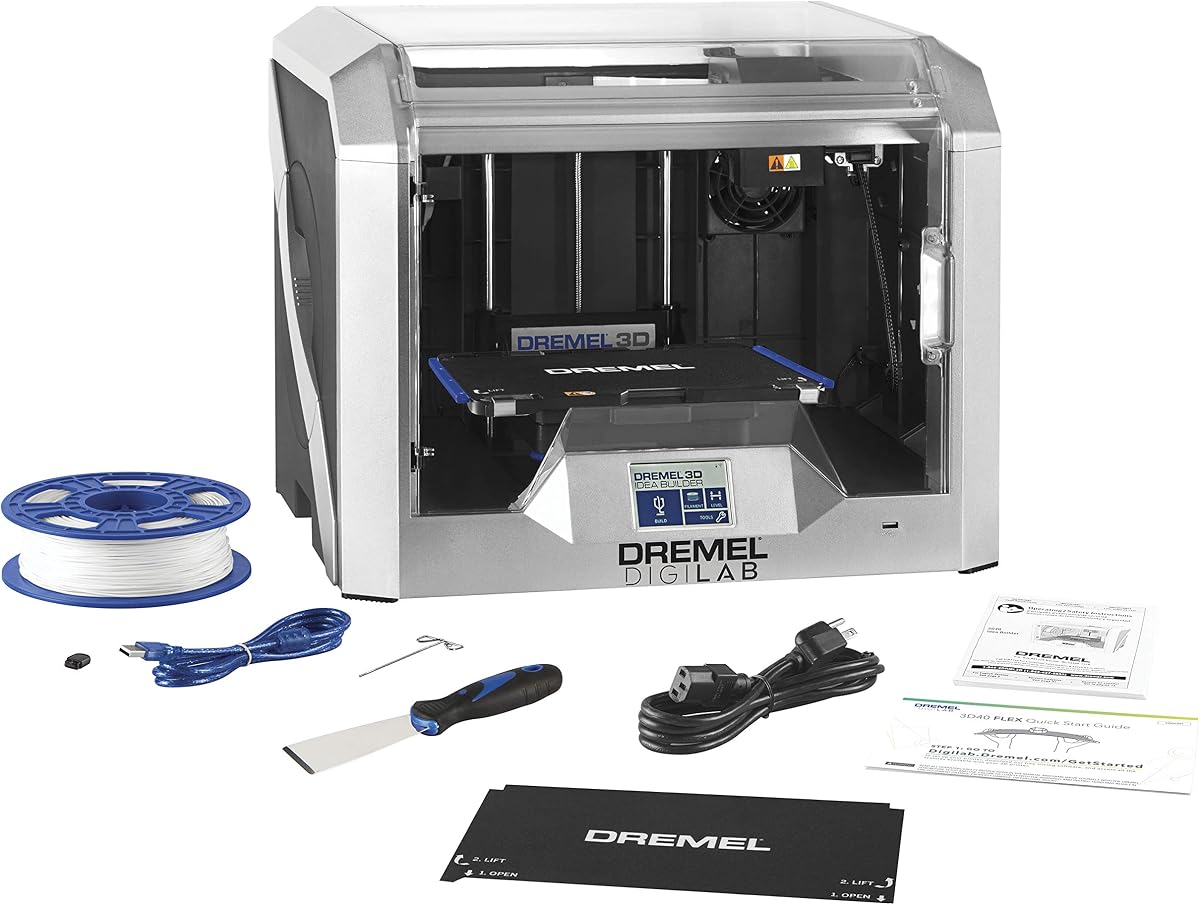
The Dremel 3D40 Flex offers high-resolution prints with a flexible build plate. Its enclosed design and easy setup suit beginners well.
We may earn a commission when you buy through this link, at no additional cost to you.
Pause-and-resume filament detection prevents wasted prints. Brand support ensures reliable service and community resources.
Speed is lower than competitors but accuracy is strong. Material range is limited compared to other FDM units.
Best for students and beginners needing reliable, safe operation. It prioritizes ease of use.
50 micron resolution delivers fine details essential for intricate figurine features.
Fully enclosed housing protects against heat and fumes, ensuring a safe environment.
We may earn a commission when you buy through this link, at no additional cost to you.
The A1 Combo integrates AMS multi-color printing seamlessly. Active flow compensation ensures precision and consistent results across all colors.
We may earn a commission when you buy through this link, at no additional cost to you.
Fully automatic calibration handles Z-shift and resonance for every print. Noise cancellation makes it office-friendly.
Open frame limits high-temp materials. Overall value for multi-color is unmatched.
Best for creators needing reliable multi-color output. It offers excellent performance for hobbyists.
AMS Lite ensures all colors print without manual intervention, simplifying complex projects.
Active flow control maintains accuracy during multi-color transitions, enhancing model detail.
We may earn a commission when you buy through this link, at no additional cost to you.
Selecting the ideal 3D printer involves evaluating speed, resolution, material support, and multi-color capabilities for your specific modeling needs.
Higher resolution printers produce smoother surfaces critical for intricate figurine features. Look for machines with small nozzle options and precise motion control to ensure fine detail.
Prioritize printers with sub-micron layer height options for miniatures.
Multi-color capabilities allow vibrant figurines without manual swapping. Tools like AMS or IFS systems automate color changes and reduce waste.
Choose models with dedicated multi-color systems for efficient production.
Ensure the build plate fits your largest planned figurine. Larger volumes reduce the need to assemble parts from separate prints.
Verify dimensions match your common model sizes before purchasing.
Different filaments require different temperatures and cooling. Heated chambers and high-nozzle temps support ABS, ASA, and engineering materials.
Check compatibility with desired materials to avoid print failures.
Auto-leveling and quick-swap nozzles simplify maintenance and setup. Beginners benefit from intuitive interfaces and guided calibration.
Look for features that reduce manual effort to save time.
Fast print speeds and high acceleration shorten project timelines. CoreXY structures minimize vibration for accurate fast printing.
Prioritize models with high-speed capabilities to increase output.
Enclosed chambers with HEPA filtration capture fumes from engineering materials. This is essential for home or office safety.
Ensure adequate filtration if using high-temp or toxic filaments.
User-friendly slicing software and remote control streamline workflows. Features like AI detection and monitoring improve success rates.
Check for compatible software and mobile apps for better management.
Calibrate your printer regularly to ensure consistent first layers. Use auto-leveling features if available and manually adjust Z-offset as needed for precision.
Clean and dry filament spools to prevent moisture-related defects. Store materials in sealed containers with desiccants to maintain print quality.
Update firmware and slicer software to access new features and fixes. Monitor prints during the first few layers to catch issues early.
For detailed miniatures, look for printers with high resolution and precise motion systems like CoreXY. Models like the Bambu Lab A1 offer fast speeds with excellent detail and reliable calibration.
Yes, many modern printers support multi-color printing through systems like AMS or IFS. These automate filament changes for vibrant, multi-colored prints without manual swapping.
Enclosed printers are recommended for advanced filaments like ABS to prevent warping. However, open-frame models work well with PLA which is ideal for most figurine projects.
Improve quality by calibrating the bed, slowing down print speeds for details, and using high-quality filament. Ensure proper cooling settings to maintain fine features.
Nozzles between 0.2mm and 0.4mm provide the best balance of speed and detail. Smaller nozzles enhance fine features but increase print times significantly.
Print time depends on size and detail. A standard figurine may take 10 to 20 hours on most FDM printers, while faster models reduce this time significantly.
PLA is ideal for most figurines due to ease of use and detail. PETG or ASA may be used for parts requiring durability or outdoor exposure.
A heated bed improves adhesion especially for larger prints. Most recommended printers include this feature to prevent warping and ensure consistent results.
This guide highlights top performers like the Bambu Lab A1 and P2S Combo for their balance of speed detail color, and precision. Each model serves different needs from hobbyists to professionals.
Prioritize features such as auto-calibration, multi-color support, and build volume based on your project goals. The right printer enhances creativity and reduces workflow friction.
Always verify current pricing and availability before purchasing. Technology advances quickly, so choose a model that grows with your creative ambitions.