
Anycubic Kobra 3 Camera
4.5Editor score
Easy DIY frame
Anycubic app support
Wide printer compatibility
This guide compares the top 3D Printer Camera for Remote Monitoring options for 2026, focusing on resolution, connectivity, and reliability for seamless
Monitoring your 3D prints remotely ensures you catch issues like spaghetti failures early. A good camera offers clear video, easy app integration, and reliable connectivity to keep your prints safe even when you are away from home.
We evaluated ten leading 3D Printer Camera for Remote Monitoring solutions based on user ratings, compatibility, and feature sets. Our comparison highlights key strengths like night vision, time-lapse generation, and specific printer support to help you choose the right tool.
Each pick below showcases a distinct model designed for different printer ecosystems. While prices may fluctuate over time, the core features remain consistent. Review the details to find the camera that best fits your specific printing setup needs.
4.5Editor score

4.3Editor score

4.1Editor score
The following table provides a side-by-side comparison of all ten cameras. It highlights key specifications like resolution, specific printer compatibility, and unique features to help you quickly identify the best match for your setup.



The Creality Official Nebula Camera stands out as a top choice for monitoring your prints remotely. With a strong rating and user feedback, it offers reliable performance for Ender and Sonic Pad users. Its main appeal lies in the seamless integration with the Creality Cloud ecosystem.
We may earn a commission when you buy through this link, at no additional cost to you.
This camera includes a 940nm infrared fill light, which ensures clear visibility even in dark rooms. You can monitor progress via WiFi using the user-friendly app or a browser. The auto-generated time-lapse feature saves you from manual recording, making it easy to share your work.
While it is powerful, it does require specific Creality printers or pads to function fully. Users need to ensure their setup is compatible before purchasing. The app setup can also take a few minutes to configure properly for remote access.
If you own a compatible Creality printer, this camera is highly recommended for its ease of use and reliable monitoring capabilities. It helps you catch issues quickly and document your prints professionally without needing extra hardware.
The built-in 940nm infrared light allows you to see prints clearly in the dark without visible red glow that might disturb sleep.
You do not need to set up manual timers as the camera automatically captures images at each layer to create smooth videos later.
We may earn a commission when you buy through this link, at no additional cost to you.
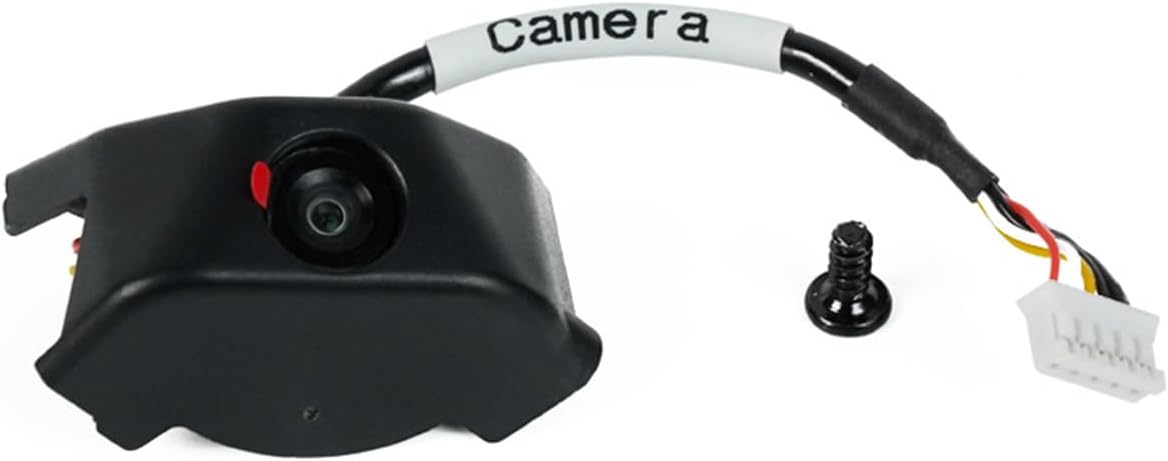
For those seeking a cost-effective solution, the Anycubic Kobra 3 Camera delivers impressive value. It allows real-time remote monitoring through the Anycubic app, helping you track progress from anywhere. The design is simple yet effective for basic needs.
We may earn a commission when you buy through this link, at no additional cost to you.
One of its unique selling points is the DIY replaceable frame, letting you personalize your setup to fit your printer or style. It works well with the Kobra 3 series but also supports other printers like the Klipper and Anycubic Kobra 2. This flexibility makes it a versatile choice for many users.
The assembly process is straightforward but might require some patience if you want to customize the frame. While the app is functional, it lacks some advanced features found in premium models. However, for its price point, it offers solid performance.
This camera is perfect for hobbyists who want remote monitoring without spending too much. If you enjoy customizing your gear, the DIY frame adds a fun element to your 3D printing journey while keeping your prints safe.
The replaceable frame allows you to print your own designs or modify the existing one to fit your specific printer enclosure perfectly.
Despite being branded for Kobra 3, it supports other printers like Klipper and Kobra 2 series, broadening its utility across different setups.
We may earn a commission when you buy through this link, at no additional cost to you.
The Official Original FLASHFORGE AD5M Camera Smart Kit is a premium choice designed specifically for Adventurer 5M and AD5X users. It ensures seamless integration with your existing printer ecosystem for a smooth experience. You can monitor status and control prints using the Flash Maker app.
We may earn a commission when you buy through this link, at no additional cost to you.
This kit focuses on HD quality images, ensuring that every detail of your print is visible during monitoring. It also allows you to record the entire printing process, which is great for sharing or reviewing past jobs. Installation is supported by video guides, making it accessible for beginners.
Because it is an official kit, it is optimized for specific models which limits its use with other brands. The price is higher than generic options, but you pay for reliability and better quality control. The recording feature adds significant value for those who create content.
If you own a FlashForge printer, this camera is the logical choice for maximum compatibility and feature support. It elevates your printing experience by combining reliable monitoring with high-quality capture capabilities for your projects.
Designed as an official kit, this camera connects directly with the printer's firmware for stable remote access and control without extra configuration.
The system allows you to generate video files after printing, making it easy to export them via USB for sharing with others.
We may earn a commission when you buy through this link, at no additional cost to you.
This variant of the Creality Official Nebula Camera focuses on high-definition monitoring with night vision capabilities. It supports 1920×1080 resolution, providing sharp images for detailed inspection. The auto-switch night vision ensures clarity even when lights are off.
We may earn a commission when you buy through this link, at no additional cost to you.
A unique feature is the manual focus lens, allowing you to adjust the focal length for optimal sharpness. It connects via USB for convenience, though it requires specific Creality pads or printers like the Ender 3 V3 KE. The detailed setup process ensures you get the best image quality.
Adjusting focus manually might take a moment to master, but the result is a crisp image. It is not a universal camera as it is tied to specific Creality ecosystems. However, for users in that ecosystem, it offers excellent control and image fidelity.
Consider this if you need high-resolution images for detailed prints and have a compatible Creality printer. The manual focus gives you control over the view, ensuring you never miss a layer detail during the printing process.
With 1080p resolution, this camera captures fine details of your prints allowing you to spot early layer issues easily from a phone.
The built-in light auto-switches to help you monitor at night without needing external lighting which keeps your work area dark and clean.
We may earn a commission when you buy through this link, at no additional cost to you.
The FLASHFORGE Camera Kit for Adventurer 5M is designed to provide basic yet effective remote monitoring. It integrates smoothly with the Flash Maker app, allowing you to view and control your printer from anywhere. It is an official kit ensuring good reliability.
We may earn a commission when you buy through this link, at no additional cost to you.
Installation is emphasized as simple, requiring no complex steps to get started. It works best with the Adventurer 5M, 5M Pro, and AD5X models. While it lacks advanced features like time-lapse, it serves the core function of keeping an eye on your print job.
The focus is on simplicity and integration rather than advanced customization. For users who just want to know if their print failed without opening the enclosure, this is sufficient. It is a straightforward addition to the printer ecosystem.
This kit is ideal for FlashForge users looking for a plug-and-play solution. If you value ease of use and official support over advanced features, this camera provides the necessary tools for remote monitoring effectively.
As an official accessory, it receives regular updates and support ensuring it works well with your printer firmware and app software.
You can control and view your printer from anywhere using the app which saves time and effort especially during long overnight prints.
We may earn a commission when you buy through this link, at no additional cost to you.
The Anycubic Kobra 3 Camera offers a streamlined experience for users wanting quick setup. It connects easily via USB and works with the Anycubic app for real-time monitoring. Its DIY replaceable frame adds a creative touch to your setup.
We may earn a commission when you buy through this link, at no additional cost to you.
You can identify and resolve issues like jams or layer adhesion problems quickly using the app. It supports not only the Kobra 3 but also Kobra 2 series and Klipper printers. This wide compatibility makes it a versatile choice for various users.
Assembly is designed to be simple, taking only a few minutes to complete. The frame can be replaced, so you can swap it for a custom part if desired. However, it does rely on the app which might not be as robust as open-source solutions.
Choose this if you need a quick, affordable camera for monitoring without complex configuration. The wide compatibility and easy setup make it a practical tool for keeping your prints safe from afar.
Installation requires just a USB connection and app setup, allowing you to start monitoring your prints within minutes of unboxing.
The replaceable frame means you can upgrade or modify the housing to fit your needs or add your own custom designs later.
We may earn a commission when you buy through this link, at no additional cost to you.
The Creality K1 AI Camera is designed to integrate seamlessly with K1 series printers. It offers 1080P HD quality ensuring clear visuals. The AI detection helps enhance efficiency by identifying potential problems early in the process.
We may earn a commission when you buy through this link, at no additional cost to you.
Time-lapse photography is handled automatically by the app once you log in. It is easy to install due to a reserved interface on the printer. The camera is optimized for the K1 ecosystem making it a natural choice for owners of these models.
Its primary limitation is that it is tailored for K1 printers which limits cross-compatibility. While the AI helps, the full benefit is realized within the Creality software suite. For those in the ecosystem, the integration is smooth and reliable.
This camera is perfect for K1 users who want high quality and AI features built in. It simplifies the monitoring process and ensures you do not miss critical details during your print runs.
The system helps you identify issues like spaghetti early by detecting anomalies in the print structure and alerting you promptly.
With 1080P resolution, you get sharp images that allow you to see fine details and texture on your prints from a distance.
We may earn a commission when you buy through this link, at no additional cost to you.
This Nebula Camera variant provides real-time monitoring with a focus on clarity and anomaly detection. It features a 940nm infrared fill light to maintain visibility at night. The resolution of 1920×1080 ensures you can see fine details clearly.
We may earn a commission when you buy through this link, at no additional cost to you.
It includes an anomaly monitoring feature which reminds you and pauses printing to avoid waste of filaments. The manual focus option lets you rotate the lens to adjust the view for sharpness. It connects via USB and uses the Creality Cloud app for setup.
The specific compatibility with Sonic Pad or Nebula Pad models is a key consideration. If your printer does not support these interfaces you may need additional hardware. However for compatible users it offers robust protection and control.
This is a strong option for those needing detailed control and anomaly safety. The combination of manual focus and automatic alerts makes it a versatile tool for serious 3D printing enthusiasts.
The system watches for printing errors and can pause the job automatically saving material and preventing damage when issues arise.
You can manually rotate the lens to adjust the focus ensuring you get the sharpest image possible for your specific print geometry.
We may earn a commission when you buy through this link, at no additional cost to you.
The Creality Nebula Camera offers advanced features like spaghetti detection to reduce waste. It allows for 24-hour real-time monitoring via WiFi connection. You can view your prints through the user-friendly Creality Cloud app on phone or computer.
We may earn a commission when you buy through this link, at no additional cost to you.
Time-lapse photography is another key feature allowing you to visualize progress. The manual focus ensures high-definition quality for close examination. It fits models like Sonic Pad, Ender 3 V3, and CR-10 SE providing broad utility within the brand.
Setting up the cloud connection may require initial configuration which adds a step before use. Also the detection features rely on specific firmware support which might vary by printer version. However it provides strong peace of mind for unattended printing.
This camera is excellent for users who want automated error detection. The spaghetti detection and time-lapse features make it a valuable investment for those printing overnight or away from home regularly.
The camera helps identify spaghetti failures early alerting you to stop the print before materials and time are wasted.
Time-lapse feature captures images automatically so you can see the full build progress from start to finish easily.
We may earn a commission when you buy through this link, at no additional cost to you.
The Flashforge Camera Kit for Adventurer 5M and AD5X is designed to provide detailed recording of your prints. It offers HD camera quality to ensure you see the process clearly. The video can be exported to a USB flash drive for viewing later.
We may earn a commission when you buy through this link, at no additional cost to you.
The cable is made longer to fit enclosures making installation easier. It is an official accessory ensuring it is designed well for the printer. You can view and monitor prints remotely when away using the Flash Maker app.
It focuses on practical use rather than advanced automation features. The USB export is a nice touch for offline sharing without needing cloud uploads. However it does not have as broad feature set as some other models.
This is a solid choice for users needing a reliable kit for their printer. The USB export feature and official support make it a convenient tool for documenting and managing prints effectively.
Video files generated after printing can be exported via USB allowing you to save and share them without relying on internet access.
The longer cable helps reach power and data ports easily making installation a breeze even in enclosed setups.
We may earn a commission when you buy through this link, at no additional cost to you.
Selecting the right 3D Printer Camera for Remote Monitoring involves understanding your printer compatibility and the features you need for safe printing. This guide breaks down the key factors to consider before making a purchase to ensure you get the best value.
The most critical factor is ensuring the camera works with your specific 3D printer model. Most cameras are branded for specific ecosystems like Creality, Flashforge, or Anycubic. Using an incompatible camera may lead to connection issues or limited functionality. Check the product specifications to confirm it supports your printer type or operating system like Klipper.
Always verify compatibility before buying to avoid returns. If you use open-source firmware like Klipper, look for cameras that support generic USB connections rather than proprietary apps.
Resolution determines how clearly you can see your print details on your phone screen. Look for cameras offering at least 720p or 1080p HD resolution to spot early layer defects like spaghetti failures. Higher resolution helps you identify misalignments or nozzle clogs before they ruin a long print.
Prioritize cameras with high-definition sensors and manual focus options if you need detailed inspection. Clear images are essential for effective remote monitoring.
If you often print at night or in a dark room, night vision is an essential feature. Cameras with infrared (IR) fill lights allow you to see prints without visible light that could disrupt your sleep or environment. Look for IR lights around 940nm for effective dark room visibility.
Ensure the camera has built-in lighting or supports external IR sources to maintain visibility 24/7. This feature is vital for continuous unattended printing safety.
The mobile app or web interface determines how easy it is to access your camera feed remotely. Check if the app supports real-time video streaming time-lapse generation and anomaly detection. A user-friendly interface simplifies setup and daily monitoring tasks.
Look for apps that offer push notifications for errors and allow you to pause or stop prints remotely. Reliable software integration is key to effective monitoring.
Connectivity options include USB direct connection or WiFi. USB is often more stable but requires physical wiring which may need longer cables for enclosures. WiFi offers more flexibility but depends on network stability. Ensure the installation process is straightforward with clear guides provided.
Choose a connection method that fits your setup and network environment. Simple assembly and reliable connection reduce frustration and downtime.
Time-lapse videos are a popular feature for showcasing print progress automatically. Cameras that support this feature capture images at each layer or interval to create smooth videos. This is useful for sharing your work or documenting long prints without manual effort.
Verify if the time-lapse is automatic or requires manual configuration. Automatic generation saves time and effort for creators who want to document projects.
Prices vary significantly between generic and brand-specific camera kits. While budget options provide basic monitoring, premium models offer advanced features like AI detection and higher resolution. Assess what features matter most to your workflow before setting a budget.
Invest in a camera that balances cost with the essential features you need. A reliable tool protects your printer and material investments over time.
Reliable customer support and warranties are important if you face technical issues. Check for support options like technical assistance, video guides, and warranty periods. Access to help ensures you can resolve connectivity or software problems quickly.
Prioritize brands that offer responsive support and clear documentation. Good after-sales service adds value to your purchase and reduces risk.
To start using your camera, connect it securely to the designated USB port on your 3D printer. Ensure the cable is long enough to route safely without interfering with moving parts. For WiFi models, follow the in-app steps to link the camera to your home network.
Calibrate the lens and view angle before leaving the printer unattended. Adjust focus or tilt to get a clear view of the build plate and nozzle. Verify the live feed on your phone or computer to confirm everything is working properly.
Keep the lens clean and protected from dust or filament residue. Regularly update the camera firmware and app to ensure compatibility and security. Avoid exposing the camera to excessive heat by mounting it away from direct hot surfaces.
No, many cameras are designed for specific brands or printer models. Always check the compatibility list to ensure it supports your printer. Some cameras work universally via USB, but others need proprietary integration.
Not all cameras require WiFi. Some connect directly to a PC or phone via USB. However, to monitor remotely when you are away from home, a network connection like WiFi is usually necessary to access the live feed over the internet.
Most modern cameras require an app to view the feed and control settings. Some may offer web browser access, but apps provide better control for alerts and time-lapses. Check if your chosen camera supports browser streaming if you prefer not to use an app.
Look for cameras with built-in infrared night vision. These use invisible IR lights to illuminate the build area so you can see clearly in dark rooms. Ensure the camera supports auto-switch to night mode for seamless 24/7 monitoring.
Resolution like 1080p is recommended for clear and detailed views of your prints. Higher resolution helps you spot small defects early. Most quality cameras offer at least 720p which is sufficient for basic monitoring needs.
Most cameras are designed to operate safely in enclosed environments. They usually run on low voltage and are heat resistant. However, place them away from the hot end or direct heat sources to prevent damage.
Many models offer time-lapse or full video recording features. These can save to the cloud or a local USB drive. Check the product specs to confirm it supports recording and how you can access those files.
Most kits include the camera and necessary cables. You may need to install custom mounts or brackets depending on your printer. Some advanced setups might require extra hubs or power sources but basic kits are often all-in-one.
Selecting the right 3D Printer Camera for Remote Monitoring can significantly improve your printing reliability. The top picks offer a mix of budget friendly options and advanced features to suit different needs. Whether you choose the Creality Official Nebula Camera for versatility or the Flashforge kit for seamless integration each model provides solid monitoring capabilities.
Prioritize features like night vision and app integration that fit your workflow. Compatibility with your specific printer is essential to ensure stable operation. Consider your budget and the importance of features like time-lapse or anomaly detection before deciding.
Remember to check current prices and availability before purchasing. Technology evolves quickly so new models may appear with updated features. By choosing the right camera you protect your prints and gain peace of mind during every project.