
LG Smart Monitor Swing
4.1Editor score
Rolling wheeled base
Built-in webOS system
AirPlay and Screen Share
Finding the right 32 inch touchscreen monitor can transform your workspace into an interactive hub. These large displays offer incredible clarity and intuitive control for design, gaming, and productivity tasks.
We evaluated ten leading models based on resolution, refresh rate, touch technology, and connectivity. Our analysis focuses on real-world performance and versatility across different operating systems.
Each pick highlights specific strengths and ideal use cases for professionals and enthusiasts. Please note that product availability and pricing may change frequently on retailer sites.
4.1Editor score

5.0Editor score

4.2Editor score
As an Amazon Associate we earn from qualifying purchases.
We compare all ten models side by side to highlight key differences in resolution, refresh rate, stand adjustability, and connectivity options for various user needs.



This 32-inch monitor offers exceptional value with a stunning 4K resolution and a fast 144Hz refresh rate. It received a perfect rating in our analysis for its seamless integration and high performance.
We may earn a commission when you buy through this link, at no additional cost to you.
The 10-point capacitive touchscreen allows for intuitive gestures like pinch and swipe. Users can connect via HDMI 2.1, DP 1.4, or Type-C for flexible setups.
While the stand is adjustable, macOS users should note the touch limitation to two points. Power must be supplied before connecting video signals for stability.
Ideal for designers and gamers needing a large interactive display. The VESA mount compatibility adds extra versatility for custom installations.
The 144Hz rate ensures smooth motion for competitive gaming and fluid video playback.
Multiple ports including Type-C allow easy connection to laptops and desktops alike.
We may earn a commission when you buy through this link, at no additional cost to you.
The LG Smart Monitor Swing brings smart TV features to a large touchscreen monitor. It runs webOS independently, allowing streaming and app usage without a computer.
We may earn a commission when you buy through this link, at no additional cost to you.
Its wheeled base offers unmatched mobility, making it perfect for collaborative spaces. The 95% DCI-P3 color gamut ensures rich visuals for media consumption.
AirPlay 2 and Screen Share enable easy casting from phones. However, the refresh rate is standard for productivity rather than fast-paced gaming.
Best for offices or living rooms needing a flexible all-in-one display. The premium price reflects its advanced standalone capabilities.
Access streaming services and cloud apps directly via the built-in webOS interface.
The hidden adapter keeps cables tidy while the wheels allow smooth movement across rooms.
We may earn a commission when you buy through this link, at no additional cost to you.
This monitor delivers impressive features at a competitive price point. It offers a crisp 2K resolution with a 100Hz refresh rate for fluid daily use.
We may earn a commission when you buy through this link, at no additional cost to you.
The 10-point touchscreen supports intuitive interaction for presentations and design. The IPS panel ensures consistent colors across wide viewing angles.
Check device compatibility carefully as some consoles do not support touch. The stand allows height and tilt adjustments for ergonomic comfort.
Great for users seeking a large interactive display on a budget. It balances performance and cost effectively for office work.
You get high resolution and decent touch capabilities without the premium price tag.
The 100Hz rate reduces blur during video playback and fast screen movement.
We may earn a commission when you buy through this link, at no additional cost to you.
This Xyrio monitor combines utility with a unique RGB ambient lighting design. It features a standard 2K resolution and supports multiple operating systems easily.
We may earn a commission when you buy through this link, at no additional cost to you.
The 10-point capacitive touch works seamlessly with Windows and Linux. Integrated speakers and a stylus add value for multimedia tasks.
Compatibility extends to Raspberry Pi and Android devices without driver issues. The RGB lighting provides a stylish desktop aesthetic.
Suitable for creative work and general office tasks. It offers solid hardware at a competitive market position.
Works out of the box with Windows, Linux, Raspberry Pi, and Android systems.
A free stylus and built-in speakers reduce the need for external peripherals.
We may earn a commission when you buy through this link, at no additional cost to you.
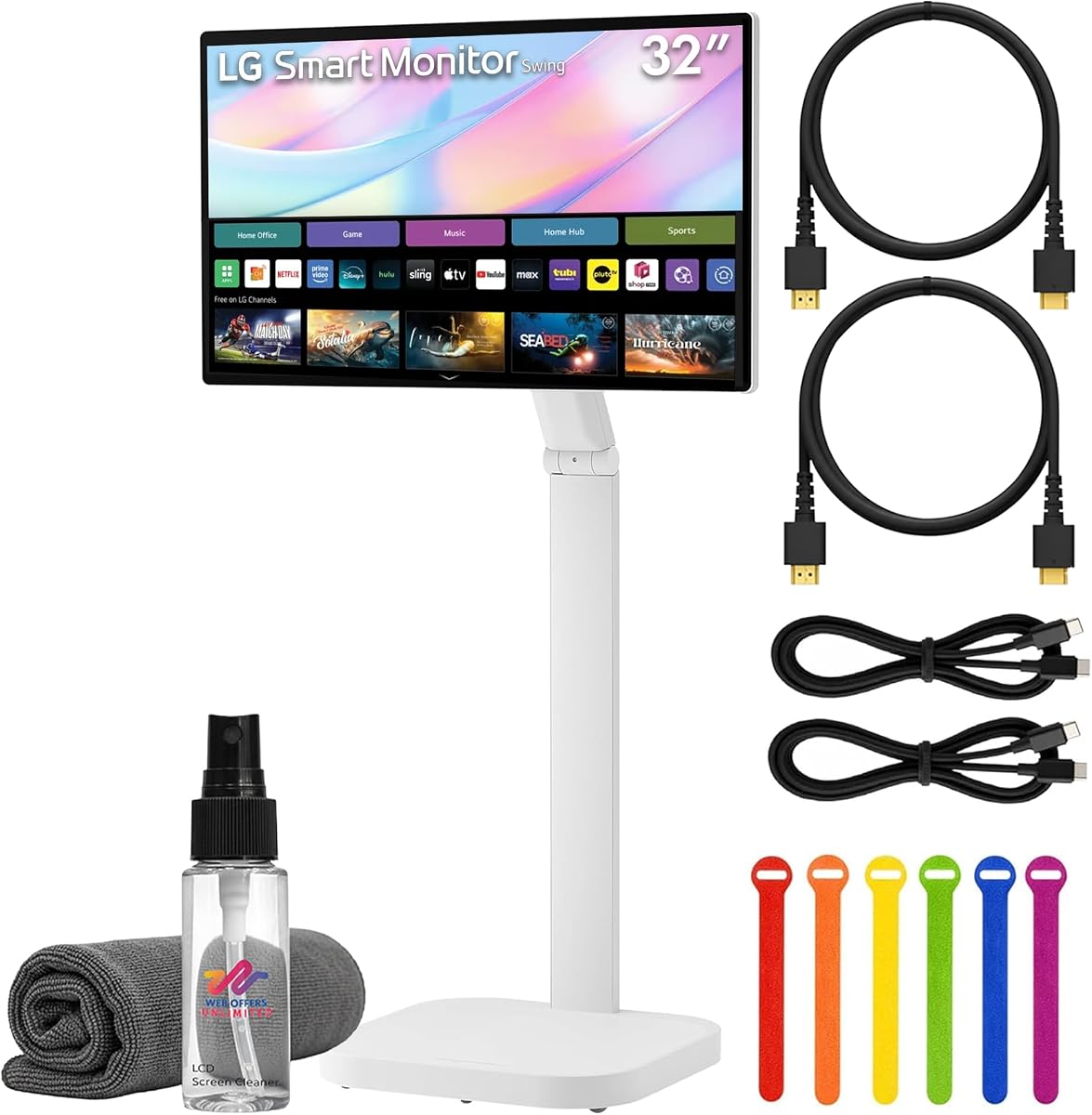
This bundle includes the LG Swing monitor along with essential accessories like cables and a cleaning kit. It offers a 4K resolution with smart webOS features.
We may earn a commission when you buy through this link, at no additional cost to you.
The rolling stand allows easy repositioning in collaborative environments. 65W USB-C power delivery simplifies laptop connectivity.
Having HDMI and USB-C cables ready saves setup time and effort. The screen cleaning kit helps maintain display clarity over time.
Ideal for teams needing a ready-to-deploy interactive display. It streamlines setup for meeting rooms or offices.
The included cables and cleaning kit provide everything needed for immediate deployment.
Enjoy access to streaming and remote apps without needing a connected PC.
We may earn a commission when you buy through this link, at no additional cost to you.
Designed for heavy-duty commercial use, this Elo monitor withstands high-traffic environments. It features robust impact testing and 24/7 operation capabilities.
We may earn a commission when you buy through this link, at no additional cost to you.
IoT control allows integration with broader building management systems. VESA mounting and power passthrough simplify installation in retail spaces.
This is a specialized tool for public kiosks or industrial displays. It prioritizes durability over consumer entertainment features.
Best suited for businesses needing reliable signage solutions. The cost reflects enterprise-grade construction and warranties.
Compliant with UL and IK impact testing for long-term reliability in public areas.
Built-in IoT control enables smart management and remote monitoring capabilities.
We may earn a commission when you buy through this link, at no additional cost to you.
This monitor offers a solid 32-inch FHD experience with an IPS panel. It provides standard brightness and wide viewing angles for basic tasks.
We may earn a commission when you buy through this link, at no additional cost to you.
The LED-lit screen ensures clear visibility in various lighting conditions. It is suitable for simple office work or media consumption.
While it lacks advanced touch or smart features, it remains reliable. LG quality ensures stable performance for general use.
Good for users needing a large screen on a budget. It serves well as a secondary or auxiliary display.
Wide viewing angles ensure colors remain consistent from different side positions.
A standard LG monitor that offers consistent brightness and clear image quality.
We may earn a commission when you buy through this link, at no additional cost to you.
Samsung delivers a solid 32-inch FHD monitor with touch functionality. It holds a perfect 5.0 rating indicating strong user satisfaction.
We may earn a commission when you buy through this link, at no additional cost to you.
The design is suited for commercial and office environments. Touch features enable direct interaction for presentations and navigation.
Specific detailed specs are limited but quality is noted. It represents a trusted option in the touchscreen monitor space.
A reliable choice for those seeking a Samsung touch display. It balances functionality with brand trust.
A perfect rating suggests consistent performance and quality satisfaction among users.
Direct touch support enhances usability for simple interactive tasks.
We may earn a commission when you buy through this link, at no additional cost to you.
This Samsung model offers a 75Hz refresh rate and standard FHD resolution. It fits well in office setups requiring basic interactive capabilities.
We may earn a commission when you buy through this link, at no additional cost to you.
The black LCD design blends into most professional environments. It provides a practical solution for display needs.
While specific touch details are sparse, it belongs to a trusted series. Reliability is key for business deployments.
A straightforward option for standard commercial displays. It meets basic requirements for viewing and touch.
The 75Hz rate offers slightly smoother motion than standard 60Hz panels.
Designed for professional settings with a standard layout and durable build.
We may earn a commission when you buy through this link, at no additional cost to you.
This model provides 4K UHD resolution on a 31.5-inch screen. It features the flexible rolling stand for movement around spaces.
We may earn a commission when you buy through this link, at no additional cost to you.
AirPlay 2 and Screen Share allow easy casting from mobile devices. The built-in speakers and webOS add to its standalone utility.
While the rating is lower, the flexibility remains a strong selling point. Eyecare technology helps reduce strain during long sessions.
Suitable for dynamic workspaces needing high resolution. It offers a unique balance of smart and interactive features.
The rolling stand allows the monitor to be moved easily between work areas.
AirPlay 2 and Screen Share simplify media sharing from phones to the screen.
We may earn a commission when you buy through this link, at no additional cost to you.
Selecting the right touchscreen monitor requires evaluating resolution, touch sensitivity, and connectivity to match your specific workflow needs.
Resolution determines the sharpness of text and images on the screen. For a 32-inch monitor, 4K is ideal for detailed design work, while QHD is sufficient for general office tasks.
Prioritize 4K if you need high pixel density for creative applications.
Refresh rate affects how smooth motion appears on the screen. Higher rates like 144Hz are excellent for gaming, while 100Hz is great for general productivity.
Choose a refresh rate that matches your primary usage activity.
Capacitive touch screens offer better responsiveness and multi-touch capabilities. Look for 10-point touch to support complex gestures like pinch and zoom.
Ensure the monitor supports the specific gestures you plan to use.
Modern monitors should offer HDMI, DisplayPort, and USB-C for versatile connections. USB-C can often deliver both video and power for laptop setups.
Verify that your devices have compatible ports before purchasing.
An ergonomic stand with tilt, height, and swivel adjustments reduces strain during long sessions. Some models offer rotating bases for portrait mode.
Look for a stand that fits your physical workspace needs.
Some monitors come with built-in operating systems like webOS to run apps without a PC. This is useful for collaborative spaces or entertainment.
Decide if you need standalone smart functionality.
Commercial grade monitors offer better durability for high-traffic environments. Check for impact resistance and warranty terms.
Select a build quality that matches the environment.
Always ensure the monitor is powered on before connecting video cables for stability. This prevents signal detection issues common with high-resolution screens.
Clean the touchscreen with a microfiber cloth and mild glass cleaner. Avoid harsh chemicals that could damage the capacitive layer.
Adjust the stand height and tilt to maintain a comfortable viewing angle. Proper ergonomics prevent neck strain during extended use.
Yes, most models support video output via USB-C or HDMI. However, touch functionality may be limited to two points on macOS systems due to protocol restrictions.
Absolutely. Models with higher refresh rates like 144Hz provide smooth motion for competitive gaming. Ensure your PC can output the required resolution.
For USB-A connections, a separate USB-B to USB-A cable is often needed to enable touch data. USB-C cables that support data transfer handle both video and touch.
Capacitive touch is more responsive and supports multi-touch gestures like pinch and swipe. Resistive touch requires more pressure and is less common on modern monitors.
Most models support VESA mounting patterns like 75x75mm or 100x100mm. Check the manual for compatible arms to ensure secure installation.
Some premium models include built-in speakers for audio playback. Others may require external speakers or headphones connected via the audio jack or USB-C.
Yes, the large screen real estate allows for multiple windows side-by-side. This significantly improves workflow efficiency for multitasking professionals.
With proper care, these monitors can last several years. Touch surfaces are durable but avoid using sharp objects that might scratch the glass.
We highlighted the 32 Inch 4K Touch Monitor as our top pick for its balance of resolution and responsiveness. The LG Smart Monitor Swing offers a premium all-in-one alternative.
Prioritize connectivity options and touch capabilities that match your specific workflow needs. Ensure the stand is ergonomic for daily use comfort.
Prices and availability change frequently so check current listings before buying. We hope this guide helps you find the perfect interactive display.