
QNAP TL-R1600PES-RP-US 16 Bay 3U Short Depth Rackmount JBOD
4.5Editor score
Supports 16×3.5 inch SATA drives
Redundant power supplies for uptime
Short depth design for small cabinets
Finding the right storage solution is critical for modern workflows. A 16 Bay NAS Enclosure offers massive capacity and redundancy for businesses and enthusiasts.
We evaluated ten leading models based on drive support, networking speeds, and build quality. Our analysis covers both complete NAS systems and expansion units.
Each pick highlights key strengths and trade-offs to help you decide. Prices and availability change frequently, so verify details before purchasing.
4.5Editor score
4.3Editor score

4.5Editor score
As an Amazon Associate we earn from qualifying purchases.
This table provides a side-by-side comparison of the top rated 16 Bay NAS Enclosures available this year.


The CENMATE aluminum enclosure is a standout choice for those needing large storage without complex RAID setup. It supports up to 240TB across 12 bays.
We may earn a commission when you buy through this link, at no additional cost to you.
Its USB 3.0 interface offers fast transfer speeds, moving 1GB files in seconds. The aluminum construction and included fans help maintain safe operating temperatures.
Note that this is a DAS unit, meaning it lacks built-in RAID protection. You must test drives individually before use to avoid data issues.
Ideal for users needing bulk storage for media or backups who are comfortable managing redundancy externally. It offers excellent value per bay.
The advanced chips and USB 3.0 ports ensure quick access to your files. This is perfect for video editors needing fast throughput.
A USB HOST port allows daisy chaining up to three devices for massive total capacity. This expands your storage significantly over time.
We may earn a commission when you buy through this link, at no additional cost to you.
This Synology RackStation delivers enterprise-grade performance with its 8-core processor and massive IOPS capability. It is designed for demanding compute-intensive services.
We may earn a commission when you buy through this link, at no additional cost to you.
It supports expansion up to 40 bays using RX1217 units. The dual redundant power supplies ensure continuous operation, vital for business environments.
The price is high, and it comes diskless. However, the performance and warranty justify the cost for serious professional deployments.
Best for businesses needing reliable, scalable storage with high availability. It integrates well with existing Synology NAS ecosystems.
The 8-core processor and high memory bandwidth support virtualization and heavy multitasking. This handles complex workloads efficiently.
PCIe slots allow for high-bandwidth network cards or NVMe caching. This keeps performance optimized as your needs grow.
We may earn a commission when you buy through this link, at no additional cost to you.
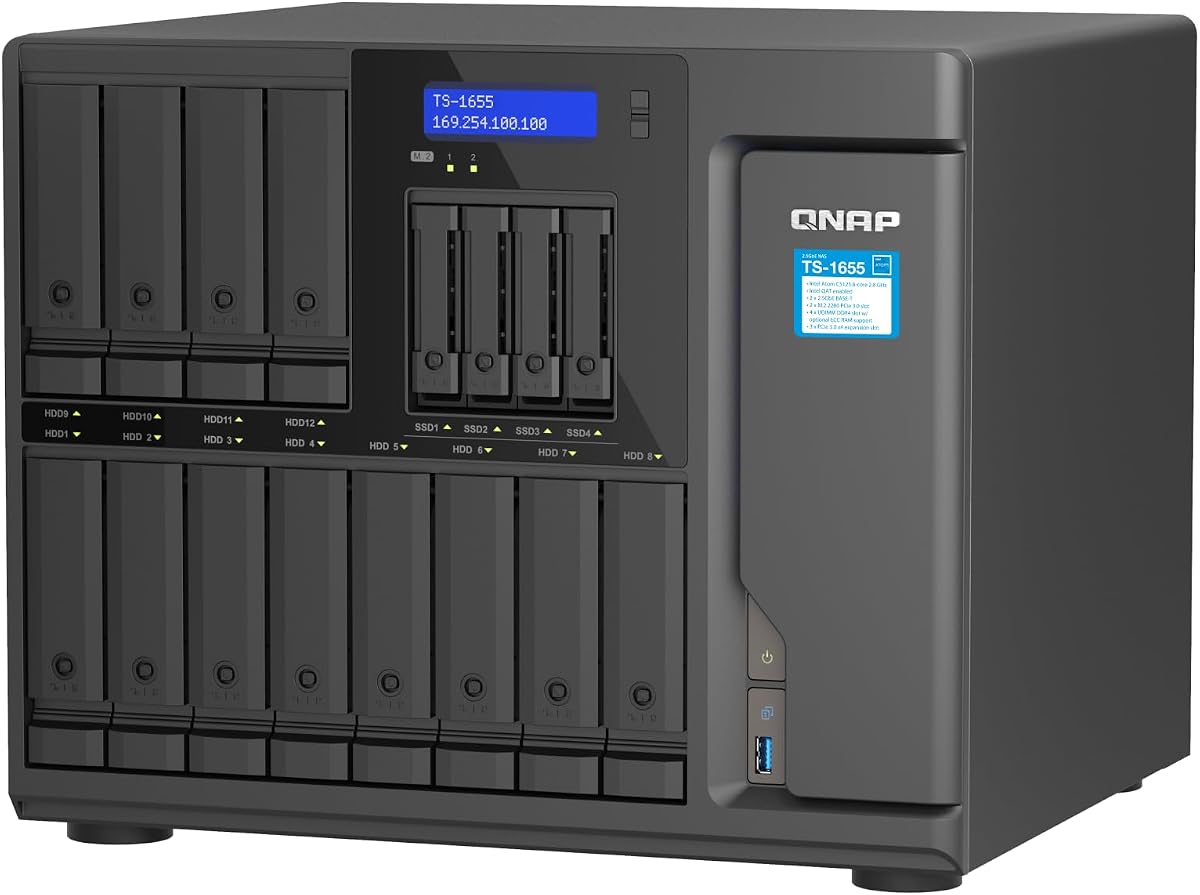
The TS-1655 offers a balanced mix of performance and price. Its 8-core Atom processor handles virtualization and heavy file access well.
We may earn a commission when you buy through this link, at no additional cost to you.
Dual 2.5GbE ports provide fast networking without expensive 10GbE costs. The ability to upgrade RAM to 128GB with ECC support is impressive.
While not the fastest on the market, it offers great longevity. The M.2 slots allow for SSD caching to boost speed.
Highly recommended for home labs and small businesses needing robust NAS features. It balances power and efficiency effectively.
Dual 2.5GbE ports accelerate large file transfers and backups. This speeds up workflows without needing complex network upgrades.
M.2 NVMe slots allow implementing SSD cache or storage pools. This provides speed boosts for critical data access.
We may earn a commission when you buy through this link, at no additional cost to you.
This expansion unit adds storage capacity to supported Synology DiskStation models. It allows you to configure new storage in minutes.
We may earn a commission when you buy through this link, at no additional cost to you.
The unified tools in DSM make management seamless. You can simply add drives and expand your volume without complex reconfigurations.
It requires specific Synology units to function. But for existing owners, this is a reliable way to scale up storage needs.
A great choice for those who already own compatible hardware. The warranty adds peace of mind for long-term use.
Synology DSM's unified tools allow easy configuration of new storage. This reduces setup time significantly.
The included 5 year warranty covers most potential hardware issues. This ensures long-term reliability for your setup.
We may earn a commission when you buy through this link, at no additional cost to you.
This case is ideal for building a custom NAS server from scratch. It supports a wide range of motherboard sizes up to EATX.
We may earn a commission when you buy through this link, at no additional cost to you.
It features 15 hot swappable drive bays and supports redundant power supplies. This makes it robust for server environments.
Shipping delays are common due to sea transport. The build material is standard SGCC steel. Ensure you verify hardware compatibility.
Best for builders needing maximum flexibility and drive density. It offers enterprise features at a DIY-friendly cost.
15 hot swappable bays allow quick drive replacement without system downtime. This is perfect for high-uptime requirements.
8 PCI Full-Height slots provide room for network and GPU cards. This allows for significant system customization.
We may earn a commission when you buy through this link, at no additional cost to you.
This Asustor NAS offers enterprise-grade performance with AMD Ryzen and DDR5 memory. It handles virtualization and heavy workloads efficiently.
We may earn a commission when you buy through this link, at no additional cost to you.
The dual 10GbE ports and USB4 support ensure ultra-fast connectivity. This is vital for high-res media workflows.
The price is premium and includes no drives. However, the specs are top-tier for professional environments.
Ideal for creative studios needing high-speed centralized storage. It brings server-level features to enthusiast hardware.
USB4 40Gbps and dual 10GbE allow massive bandwidth. This reduces bottlenecks during heavy data transfer.
ECC memory ensures data integrity for business storage. This protects your valuable information from corruption.
We may earn a commission when you buy through this link, at no additional cost to you.
This DiskStation offers extreme performance for heavy workloads. It supports over 260k 4K random read IOPS.
We may earn a commission when you buy through this link, at no additional cost to you.
You can scale up to 36 bays with DX units. The Xeon processor and up to 48GB memory handle virtualization well.
The cost is high and setup may be complex. But for those needing serious processing power, it delivers.
Best for businesses with large media libraries or virtual machines. It is a powerhouse for enterprise environments.
You can scale up to 36 bays using expansion units. This ensures your storage grows with your needs.
Support for 25GbE and Fibre Channel ensures network speed. This matches high-performance storage requirements.
We may earn a commission when you buy through this link, at no additional cost to you.
This JBOD offers massive expansion for QNAP NAS systems. It holds 16 3.5-inch SATA drives for petabyte-level capacity.
We may earn a commission when you buy through this link, at no additional cost to you.
The redundant power supplies ensure stability. The short depth design fits well in smaller media cabinets.
It uses Mini-SAS HD for connectivity. Note that rail kits are sold separately. It is built for reliability.
Ideal for expanding small server racks. The short depth makes it easy to install in tight spaces.
Redundant power supplies ensure service continuity if one fails. This keeps your data accessible at all times.
You can flexibly expand storage space to petabyte levels. This provides significant room for future growth.
We may earn a commission when you buy through this link, at no additional cost to you.
This QNAP enclosure is great for desktop expansion. It includes the necessary PCIe SATA card for setup.
We may earn a commission when you buy through this link, at no additional cost to you.
It supports a mix of 3.5 and 2.5-inch drives. This flexibility is useful for managing existing hardware.
It is not RAID capable but offers fast SATA speeds. The included card makes installation straightforward.
Best for users with PCIe slots needing extra space. It is affordable and reliable for bulk storage.
It supports 12×3.5 and 4×2.5-inch drives. This accommodates different drive sizes efficiently.
The included QXP-1600eS card makes installation easy. You do not need to buy a separate card.
We may earn a commission when you buy through this link, at no additional cost to you.
This model offers high performance and long-term availability. It is built for sustained use in professional environments.
We may earn a commission when you buy through this link, at no additional cost to you.
The 8-core Atom processor balances power and efficiency. Dual 2.5GbE ports provide fast network access.
It supports ECC memory for data integrity. The M.2 slots add SSD caching options.
Best for users needing reliability over many years. The specs support a wide range of workloads.
Designed for long-term availability, it supports sustained use. This ensures your hardware lasts as your business grows.
M.2 NVMe slots allow for SSD cache acceleration. This boosts read and write speeds for critical files.
We may earn a commission when you buy through this link, at no additional cost to you.
Selecting the right 16 Bay NAS Enclosure requires considering several technical factors to ensure it meets your needs.
Check that the enclosure supports your specific drive types (SATA/SSD) and sizes (2.5 or 3.5). Ensure it can handle the total capacity you plan to use.
Always verify the maximum capacity per bay and total system capacity before purchasing.
Look for USB 3.0, PCIe, or Mini-SAS HD interfaces. These determine how fast you can access and transfer data. Higher bandwidth is vital for large media files.
Prioritize units with high-speed interfaces to avoid bottlenecks in your workflow.
With 16 drives, cooling is critical. Look for units with multiple fans and aluminum bodies. Be aware that fans can be loud, especially in office settings.
Choose units with noise control if you plan to place them in a living space.
Determine if you need just a DAS unit or a full NAS with expansion options. Some units allow daisy chaining or expansion via PCIe cards.
Select an enclosure that allows you to scale up storage as your needs increase.
Redundant power supplies ensure continuity if one fails. This is crucial for business environments. Verify that the unit supports dual PSUs.
Always prefer units with redundant power options for critical storage needs.
Full NAS systems should offer 2.5GbE or 10GbE ports. These speeds are essential for multi-user access. JBOD units rely on the host for networking.
Pick a NAS system with network speeds that match your bandwidth requirements.
A solid warranty like 5 years indicates confidence in the build quality. Check the manufacturer's support response times and policy details.
Always verify warranty terms before buying to protect your investment.
Consider rackmount vs desktop cases. Rackmount units save space but need rails. Desktop units fit on shelves. Check the dimensions and shipping details.
Ensure you have the physical space and tools required for installation.
Install drives one by one to test their health. This helps identify bad drives before full setup. Use the included mounting trays if available.
Keep the unit in a well-ventilated area. Dust can clog fans and reduce cooling. Regularly check intake and exhaust vents.
Monitor drive health and temperatures via your OS. Update firmware to keep features current. Perform backups to separate drives to protect your data.
Yes, if you need high capacity. It consolidates storage and offers redundancy. It is ideal for media libraries and backups.
Many models support both sizes. Check the product specs. Some have specific bays for each size.
Not all units do. JBODs do not. Full NAS systems often do. Check the product features carefully.
It depends on the fan speed. Most have moderate noise. Rack units can be louder. Check decibel levels.
Some units support daisy chaining via USB or SATA. This expands total capacity. Verify the ports on your unit.
Most support up to 240TB or more total. Each bay usually supports 20TB drives. Check the max capacity spec.
The top picks offer great options for different needs. From budget DAS to premium NAS systems.
Prioritize interface speed and power redundancy. This ensures reliable long-term operation for your data.
Prices vary widely. Check current availability and verify specs before purchasing.