
TRENDnet TEG-S50284
4.8Editor score
24x 2.5G RJ45 ports
4x 10G SFP+ uplinks
Lifetime manufacturer protection
This guide compares the top 25GbE switches with SFP28 ports for data centers, featuring specs, performance, and value for enterprise networking needs.
Selecting the right network switch is critical for modern infrastructure that demands high throughput and low latency. 25GbE switches with SFP28 ports offer a perfect balance between cost and performance for data centers and enterprise environments.
We analyzed ten leading models based on port density, switching capacity, management features, and reliability. Our comparison highlights options ranging from affordable multi-gig solutions to high-end aggregation switches designed for heavy workloads.
Each pick below details specific strengths and ideal use cases to help you match hardware to your requirements. Remember that pricing and availability fluctuate frequently, so verify current details before making your final procurement decision.
4.8Editor score

5.0Editor score

4.6Editor score
The following table provides a side-by-side overview of key specifications for all ten switches evaluated in this guide, allowing you to quickly identify the model that fits your port and speed requirements.





The QNAP QSW-M7230 stands out as a powerful solution for storage-heavy environments where 25GbE connectivity is essential. While it does not carry a user rating due to its specialized nature, its architecture is purpose-built for AI clustering and large-scale NAS deployments.
We may earn a commission when you buy through this link, at no additional cost to you.
This switch offers a unique mix of ports, including 24 10GbE copper ports and 4 25GbE SFP28 fiber ports, bridging the gap between existing infrastructure and high-speed upgrades. The inclusion of two 100GbE QSFP28 uplinks ensures your backbone remains future-proof.
You will appreciate the Lossless Network Performance features like Priority Flow Control and Explicit Congestion Notification. These technologies minimize packet loss during high traffic bursts, which is critical for virtualization workloads like VMware ESXi and Hyper-V.
Network administrators managing server rooms requiring low-latency connectivity will find this ToR design highly effective. If you need a bridge between modern fiber backbones and copper setups, this model provides a cost-effective migration path.
Built-in advanced technologies reduce bottlenecks ensuring smooth operation for intensive virtualization tasks.
Seamlessly integrate 100G fiber optical backbones with your existing 10G copper network infrastructure.
We may earn a commission when you buy through this link, at no additional cost to you.
The TRENDnet TEG-S50284 delivers exceptional value with a 4.8 rating from users who need multi-gigabit speeds without breaking the bank. It provides 24 ports running at 2.5Gbps over existing cabling which is perfect for expanding office networks.
We may earn a commission when you buy through this link, at no additional cost to you.
Its four 10G SFP+ ports offer high-speed uplinks to connect to your core network or server farm. The switch includes smart fans that adjust speed based on cooling needs reducing energy consumption and noise levels in shared spaces.
TRENDnet backs this product with a lifetime manufacturer protection plan offering peace of mind for long-term deployments. Additionally its NDAA and TAA compliance makes it a viable option for government contracts in the US and Canada.
If your primary goal is upgrading from 1G to 2.5G or 5G access layers this switch is the logical choice. It balances cost and performance effectively for small businesses seeking reliable web smart management features.
Deliver 2.5G speeds over existing Cat5e cabling reducing the need for immediate wiring replacement.
NDAA and TAA compliance ensures suitability for public sector networking projects and installations.
We may earn a commission when you buy through this link, at no additional cost to you.
This Renewed Cisco Nexus switch offers a high-density 25GbE solution at a fraction of the cost of a new unit. Amazon qualified vendors professionally inspect test and clean the device before it reaches you ensuring functionality.
We may earn a commission when you buy through this link, at no additional cost to you.
With 48 fixed 25GbE SFP28 ports it provides massive connectivity for blade servers and high-performance storage arrays. The six QSFP+/QSFP28 ports allow you to build a robust 100G backbone to connect multiple racks together efficiently.
Purchasing a renewed product allows you to access premium enterprise hardware like the Nexus 9300 series without the full price tag. However you should note that accessories may not be original and might come in a generic box.
For organizations managing large-scale data centers on a budget this switch is a compelling option. Just verify the specific warranty conditions and power supply configurations with the seller before finalizing your purchase decision.
Forty-eight 25GbE ports support dense server deployments requiring ultra-fast individual node connectivity.
Renewed units provide access to enterprise grade hardware at reduced acquisition costs.
We may earn a commission when you buy through this link, at no additional cost to you.
The Mikrotik CRS520 is an ultra-fast enterprise switch designed for networks that demand significant processing power and throughput. It boasts 28 Gigabit SFP28 ports which provide flexible connectivity for 25GbE devices and fiber links.
We may earn a commission when you buy through this link, at no additional cost to you.
Powered by a CCR series quad-core ARM CPU running at 2 GHz this switch can handle complex routing and filtering tasks locally. The 4 GB of DDR4 RAM ensures smooth operation even when processing large tables and high traffic loads.
Users appreciate its raw performance capabilities making it ideal for research networks or ISPs managing heavy traffic flows. The design supports 100 Gigabit QSFP28 ports allowing you to aggregate traffic efficiently to your core network.
Be aware that Mikrotik devices often require a deeper technical understanding to configure fully compared to consumer switches. If you need a powerful tool with extensive control over your network traffic this switch delivers premium performance.
The powerful CPU handles advanced routing and firewall rules without offloading to external appliances.
Supports multiple speeds on SFP28 ports to match diverse fiber infrastructure requirements.
We may earn a commission when you buy through this link, at no additional cost to you.
The Ubiquiti UniFi Aggregation Switch Pro is designed to integrate seamlessly into the UniFi ecosystem offering a robust Layer 3 solution. It provides 28 10G SFP+ ports and four 25G SFP28 ports for high-bandwidth aggregation links.
We may earn a commission when you buy through this link, at no additional cost to you.
A standout feature is the 1.3 inch LCM color touchscreen which allows you to manage the switch locally without accessing a web browser. This concisely displays key system and connection insights for quick troubleshooting and monitoring.
With a 760 Gbps switching capacity this switch ensures non-blocking performance even when all ports are active simultaneously. It also supports a SmartPower Redundant Power System ensuring your network stays up during power supply failures.
If you already use UniFi APs and gateways this switch expands your network capacity effectively. The intuitive web app and mobile app make management easy allowing you to monitor your infrastructure from anywhere.
Fully managed via the powerful UniFi Network web application and mobile app for centralized control.
Designed to enhance network switching capacity and create high-bandwidth aggregation links.
We may earn a commission when you buy through this link, at no additional cost to you.
The Dell EMC PowerSwitch N3224P-ON brings a versatile combination of PoE++ and high-speed fiber uplinks to the enterprise market. It offers 21 total ports including flexible options for copper and fiber connections.
We may earn a commission when you buy through this link, at no additional cost to you.
It supports PoE++ on its ports which is crucial for powering high-demand devices like 802.11ac Wi-Fi access points and advanced cameras. The inclusion of 4x 25GbE SFP28 and 2x 100GbE QSFP28 ports ensures scalable uplinks.
Managed with Layer 3 support this switch allows for efficient traffic routing and segmentation. Its modular design and rackmountable housing make it suitable for standard server racks requiring reliable and efficient cooling.
If your environment requires both high-speed data and advanced power delivery this switch is a strong contender. Verify the specific power consumption requirements as high performance often correlates with higher energy usage.
PoE++ support provides ample power for modern high-consumption network devices and cameras.
Dedicated 100GbE ports allow for massive bandwidth expansion to core network routers.
We may earn a commission when you buy through this link, at no additional cost to you.
The TRENDnet TEG-3284WS is a web smart switch designed for small businesses that need easy configuration and management. It includes 24 2.5G RJ45 ports and 4 10G SFP+ ports to support a mix of devices and high-speed links.
We may earn a commission when you buy through this link, at no additional cost to you.
Its web-based GUI simplifies switch configuration by providing accessible tools for VLANs, QoS, and ACLs. The HIVE enabled cloud service allows you to remotely manage and diagnose the switch which is helpful for distributed networks.
Lifetime manufacturer protection is included giving you assurance against defects and longevity issues. Additionally NDAA and TAA compliance ensures it meets government standards for secure network installations in North America.
While user ratings suggest some variability in satisfaction this switch remains a practical choice for those wanting affordable multi-gigabit access. Always confirm current pricing and feature availability as updates can change device specifications.
Use the HIVE cloud service to diagnose issues from a remote location easily.
Access control lists and VLANs provide robust management tools for network segmentation.
We may earn a commission when you buy through this link, at no additional cost to you.
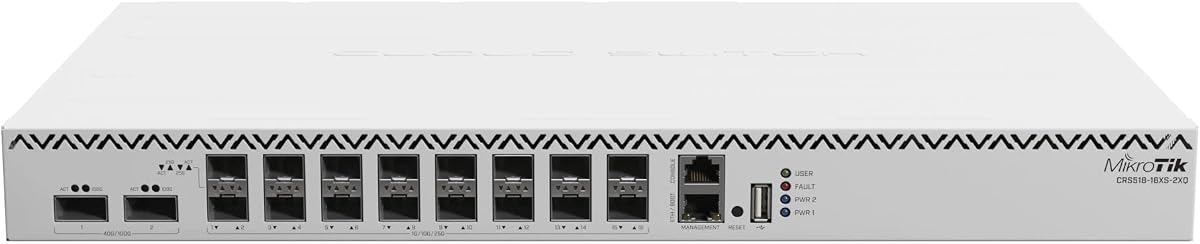
The MikroTik CRS518 is a Cloud Router Switch that packs significant port density into a compact form factor. It offers 16 SFP28 ports for 25GbE connectivity and 2 QSFP28 ports for 100GbE uplinks making it versatile for various deployments.
We may earn a commission when you buy through this link, at no additional cost to you.
Running at 650MHz with 64MB of RAM it is optimized for switching tasks rather than heavy routing. This makes it ideal for edge switches or access layers where high speed is required without complex routing policies.
Its compact design allows it to fit easily into standard 1U rack spaces without consuming much room. The strong community support and documentation help users troubleshoot and configure the device effectively.
If you need a reliable bridge between 25GbE servers and a 100GbE backbone this model provides a balanced approach. Ensure you review the specific limitations regarding CPU power if your use case involves heavy packet processing.
Eighteen high speed ports allow for flexible cabling and connection options.
Saves rack space while providing robust high speed connectivity options.
We may earn a commission when you buy through this link, at no additional cost to you.
This Cisco Nexus switch offers unmatched connectivity with 48 fixed 10/25-Gbps SFP+ ports and 6 fixed 100-Gbps QSFP28 ports. A perfect 5.0 rating reflects its reliability and performance in demanding applications.
We may earn a commission when you buy through this link, at no additional cost to you.
The cut-through switching architecture minimizes latency to less than 1 microsecond ensuring seamless operations for big data processing. VXLAN support allows for efficient network virtualization enabling scalable and highly available networks.
Hot-swappable power supplies and fans ensure high availability with redundant power supplies. This modular design allows for easy upgrades and maintenance keeping your network running 24/7 without significant downtime.
Network administrators using Cisco Application Centric Infrastructure can simplify automation with NX-OS. If you need a robust platform for large-scale data center deployments this renewed option offers enterprise grade features at a reduced cost.
Cut-through switching architecture ensures minimal delay for high-performance computing tasks.
Modular design with hot-swappable components ensures continuous operation during maintenance.
We may earn a commission when you buy through this link, at no additional cost to you.
The D-Link DGS-1210-28 provides high-speed networking for expanding networks with 24 Gigabit Ethernet ports. It is ideal for connecting a wide range of devices in small offices or surveillance setups requiring reliable access.
We may earn a commission when you buy through this link, at no additional cost to you.
Four Gigabit optical SFP ports enable high-speed uplinks and long-distance fiber connectivity enhancing network flexibility. This switch supports surveillance mode with ONVIF support to streamline IP camera deployment and traffic optimization.
Its fanless design ensures silent operation and energy savings complying with IEEE 802.3az standards. NDAA compliance meets strict regulatory standards making it suitable for government and high-security enterprise projects.
Backed by a lifetime warranty this model offers long-term confidence in quality and reliability. While it may not support 25GbE speeds it remains a cost-effective solution for Gigabit access layer needs.
Fanless design reduces noise and energy costs for quiet office environments.
ONVIF support automatically detects cameras and optimizes video traffic effectively.
We may earn a commission when you buy through this link, at no additional cost to you.
Choosing the right switch involves evaluating port types, switching capacity, and management needs to match your infrastructure requirements.
Ensure the switch has enough SFP28 ports for your servers and enough copper ports for general use. Some models mix 25GbE and 10GbE ports to bridge legacy and modern gear efficiently.
Choose a switch with sufficient port counts to avoid stacking complexity and keep uplink bandwidth high.
Look for non-blocking throughput where the total switching capacity exceeds the sum of all port speeds. This prevents bottlenecks when multiple ports are transmitting data simultaneously at maximum speed.
Prioritize switches with high Tbps ratings to ensure smooth performance under heavy network loads.
Determine if you need Layer 2 managed Layer 3 managed or unmanaged features based on your routing needs. Layer 3 switches offer static routing and VLANs which are crucial for complex enterprise environments.
Select a managed switch with a clear GUI if you need remote control and traffic monitoring tools.
High performance often comes with higher power draw so calculate total energy costs for your deployment. Ensure your power supply and cooling systems can handle the wattage requirements of these high speed devices.
Consider power efficient models with smart fans to reduce operating expenses and noise levels.
For HPC or financial applications latency matters significantly so look for cut-through switching architectures. These forward packets immediately upon reading headers rather than buffering the entire frame first.
Verify latency specs if your applications require microsecond level response times for best performance.
Check warranty terms and support availability especially if you are deploying in critical business environments. Models with hot-swappable power supplies and fans allow maintenance without shutting down the network.
Prioritize vendors with established support channels to ensure quick resolution of hardware issues.
Connect SFP28 modules carefully by aligning the tabs and pushing them in until they click. Ensure cables are rated for the distance and speed required to avoid signal degradation or errors.
Update the switch firmware regularly to benefit from performance improvements and security patches. Use the provided management interface to configure VLANs and security settings based on your network design.
Monitor airflow and dust accumulation to maintain optimal operating temperatures. Clean vents periodically and ensure the device is installed in a ventilated rack space to prevent overheating.
SFP28 supports speeds up to 25Gbps while SFP+ supports up to 10Gbps. SFP28 modules are physically compatible with SFP+ ports but will typically operate at 10Gbps when inserted.
Yes many SFP28 ports support auto-negotiation and will work at 10Gbps with SFP+ devices. This allows for a gradual upgrade path from 10G to 25G infrastructure.
Only specific models offer PoE or PoE++ features so check the specs for supported models. Most high speed fiber switches do not include PoE for data ports.
Renewed units inspected by qualified vendors often perform like new units. They can be a cost-effective way to deploy enterprise gear if you verify the warranty terms.
You will need OM3 or OM4 fiber cables with LC connectors for long distances or DAC cables for short reach. Ensure the cables match the specific module speeds required for your deployment.
Most managed switches offer web interfaces SSH or SNMP for remote access. Use the vendor provided software or web portal to configure and monitor the switch from anywhere.
We highlighted top options like the Cisco N9K-C93180YC-EX for data centers and the TRENDnet TEG-S50284 for budget conscious users. Each model brings distinct strengths tailored to different workload requirements.
Prioritize non-blocking capacity and proper management features to ensure your network scales efficiently. Matching the switch to your specific cabling and server needs is key to a successful deployment.
Prices and availability change quickly so check current listings and warranty details before purchasing. Taking time to verify specs will help you secure the best value for your high speed upgrade.