
Universal Audio Apollo Twin X QUAD
4.0Editor score
Unison preamps
200+ UAD plug-ins
Thunderbolt 3 interface
This guide compares the top audio interfaces with built in dsp for low latency monitoring and real time effects processing in your studio workflow.
Audio interfaces with built in dsp offer musicians and creators powerful tools for recording and mixing without taxing your computer processor. These devices handle effects and monitoring locally, ensuring smooth performance during critical sessions.
We evaluated ten leading models based on conversion quality, onboard processing power, connectivity options, and software ecosystems. Our comparison highlights devices that excel in specific use cases from home studios to live streaming setups.
Each selection showcases unique strengths like real time effects, extensive I/O, or portable designs. Remember that pricing and availability can shift frequently, so check current listings before making your final purchase decision.
4.0Editor score
4.7Editor score

4.3Editor score
The following table provides a side by side overview of key specifications and features for each interface to help you quickly identify the best fit for your specific recording and production needs.




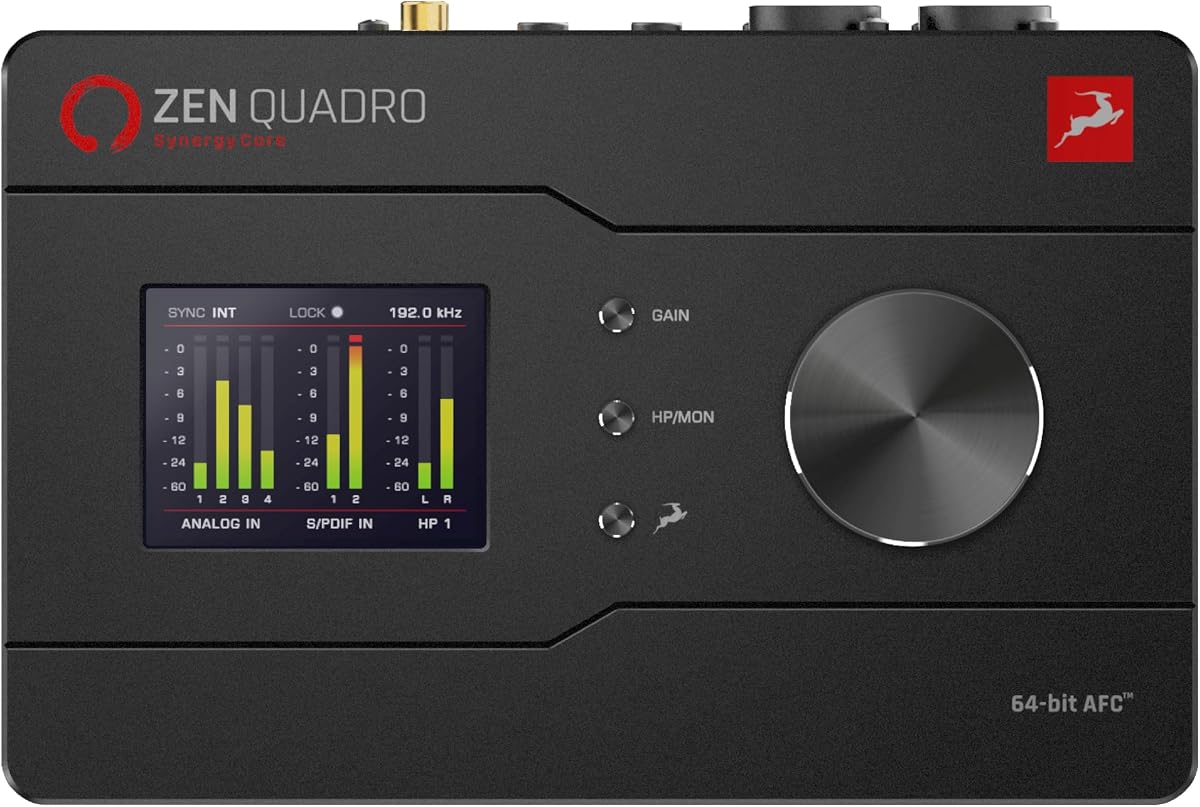
The Antelope Audio Zen Quadro stands out as a top choice for musicians needing professional processing without CPU load. Its Synergy Core technology runs effects in real time ensuring your recordings sound finished from the first take.
We may earn a commission when you buy through this link, at no additional cost to you.
With four discrete preamps and a massive 130dB dynamic range this interface captures audio with exceptional clarity. The dual USB-C connectivity allows flexible workflows connecting to phones tablets or two computers simultaneously.
While the feature set is robust it may take time to master all routing options. The investment is justified for those who demand studio grade conversion and onboard effects for live or studio use.
This interface is ideal for creators who need reliable monitoring and high fidelity sound in a compact form factor. It delivers the power of a large rack unit in a portable package.
Analog-modeled compressors EQs and preamps run on dedicated hardware for near-zero-latency recording without taxing your host CPU.
64-bit AFC clocking ensures precise audio timing trusted by Grammy-winning engineers worldwide for consistent professional results.
We may earn a commission when you buy through this link, at no additional cost to you.
Universal Audio Apollo Twin X QUAD offers next generation audio conversion with the widest dynamic range of any Apollo model. Its Unison preamps let you record through authentic emulations of classic hardware in real time.
We may earn a commission when you buy through this link, at no additional cost to you.
Accessing over 200 UAD DSP and Native plug-ins including award-winning titles like Capitol Chambers provides endless sonic possibilities. Apollo Monitor Correction powered by Sonarworks ensures accurate mixing in any environment.
The price reflects its premium status and hardware requirements. Thunderbolt connectivity is essential for performance which may limit compatibility with older computers lacking the specific port type.
This unit is perfect for professional producers seeking the industry standard for analog tone emulation. It delivers unmatched fidelity and processing power for high end production workflows.
Record in real time through authentic emulations of Neve API Avalon and more for hardware tone with software flexibility.
Access the full library of 200+ DSP and Native plug-ins including award-winning titles like Sound City Studios and EL8 Distressor.
We may earn a commission when you buy through this link, at no additional cost to you.
The Elgato Wave XLR MK.2 provides ultra-low-latency monitoring and powerful DSP effects perfect for streaming and podcasting. Its onboard effects chain unifies DSP effects and VST plugins for streamlined sound shaping.
We may earn a commission when you buy through this link, at no additional cost to you.
Adjust levels and mute instantly with a touch while customizable LED lighting offers instant visual feedback on signal levels. The Wave Link App integrates natively for precise routing and effects management across your setup.
While it lacks extensive physical outputs the software ecosystem compensates with powerful virtual routing. It is an affordable entry point for creators prioritizing ease of use and voice quality.
This interface is best for streamers and podcasters who need reliable performance without complex hardware setups. It simplifies audio control while delivering professional clarity for voice content.
Enhance your voice with built-in voice enhancer compressor EQ and more within the Wave FX Processor signal chain.
Adjust levels and mute instantly with a touch and get instant visual feedback with customizable LED lighting.
We may earn a commission when you buy through this link, at no additional cost to you.
Universal Audio Apollo Twin X DUO lets you record in real time through authentic emulations of Neve API Avalon and more. Its Unison preamps provide hardware quality tone with the convenience of software control.
We may earn a commission when you buy through this link, at no additional cost to you.
Access the full library of 200+ UAD DSP and Native plug-ins including award-winning titles like Capitol Chambers and Sound City Studios. Monitor Correction powered by Sonarworks ensures accurate monitoring in any acoustic environment.
This dual-core version balances performance and price well for home studios. While it shares features with the QUAD model it remains a strong choice for those prioritizing analog emulation fidelity.
It is ideal for musicians wanting professional analog warmth without bulky rack gear. The Auto-Gain feature simplifies setup allowing you to focus on capturing the perfect take.
Record in real time through authentic emulations of classic hardware preamps for natural tone shaping.
Mix with confidence in any room or through headphones using Apollo Monitor Correction powered by Sonarworks.
We may earn a commission when you buy through this link, at no additional cost to you.
The Solid State Logic 2 MKII Plus features 32-bit converters and Legacy 4K analog enhancement to add warmth to your recordings. It is ideal for producer-podcaster live studio musician workflows needing reliable connectivity.
We may earn a commission when you buy through this link, at no additional cost to you.
With 2 discrete headphone outputs and 4 line outputs you have flexible monitoring options for different setups. High-Pass filters and zero-latency monitoring ensure clean signal paths during tracking and mixing sessions.
While it offers less DSP than competitors its analog character is distinct. The bus-powered design makes it highly portable for on-the-go recording sessions without needing external power.
This interface suits those who prioritize sonic quality and convenience over extensive effects processing. The included SSL Production Pack software adds value for beginners starting their recording journey.
Add classic analog character to your recordings with Legacy 4K analog enhancement for rich harmonic detail.
Bus powered via USB-C for Mac and Windows ensuring easy portability without needing extra power adapters.
We may earn a commission when you buy through this link, at no additional cost to you.
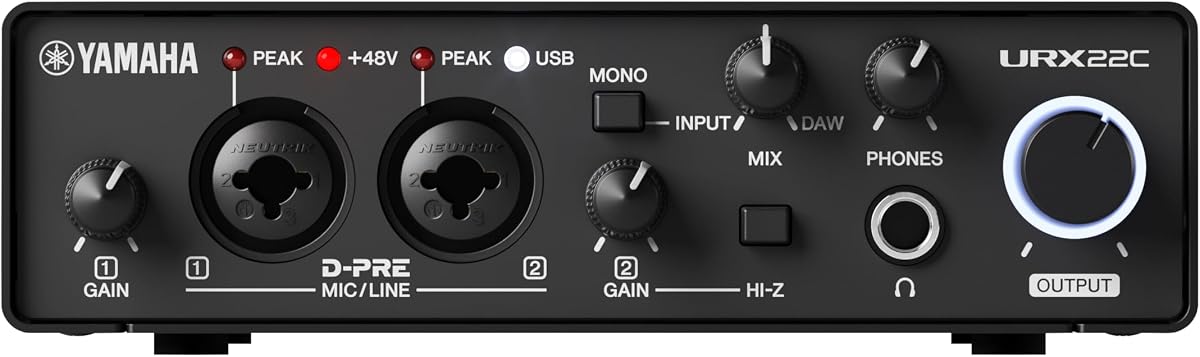
Yamaha URX22C provides latency-free DSP-powered monitoring with REV-X reverb and Channel Strip for polished sounds. Its 32-bit integer and 192 kHz support ensures high fidelity audio capture for professional production.
We may earn a commission when you buy through this link, at no additional cost to you.
The rugged full-metal housing offers ultimate durability for transport. Cross-platform compatibility with Windows macOS and iOS makes it versatile for diverse creative environments and mobile setups.
It includes the dspMixFx application for precise control over onboard effects and mixing. While it lacks some modern touch features its reliability and audio quality remain strong selling points.
This unit is best for musicians who need durable gear with solid DAW integration. The Steinberg software bundle provides immediate tools for recording and editing right out of the box.
Latency-free DSP-powered monitoring includes REV-X reverb Channel Strip and Guitar Amp Classics for instant polish.
2 analog XLR/TRS combo inputs feature Class-A D-PRE mic preamps supporting +48 V phantom power.
We may earn a commission when you buy through this link, at no additional cost to you.
The MOTU UltraLite-mk5 is a 18×22 USB audio interface delivering superb analog quality with 125 dB dynamic range. Its optimized drivers ensure rock-solid performance and industry-leading low latency across all channels.
We may earn a commission when you buy through this link, at no additional cost to you.
DSP-driven monitor mixing allows you to create separate unique mixes for each output pair without CPU load. The high-resolution OLED display provides detailed metering for all I/O at a glance.
While it requires specific drivers it offers universal connectivity with any audio software. The CueMix 5 app enables control from Mac PC or iOS devices making it flexible for varied workflows.
This interface is perfect for bands or complex recording scenarios needing many inputs. It balances channel capacity with high fidelity conversion and flexible monitoring options.
Create a separate unique mix for each output pair with six separate mix busses including computer channels.
The high-resolution OLED display lets you view all signal activity at a glance with detailed metering.
We may earn a commission when you buy through this link, at no additional cost to you.
Yamaha URX22 features a 4.3 touchscreen and 5 control knobs for intuitive hands-on control. It supports 32-bit 192 kHz audio with dual MAIN/SUB USB ports for versatile connectivity and streaming.
We may earn a commission when you buy through this link, at no additional cost to you.
Premium Microphone preamps offer 78 dB gain range with +48 V phantom power for demanding microphones. The built-in DSP processor ensures professional sound and latency-free monitoring without CPU load.
The interface includes a Basic FX Suite and Steinberg Plus software for immediate use. While its ecosystem is smaller its touch interface offers a modern workflow alternative to traditional knobs.
This model suits users who prioritize tactile control and ease of use. It provides a streamlined experience for vocalists and podcasters needing quick setup and reliable performance.
Control your sound easily with a 4.3 touchscreen and 5 control knobs for intuitive tactile operation.
Dual MAIN/SUB USB ports allow multi-stream audio support for flexible routing and recording configurations.
We may earn a commission when you buy through this link, at no additional cost to you.
The Focusrite Scarlett Solo 4th Gen brings big studio sound to any location with a huge 120dB dynamic range. It uses the same converters as flagship interfaces found in the world's biggest studios for exceptional fidelity.
We may earn a commission when you buy through this link, at no additional cost to you.
Improved Air mode lifts vocals and guitars to the front of the mix adding musical presence and rich harmonic drive. The box includes a full collection of record-making plugins to start creating immediately.
While designed for solo creators it handles multiple instrument types effectively. Its plug-and-play simplicity makes it ideal for beginners entering the world of home recording without technical hurdles.
This interface is recommended for songwriters needing reliable high-quality sound on a budget. It delivers professional tone and a comprehensive software suite for recording mixing and mastering.
With a huge 120dB dynamic range it uses the same converters as Focusrite flagship interfaces found in top studios.
Improved Air mode lifts vocals and guitars to the front of the mix adding musical presence and rich harmonic drive.
We may earn a commission when you buy through this link, at no additional cost to you.
Antelope Audio Zenith 2 is a plug-and-play USB-C interface featuring a dedicated Smart Vocal Chain and integrated Loopback for system audio capture. It transforms your voice with premium Synergy Core effects like De-essing and Air.
We may earn a commission when you buy through this link, at no additional cost to you.
Dual independent headphone mixes allow multiple users to monitor separately during sessions. Experience world-class audio clarity with an industry-leading 123 dB 192 kHz/32bit conversion powered by discrete console-grade preamps.
The optional Software Control Panel adds remote access to mixes and presets but it works fully standalone too. Its vibrant display lets you customize themes and languages to match your workflow preferences.
This unit is perfect for streamers podcasters needing polished audio and easy setup. It combines elite conversion with intuitive controls to deliver professional results instantly.
Transform your voice with a dedicated Smart Vocal Chain and integrated Loopback for system audio capture.
Unique in its class it features two headphone outputs with fully independent mixes for recording or collaboration.
We may earn a commission when you buy through this link, at no additional cost to you.
Selecting the right interface depends on your workflow needs budget and connection types. Understanding key features will help you invest wisely.
Built-in DSP offloads processing from your computer allowing for zero-latency monitoring and real-time effects. This is critical for tracking with plugins without performance drops. Look for dedicated chips like Synergy Core or UAD architecture.
Prioritize interfaces with enough DSP capacity for your effects chain needs.
Assess how many inputs and outputs you need now and in the future. Interfaces range from stereo 2in/2out to multi-channel 18×22 units. Ensure it matches your instruments and microphone count.
Always check that physical connectors match your current gear.
Thunderbolt offers the highest bandwidth and lowest latency for high channel counts. USB-C is more versatile and common for portable setups. Check your computer's ports before purchasing to avoid adapter issues.
Choose a connection standard supported by your system hardware.
High-quality preamps are essential for capturing clean vocal and instrumental tones. Look for features like phantom power and gain range suitable for demanding dynamic microphones.
Ensure preamps offer sufficient gain for your specific microphone models.
Onboard DSP guarantees zero-latency monitoring during recording. This prevents distraction and timing errors when listening to effects. Avoid units relying solely on software monitoring for tracking.
Verify that the interface provides hardware monitoring options.
Many brands bundle DAW software and plugins that add significant value. Check the included software to see if it matches your workflow preferences. Some require proprietary drivers for full functionality.
Confirm that included software works with your operating system.
If you travel often, consider compact bus-powered units with rugged metal housing. Desktop models offer more controls but are heavier. Choose a form factor that fits your physical workspace and transport needs.
Balance durability with size based on your usage environment.
Invest in interfaces with scalable firmware and support for new effects. Models with expandable I/O via ADAT or Thunderbolt allow upgrades without replacing the whole unit. This extends the device's useful lifespan.
Select units with upgrade paths that fit your budget.
Connect your interface using the recommended cable type and allow drivers to install fully before launching your DAW software. Configure your audio settings to prioritize device latency settings for real-time effects processing.
Set gain levels carefully while monitoring input meters to avoid digital clipping. Use the onboard DSP controls or companion software to adjust equalization compression and reverb in real time.
Store your unit in a dry dust-free environment when not in use. Avoid exposing the connectors to excessive moisture or forceful handling to ensure longevity and consistent electrical connections.
While DSP handles effects efficiently you still need a DAW to record arrange and export your audio. DSP provides real-time monitoring but the DAW manages the final production workflow and storage of your tracks.
Most built-in DSP handles effects like EQ and reverb rather than full virtual instruments. These instruments generally require computer processing or specific DSP licenses depending on the software ecosystem.
You can usually disable the DSP path via software or physical knobs to bypass effects. This lets you mix with your DAW plugins after the track is recorded without processing load.
Most units with DSP require a computer host for full driver support. However some modern USB-C interfaces work with mobile tablets if the OS supports class compliant audio and the specific drivers.
For tracking musicians zero-latency monitoring is essential to prevent distraction. For playback and mastering it is less critical but still improves the experience by allowing instant feedback on changes.
USB-C is sufficient for most entry-level and mid-range DSP interfaces. Thunderbolt becomes necessary when you need high channel counts or extensive plugin loads without system latency issues.
DSP effects run independently of the host CPU which reduces strain but sound quality depends on the algorithm. High-quality software plugins can match DSP fidelity but consume computer resources.
DSP capacity is fixed by the hardware chips inside the interface. You cannot add more DSP chips later so choose a model with enough power for your current and future processing needs.
We highlighted ten top interfaces ranging from portable streaming tools to professional rack units. The Antelope Audio Zen Quadro Universal Audio Apollo Twin X, and Elgato Wave XLR MK.2 offer distinct advantages for different users.
Prioritize DSP processing power and input counts that match your current instruments. If you need zero-latency monitoring for live tracking ensure the unit supports real-time effects without host load.
Prices and availability for these interfaces change frequently across online retailers. Always verify current specifications and bundle details before purchasing to ensure you get the exact model you expect.