
ASRock PG 1600G
4.4Editor score
ATX 3.1 Compliant
Native 12V-2×6 Connectors
Japanese Capacitor Build
This comprehensive guide compares the top 1600W power supplies for high-performance gaming, AI workstations, and extreme builds based on efficiency and
Selecting a high-wattage power supply is critical for modern systems demanding extreme performance. A good 1600W unit ensures stable power delivery for flagship GPUs and processors without compromising efficiency or noise levels during heavy loads.
We evaluated ten top-rated models based on ATX standards compliance efficiency ratings, component quality, and real-world performance data. Our comparison highlights units that excel in voltage regulation, thermal management, and build durability for demanding professional environments.
Each pick showcases specific strengths tailored to different user needs, from budget-conscious builders to enthusiasts seeking premium features. Please note that product prices fluctuate frequently so check current listings before finalizing your purchase decision for your specific setup.
4.4Editor score

4.7Editor score

4.3Editor score
The following table provides a side-by-side comparison of all ten reviewed units highlighting key specifications and unique features to help you identify the most suitable model for your specific power requirements and build constraints.




The ASRock PG 1600G stands out as an affordable option for users needing massive power without overspending. It achieves Cybenetics Platinum and 80 PLUS Gold certification ensuring efficiency while supporting the latest ATX 3.1 standards seamlessly for modern hardware compatibility.
We may earn a commission when you buy through this link, at no additional cost to you.
Its standout feature includes dual native 12V-2×6 connectors with TempGuard technology for enhanced safety during GPU connections. The unit also offers a dedicated 5V BOOST switch to stabilize voltage drops which is vital for systems experiencing transient spikes during heavy loads.
While the 180mm depth requires careful case selection the internal cooling remains effective thanks to a 135mm Fluid Dynamic Bearing fan. The physical switch for continuous cooling adds flexibility though most users will appreciate the silent iCool mode during lighter daily tasks.
This power supply is ideal for builders seeking raw capacity at a competitive price. The extensive connector count supports multi-GPU setups making it a solid choice for extreme overclocking or workstation environments where reliability and connectivity are paramount needs.
The Cybenetics Platinum rating ensures minimal energy waste during operation which lowers electricity costs over time compared to lower efficiency units in similar high-wattage categories.
Integrated TempGuard technology monitors terminal temperatures directly providing an extra layer of protection against overheating at critical connection points for your graphics card.
We may earn a commission when you buy through this link, at no additional cost to you.
The Seasonic Prime TX-1600 Noctua Edition is the definitive choice for silent builds requiring top-tier power stability. It combines Seasonic's proven electrical engineering with a specialized Noctua fan achieving near-silent operation even under significant load conditions.
We may earn a commission when you buy through this link, at no additional cost to you.
This unit excels in noise management with a custom fan grill and semi-passive operation that keeps the fan off until fifty percent load. The resulting noise level is approximately ten decibels quieter than standard versions making it perfect for quiet offices.
Efficiency is unmatched with Titanium certification reaching up to ninety-four percent at half load which reduces heat output significantly. This thermal efficiency contributes to overall system stability and longevity by keeping internal temperatures consistently low during extended sessions.
For users prioritizing silence and build quality this model justifies its premium cost. It is particularly well-suited for high-end workstations or media centers where acoustic performance is just as critical as raw power output capabilities.
The Noctua NF-A12x25 fan is custom optimized for this unit delivering superior airflow with minimal turbulence for an exceptionally smooth and quiet acoustic profile.
Operating at Titanium efficiency levels means less wasted energy is converted into heat which directly supports cooler system operation and lower long-term electricity consumption.
We may earn a commission when you buy through this link, at no additional cost to you.
The be quiet! Dark Power Pro 13 introduces advanced digital control to the high-wattage market allowing unprecedented management of power rails. Its Titanium efficiency and ATX 3.1 readiness make it a forward-looking choice for enthusiasts who want granular control over their system.
We may earn a commission when you buy through this link, at no additional cost to you.
A unique overclocking key allows users to switch between six separate 12V rails or one massive rail depending on stability needs. This flexibility supports extreme overclocking scenarios where power distribution requirements vary significantly during stress testing or daily use cycles.
The full mesh front design improves airflow into the unit ensuring consistent cooling performance during high-demand scenarios. Combined with funnel-shaped air inlets the thermal management remains robust even when the system pushes power limits repeatedly during intensive workloads.
This PSU is best suited for advanced users who value customization and raw performance. While the price reflects its premium features the digital capabilities offer distinct advantages for those running demanding professional applications or overclocked gaming rigs.
Full digital control ensures unmatched signal stability which is crucial for sensitive components like high-end GPUs and multi-core processors during peak load conditions.
The full mesh front with funnel-shaped inlets optimizes air intake reducing turbulence and maintaining lower internal component temperatures during prolonged usage sessions.
We may earn a commission when you buy through this link, at no additional cost to you.
The standard Seasonic Prime TX-1600 offers a reliable balance of performance and features without the specialty fan of the Noctua edition. It maintains the core strengths of the Prime series including Titanium efficiency and robust ATX 3.1 compliance for modern hardware.
We may earn a commission when you buy through this link, at no additional cost to you.
Dual native 12V-2×6 connectors ensure safe and direct connection for high-end GPUs without adapters. This native support reduces potential connection points for failure enhancing overall system safety and signal integrity during high-power transient spikes.
Hybrid fan control keeps the unit silent during low loads while ramping up smoothly as demand increases. The use of one hundred percent Japanese capacitors ensures long-term reliability consistent with Seasonic's reputation for durable power delivery systems.
This model is ideal for professional workstations where consistent power is non-negotiable. It provides the peace of mind needed for critical tasks while delivering top-tier efficiency that aligns with high-end build requirements and budget constraints.
Having dual native connectors simplifies cable management and ensures stable power delivery directly to your graphics cards without requiring third-party adaptors.
The use of premium Japanese capacitors contributes to the unit's longevity and consistent voltage regulation under varying load conditions over time.
We may earn a commission when you buy through this link, at no additional cost to you.
The CORSAIR HX1500i brings software integration to high-wattage power supplies allowing users to monitor and adjust fan curves via iCUE. This connectivity offers a modern touch for enthusiasts who want detailed control over their system's cooling and power behavior.
We may earn a commission when you buy through this link, at no additional cost to you.
It features a large 140mm Fluid Dynamic Bearing fan that delivers excellent airflow while remaining whisper-quiet. The Zero RPM mode ensures the fan stays completely off during light usage maintaining a silent environment when maximum performance isn't required.
Fully modular cabling supports clean builds with essential cables only reducing clutter inside the chassis. Compliance with ATX 3.1 standards guarantees resistance to transient power spikes which protects sensitive components during peak GPU demand cycles.
This unit is best for CORSAIR ecosystem users who value software integration. The combination of robust power delivery and digital monitoring makes it a versatile choice for gamers wanting both performance and system visibility.
Powerful iCUE software allows custom fan curves and real-time power monitoring giving users deep insights into system efficiency and stability metrics.
The Zero RPM fan mode ensures near-silent operation during low load scenarios significantly reducing noise levels during typical desktop usage.
We may earn a commission when you buy through this link, at no additional cost to you.
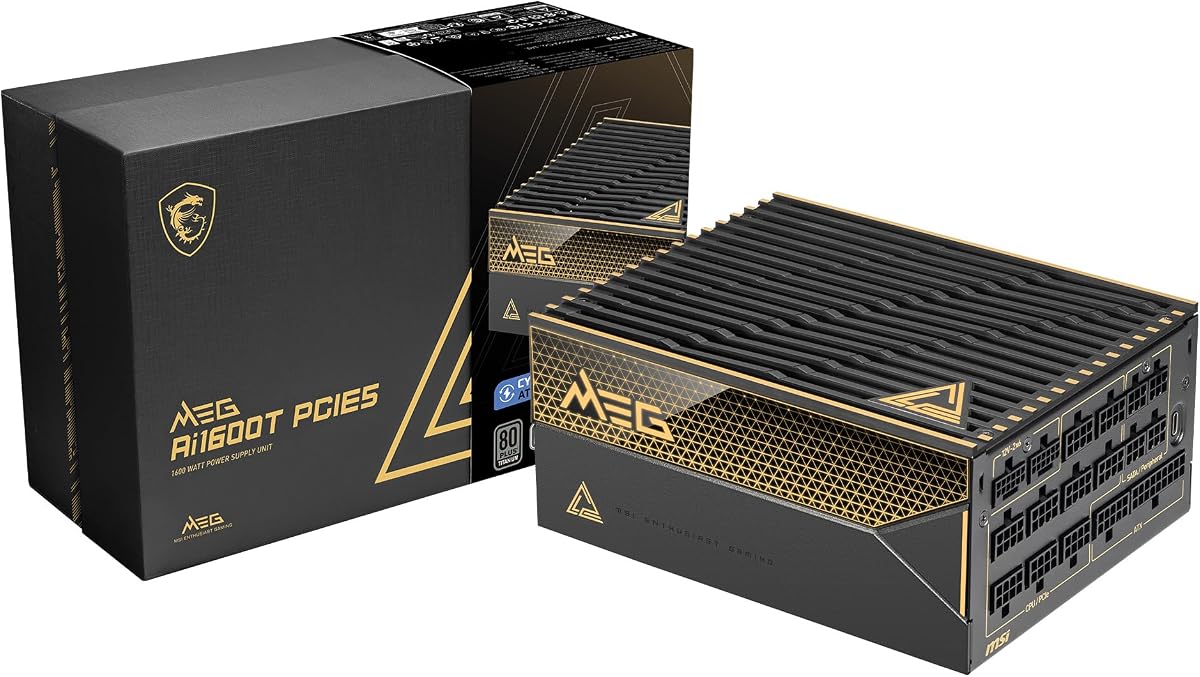
The MSI MEG Ai1600T PCIE5 is built with server-grade components to handle extreme power demands reliably. Its Titanium certification and extensive protection mechanisms ensure stability even under fluctuating loads making it suitable for demanding professional environments.
We may earn a commission when you buy through this link, at no additional cost to you.
Industrial level protection covers all critical aspects including OVP and SCP which safeguard components from electrical anomalies. This robust safety net provides confidence for users investing in expensive hardware that requires consistent and reliable power delivery at all times.
The inclusion of dual native 12V-2×6 cables supports modern GPUs directly without adapters. Braided cables improve durability and aesthetics while the low-noise fan design ensures operation remains quiet even when the unit is fully loaded during gaming or rendering tasks.
This power supply is ideal for users seeking maximum durability and warranty support. The twelve-year warranty reflects MSI's confidence in the unit's longevity making it a sound investment for long-term workstation or gaming setups requiring peace of mind.
Industrial-level protection mechanisms prevent electrical anomalies from damaging components ensuring consistent performance across a wide range of operating conditions.
A comprehensive twelve-year warranty demonstrates manufacturer confidence in the unit's durability providing users with long-term assurance against potential defects.
We may earn a commission when you buy through this link, at no additional cost to you.
The ASUS ROG Thor 1600W Titanium III redefines premium power supplies with a magnetic OLED display that shows real-time power consumption. This visual feedback adds a unique functional layer allowing users to monitor system load without needing third-party software tools.
We may earn a commission when you buy through this link, at no additional cost to you.
It utilizes GaN MOSFETs which offer significantly higher energy efficiency than standard components. Combined with a patented GPU-First voltage stabilizer the unit ensures smooth power delivery to graphics cards enhancing gaming performance and overall system stability during intensive use.
Turbo mode supports extended power excursions ensuring the PSU can handle transient spikes without shutting down. Double ball bearing fans provide superior longevity and cooling performance making this unit both reliable and aesthetically pleasing for high-end custom PC builds.
This model is perfect for enthusiasts who value cutting-edge technology and visual flair. The combination of advanced stabilization and display features makes it a standout choice for flagship builds where performance and aesthetics are equally important priorities.
The magnetic OLED display provides instant visibility into power consumption allowing users to optimize system efficiency without external monitoring software.
GaN MOSFET technology increases efficiency by up to thirty percent reducing heat generation and improving overall power delivery performance significantly.
We may earn a commission when you buy through this link, at no additional cost to you.
The EVGA SuperNOVA 1600 G2 provides solid reliability for multi-GPU setups at a competitive price point. Its 80 PLUS Gold certification ensures efficient power delivery while the fully modular design supports clean cable management for a tidy interior chassis build.
We may earn a commission when you buy through this link, at no additional cost to you.
Built with heavy-duty protections like OVP and SCP it safeguards components against electrical surges. The 140mm double ball bearing fan offers excellent longevity and consistent cooling performance making it suitable for systems running demanding applications regularly.
While it lacks some newer ATX 3.1 features it remains a robust option for users with existing hardware configurations. The ten-year warranty adds significant value and peace of mind for those prioritizing long-term reliability over cutting-edge features.
This PSU is an excellent choice for gamers and workstation users needing raw power without unnecessary extras. Its balance of quality and price makes it a trusted option for systems where proven stability and straightforward performance are paramount needs.
Heavy-duty protections like OVP and SCP guard your hardware against unexpected electrical surges ensuring consistent performance during critical workloads.
The 140mm double ball bearing fan delivers reliable cooling performance with a longer lifespan than standard sleeve bearing fans in similar units.
We may earn a commission when you buy through this link, at no additional cost to you.
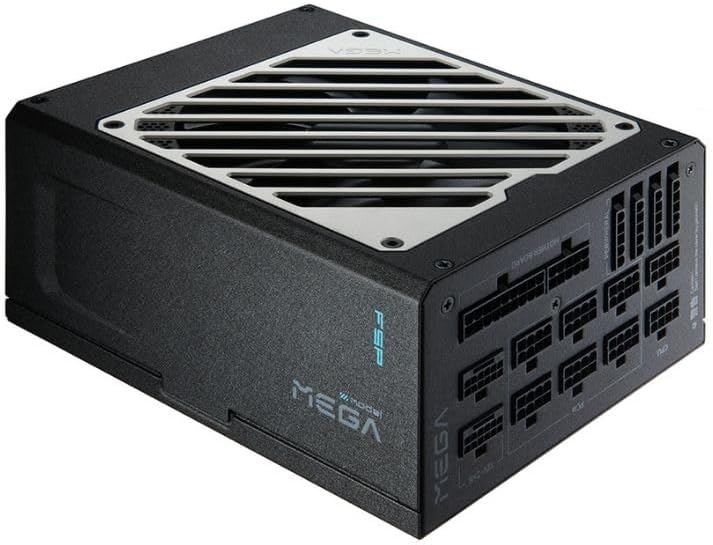
The FSP MEGA TI 1650W offers a compact chassis without compromising on power output efficiency. Its Titanium certification ensures minimal power loss and heat generation making it a smart choice for smaller cases where space is at a premium during build.
We may earn a commission when you buy through this link, at no additional cost to you.
Featuring a 135mm fluid dynamic bearing fan with Eco Zero RPM mode it remains silent during low loads. This mode keeps the fan off until forty percent load which enhances the quiet operation experience for users prioritizing silence in their environment.
Compliance with ATX 3.1 supports up to two hundred percent power excursion which is vital for modern GPUs. The fully modular cabling simplifies installation and improves airflow within the chassis ensuring better thermal management for components inside.
This PSU is ideal for compact high-performance builds needing high wattage in a smaller form factor. Its combination of efficiency and silence makes it a strong contender for users who want top-tier performance in a smaller footprint design.
Titanium efficiency combined with a smaller chassis reduces heat generation while providing enough power for extreme high-end system configurations efficiently.
Eco Zero RPM mode keeps the fan off during low usage ensuring near-silent operation when high-performance cooling is not strictly required.
We may earn a commission when you buy through this link, at no additional cost to you.
The EVGA SuperNOVA 1600 P2 delivers Platinum level efficiency which minimizes wasted energy and heat. Its ECO Mode ensures the fan stops completely at low loads providing a silent experience when the system is idling or handling light daily tasks.
We may earn a commission when you buy through this link, at no additional cost to you.
Using one hundred percent Japanese capacitors ensures stable voltage delivery and long-term reliability. The fully modular design helps reduce clutter inside the case allowing for better airflow and easier cable management during the initial assembly process.
While it is an older model it remains a highly capable power supply for demanding setups. The 140mm double ball bearing fan provides reliable cooling performance ensuring the unit stays within safe operating temperatures even during extended gaming sessions.
This unit is perfect for users seeking proven Platinum efficiency at a competitive price. Its combination of high performance and solid warranty support makes it a reliable choice for builders looking for a balanced high-wattage solution.
Operating at Platinum efficiency levels means less energy is wasted as heat leading to a cooler system and lower power consumption over time.
100% Japanese capacitors provide superior stability and longevity ensuring consistent power delivery and reduced risk of failure over time.
We may earn a commission when you buy through this link, at no additional cost to you.
Selecting a 1600W power supply requires careful consideration of several technical factors to ensure compatibility and efficiency. This guide outlines the critical elements to evaluate when choosing a unit for your specific build needs.
Modern high-wattage GPUs often exceed standard power limits during transient spikes. ATX 3.1 compliance ensures your PSU can handle these surges without shutting down or damaging components. Look for native 12V-2×6 connectors to avoid using adapters that may not be rated for full power loads.
Always verify ATX 3.1 certification before buying to ensure full compatibility with new graphics card standards.
Efficiency ratings like Gold and Titanium determine how much power is wasted as heat. Titanium rated units offer the highest efficiency which reduces electricity costs and heat output. For extreme builds minimizing waste heat is crucial for maintaining stable internal temperatures.
Prioritize Titanium or Platinum certified models for maximum energy efficiency and lower thermal output.
High-wattage units can be noisy under load so fan control features are vital. Semi-passive or Zero RPM modes allow the fan to stop during light loads keeping the system silent. Dynamic fans like Fluid Dynamic Bearings provide smoother operation and lower noise levels overall.
Look for units with smart fan modes to keep your system silent during idle usage.
A fully modular design allows you to connect only the cables you need. This reduces clutter inside the case improving airflow and making the build cleaner. Braided or sleeved cables are more durable and easier to route neatly around components.
Choose fully modular designs with premium sleeved cables for optimal airflow and aesthetics.
Multi-GPU setups or extensive peripheral arrays require a high number of connectors. Check the cable bundle to ensure there are enough PCIe and SATA cables for your needs. Missing ports can force you to use splitters which may reduce safety and performance stability.
Ensure the PSU provides sufficient native connectors to avoid unsafe daisy-chaining of cables.
Premium power supplies typically come with long warranties indicating manufacturer confidence. A ten or twelve-year warranty provides peace of mind for expensive units used in critical builds. It protects your investment against manufacturing defects that might appear years down the line.
Aim for a minimum of ten years warranty to protect your investment long term.
Some high-wattage PSUs are deeper or wider than standard units. Always measure your case's PSU clearance before buying to ensure a proper fit. Larger fans may also limit space for other components depending on your chassis layout.
Verify physical dimensions to ensure the unit fits comfortably within your chassis.
Japanese capacitors are the standard for high-quality power delivery systems. They offer better longevity and stability compared to other types under varying voltage conditions. This quality is essential for preventing brownouts or unexpected system shutdowns.
Verify the use of high-quality Japanese capacitors for better reliability and longevity.
When installing a 1600W power supply ensure you use the correct native connectors for your components. Never force connectors if they do not fit naturally as this can damage the pins and create safety hazards. Proper cable routing helps maximize airflow inside the chassis for better cooling performance.
Regular dust cleaning is essential to maintain optimal cooling and reduce noise levels. Use compressed air to clear dust from fan blades and filters at least once a month. This prevents overheating and extends the lifespan of the fan bearings and internal components effectively.
To maximize efficiency keep your system in a well-ventilated area free from direct sunlight. High ambient temperatures can strain the PSU and reduce its effective output capacity. Ensure there is ample space around the intake and exhaust vents for unrestricted airflow.
A 1600W power supply is typically unnecessary for single GPU systems unless you plan extreme overclocking or multiple GPUs. Most modern high-end setups run efficiently on units between 850W and 1200W. You should only consider 1600W for specialized workstations or extreme multi-GPU configurations.
The 12V-2×6 connector is an updated version of the 12VHPWR standard designed to reduce melting risks. It features recessed pins and tighter tolerances for a more secure connection. Most new high-wattage PSUs now ship with these safer native connectors.
Yes you can use a 1600W PSU for a mid-range gaming PC without issues. The unit will only draw the power your system actually needs. However it might be more cost-effective to choose a lower wattage unit for standard gaming builds.
Modular cables do not affect power delivery efficiency if they are high-quality and properly rated. Poor quality cables can introduce resistance leading to voltage drops. Always use the cables provided by the manufacturer to ensure safe and efficient operation.
High-quality 1600W power supplies can last over ten years with proper care and maintenance. Factors like dust accumulation and high ambient temperatures can reduce this lifespan. Regular cleaning and avoiding constant 100% load help extend the unit's operational life.
A Noctua fan offers superior bearing quality and noise reduction compared to standard unit fans. These fans are designed for longevity and low noise levels making them ideal for silent builds. Units featuring Noctua fans usually command higher prices due to these premium features.
80 Plus Titanium is superior to Gold regarding efficiency and heat management. Titanium units waste less energy as heat which helps keep your system cooler. While Gold is sufficient for most users Titanium is recommended for extreme setups needing maximum efficiency.
Measure the internal length of your case's PSU compartment and compare it to the PSU's dimensions. Many 1600W units are deeper than standard 160mm models. Verify your case's PSU clearance specs on the manufacturer's website before purchasing.
We reviewed ten top models ranging from budget-friendly options to premium units with OLED displays. Our top picks include the ASRock PG 1600G for value the Seasonic Prime TX-1600 Noctua for silence and the ASUS ROG Thor for cutting-edge features.
Prioritize safety and efficiency when selecting a power supply for high-wattage needs. Ensure your choice supports ATX 3.1 standards and offers adequate connectors for your specific GPU configuration to avoid potential compatibility issues later.
Remember that prices fluctuate frequently so always verify current listings before making a purchase decision. Check local availability and warranty terms to ensure you get the best support for your new power supply.