
EMEET C960 1080P Webcam with Microphone, 2 Mics, 90° FOV, Computer Camera
4.4Editor score
Automatic light adjustment
Built-in 2 mics
Plug-and-play setup
This guide compares the top 1080p webcams for streaming and meetings, evaluating video quality, microphone performance, privacy features, and compatibility.
Choosing the right webcam is essential for clear video calls and streaming. A good 1080p webcam ensures you look professional and present your best image during meetings.
We compared ten top models based on video clarity, audio quality, privacy features, and ease of use. Each product was evaluated for its value and performance in real-world scenarios.
Every pick highlights key strengths and ideal use cases for different users. Note that prices and availability change frequently, so check current listings before purchasing any device.
4.4Editor score

4.6Editor score

4.4Editor score
Here is a side-by-side comparison of all ten webcams featured in this guide. Each entry lists key specifications to help you quickly identify the model that fits your needs.



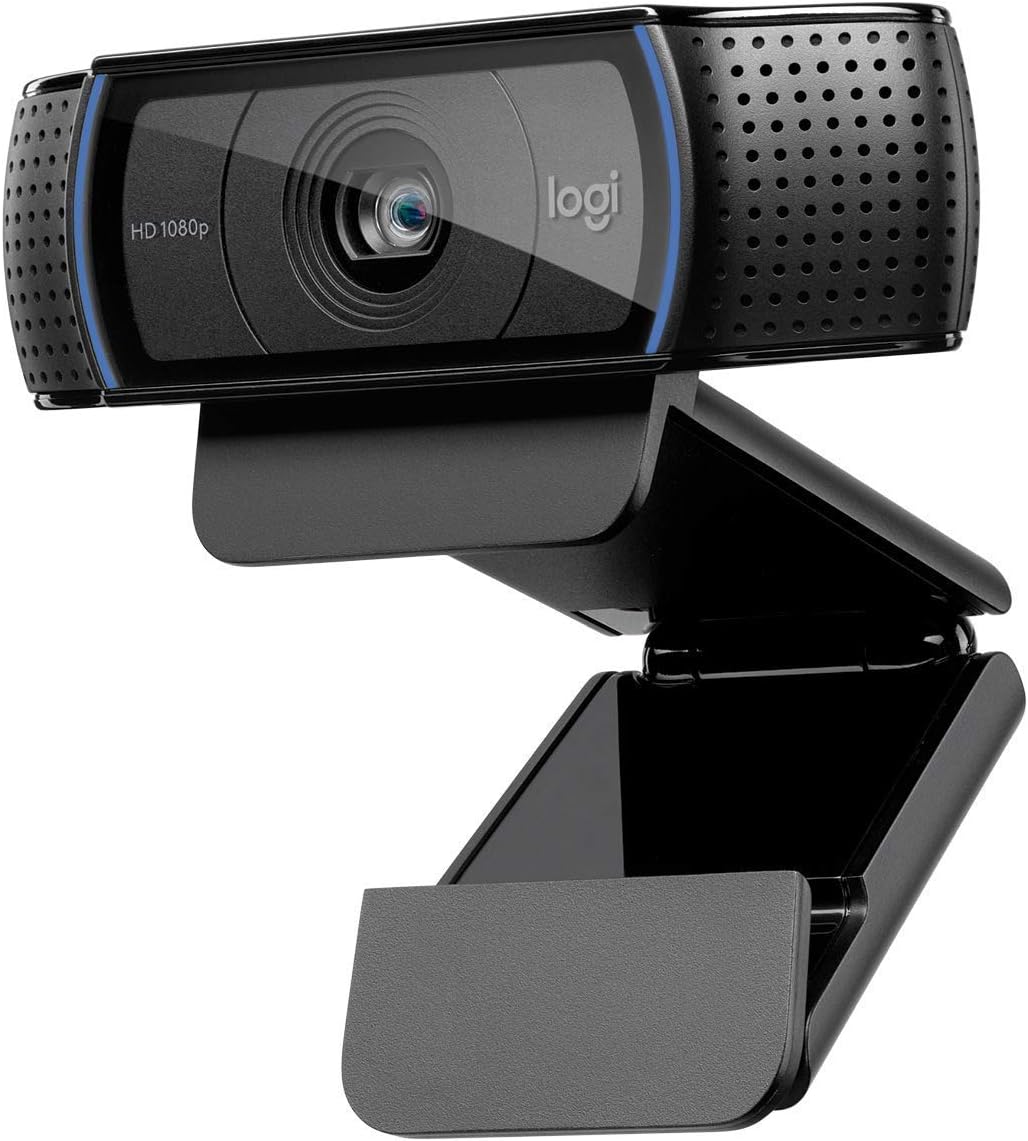


The Logitech Brio 101 is a premium 1080p webcam designed for streaming and business meetings. With a rating of 4.4 stars, it delivers bright and clear video thanks to its RightLight technology.
We may earn a commission when you buy through this link, at no additional cost to you.
Its standout quality is the automatic light adjustment that boosts brightness by up to 50 percent. This feature ensures you look your best even in dimly lit rooms. The integrated privacy slide provides reliable protection when not in use.
While the fixed USB A cable is standard, it limits setup flexibility compared to models with removable cables. Additionally, it lacks advanced manual controls for power users who prefer fine-tuning settings.
This webcam is ideal for professionals and streamers who value privacy and image clarity. It works seamlessly with platforms like Zoom and Microsoft Teams, making it a reliable choice for daily video communication.
RightLight technology automatically adjusts brightness to reduce shadows. This ensures your face remains well-lit and visible during calls regardless of ambient lighting conditions.
The integrated webcam cover slides to block the lens completely. This simple yet effective mechanism gives you total control over when your camera is active and visible to others.
We may earn a commission when you buy through this link, at no additional cost to you.
The Logitech C920x HD Pro is an excellent choice for professional and casual users alike. Rated 4.6 stars, it delivers full HD video at 30 frames per second with precise autofocus capabilities.
We may earn a commission when you buy through this link, at no additional cost to you.
Key strengths include its advanced capture software and stereo audio recording. The dual microphones capture natural sound clearly, reducing the need for external audio equipment. XSplit VCam license allows virtual backgrounds without a green screen.
One trade-off is the lack of a privacy shutter, which may concern security-conscious users. Additionally, the fixed focus range might require positioning adjustments for optimal framing in different room layouts.
This webcam is perfect for streamers and remote workers needing reliable performance. Its broad compatibility and included software tools make it a versatile option for various video conferencing and streaming scenarios.
Dual microphones and HD autofocus work together to ensure clear communication. You get sharp visuals and crisp audio in every call or recorded video session.
Included XSplit VCam allows background removal or replacement. This feature enhances privacy and professionalism without requiring additional hardware or complex setups.
We may earn a commission when you buy through this link, at no additional cost to you.
The Logitech C920S HD Pro offers outstanding value with a 4.6 star rating. It combines full HD video quality with a privacy shutter at a budget-friendly price point.
We may earn a commission when you buy through this link, at no additional cost to you.
Its key strengths include the glass lens and light correction features. These ensure vibrant colors and sharp detail in various lighting conditions. The included privacy shutter adds an essential layer of security for home office users.
The main trade-off is the absence of the XSplit VCam license found in the C920x model. Additionally, software options are more basic, which may limit customization for advanced streamers.
This webcam is ideal for users seeking reliability and privacy without breaking the bank. It handles daily video calls and recording tasks with ease, making it a top pick for general consumers.
The privacy shutter keeps your lens covered when not in use. Combined with HD autofocus and glass lens, you get both security and professional image quality.
Dual microphones capture natural sound without needing external mics. This ensures clear audio for meetings and videos while keeping your setup simple and clutter-free.
We may earn a commission when you buy through this link, at no additional cost to you.
The Logitech C920e is engineered for workplace use with a 4.6 star rating. It features a fixed field of view that balances individual framing with shared content visibility.
We may earn a commission when you buy through this link, at no additional cost to you.
Strengths include certification for Zoom and Microsoft Teams, ensuring seamless integration in office settings. The omnidirectional microphones capture clear audio from up to one meter away, suitable for group discussions.
The attachable privacy screen flips up and down but is not built into the lens housing. The fixed field of view may not suit users who need wider angles for collaborative meetings.
This webcam is best for corporate users needing certified compatibility and durable mounting options. Its design prioritizes stability and clear communication for professional video conferencing needs.
Certification ensures compatibility and performance in business environments. Teams and Zoom users benefit from optimized settings and reliable integration without additional setup.
Sturdy clip and tripod threads allow flexible placement on monitors or stands. This versatility ensures the camera stays securely positioned during long video sessions.
We may earn a commission when you buy through this link, at no additional cost to you.
The EMEET C960 is an affordable 1080p webcam rated 4.4 stars. It offers automatic light adjustment and a removable privacy cover at an entry-level price point.
We may earn a commission when you buy through this link, at no additional cost to you.
Key features include a wide 90-degree field of view and dual omnidirectional microphones. The USB connectors with A-to-C adapter support diverse connectivity needs across different devices and ports.
Fixed focus limits sharpness at very close distances, which may affect users needing detailed close-up shots. Incompatibility with Windows Hello means it cannot be used for biometric authentication.
This webcam is ideal for students and casual users needing reliable video calls on a budget. It delivers clear communication for Zoom and Teams meetings without requiring advanced technical setup.
USB Type-A and A-to-C adapters ensure compatibility with various ports. This flexibility allows you to connect to older and newer computers without extra dongles.
The removable cover slides to protect your privacy when not in use. Combined with automatic light adjustment, you get balanced video quality and security for home office use.
We may earn a commission when you buy through this link, at no additional cost to you.
The NexiGo N60 is a versatile 1080p webcam rated 4.3 stars. It features a privacy cover and noise-cancelling microphone for clear communication across multiple platforms.
We may earn a commission when you buy through this link, at no additional cost to you.
Strengths include broad compatibility with Windows, macOS, Linux, and Chrome OS. The fixed 3.6mm glass lens is optimized for distances between 19.6 inches to 13 feet for consistent indoor results.
Audio delays may require firmware updates available through support channels. The fixed lens range limits flexibility if you frequently move the camera or change seating positions.
This webcam suits users seeking a simple, reliable video solution for various operating systems. Its privacy cover and noise reduction features make it practical for daily video conferencing and content creation.
Supports Windows, macOS, Linux, and Chrome OS without drivers. This ensures seamless integration into diverse computing environments without compatibility issues.
Built-in noise-cancelling microphone minimizes background interference. You get clearer voice transmission during calls even in noisy environments.
We may earn a commission when you buy through this link, at no additional cost to you.
The EMEET S600 is a high-performance webcam rated 4.4 stars. It offers 4K streaming with Sony sensor technology and advanced PDAF autofocus for professional video production.
We may earn a commission when you buy through this link, at no additional cost to you.
Strengths include customizable FOV at 1080P and proprietary audio algorithms that filter background noise. The rugged design with flexible rotation ensures stable positioning during dynamic sessions.
Video resolution depends on connected software or apps like OBS. At 4K, the FOV is fixed at 73 degrees which may limit wide-angle flexibility.
This webcam is ideal for aspiring streamers and content creators needing high-quality visuals. Its advanced features and durable build support professional-level video and audio production at home.
PDAF autofocus offers faster speed and higher precision than standard systems. This ensures sharp focus across various scenes without lag during movement.
Proprietary algorithm filters background noise for crystal-clear voice capture. This enhances audio quality without needing additional external microphones.
We may earn a commission when you buy through this link, at no additional cost to you.
The Logitech HD Pro C920 is a classic webcam rated 4.6 stars. It delivers full HD widescreen video suitable for standard video conferencing and recording tasks.
We may earn a commission when you buy through this link, at no additional cost to you.
Its strengths include reliable video quality and automatic light correction. The design works seamlessly on both desktop monitors and laptop screens with an adjustable clip.
It lacks modern features like privacy shutters or advanced autofocus found in newer models. Software options are basic and do not include the virtual background tools of newer versions.
This webcam is best for users seeking a straightforward and proven solution. Its widescreen format and reliable performance make it suitable for general video calls and presentations.
Full HD widescreen format provides a cinematic viewing experience. This enhances engagement during calls and recorded video presentations.
Adjustable clip fits most laptops and monitors. This ensures stable placement without requiring additional mounting hardware.
We may earn a commission when you buy through this link, at no additional cost to you.
The Logitech Brio 105 is a business-focused webcam rated 4.4 stars. It offers RightLight 2 technology for automatic image improvement in poor lighting conditions.
We may earn a commission when you buy through this link, at no additional cost to you.
Strengths include certification for Google Meet and a built-in privacy shutter. The design ensures employees feel confident and protected while working from home or remote locations.
It lacks advanced manual controls found in higher-end models. The shutter is fixed rather than adjustable, which limits flexibility for some users.
This webcam is ideal for corporate users needing affordable and reliable video tools. Its certification and privacy features make it a secure choice for daily business communication.
RightLight 2 improves image quality automatically in dim environments. This ensures consistent visibility without manual adjustments during video calls.
Integrated privacy shutter keeps the lens covered when not in use. This enhances confidence and protection for employees working remotely.
We may earn a commission when you buy through this link, at no additional cost to you.
The Logitech Brio 100 renewed model is an affordable choice rated 4.5 stars. It delivers clear HD video with a built-in microphone for simple video conferencing needs.
We may earn a commission when you buy through this link, at no additional cost to you.
Its strengths include a seamless plug-and-play experience and broad compatibility with video apps. The included microphone simplifies setup for users without external audio equipment.
The 58-degree field of view is narrower than wide-angle models which limits capturing multiple people. It also lacks a privacy shutter which may be a concern for some users.
This webcam is best for budget-conscious users needing reliable performance. It works well for individual calls and recordings on platforms like Zoom and Microsoft Teams.
Renewed units provide high-quality performance at lower costs. This option allows access to proven technology while saving money on new purchases.
Built-in microphone eliminates need for separate audio gear. This ensures convenient setup for clear voice capture during meetings and video calls.
We may earn a commission when you buy through this link, at no additional cost to you.
Selecting the right webcam involves evaluating several key factors to ensure compatibility and performance with your specific setup and needs.
1080p resolution provides clear and detailed visuals suitable for most video conferencing and streaming needs. Look for models that support 30 frames per second or higher for smooth motion and reduced lag during calls.
Built-in microphones vary in quality so check if they support stereo audio or noise cancellation. Good audio ensures clear communication without needing external microphones for basic video calls.
The field of view determines how much of your surroundings the camera captures. Wider angles suit group meetings while narrower angles focus on individual speakers and reduce background distractions.
Autofocus ensures your image stays sharp even when you move during calls. Automatic light correction adjusts exposure to compensate for poor lighting conditions and keep you visible.
Privacy shutters or covers are essential for security-conscious users. These mechanical blockers prevent unauthorized access and provide peace of mind when the camera is not actively in use.
Ensure the webcam supports your operating system and video conferencing apps like Zoom or Teams. Advanced software tools allow customization of settings and virtual backgrounds for enhanced presentation.
USB Type-A connections are standard but USB-C adapters offer flexibility for newer laptops. Check cable length and connector type to ensure it reaches your device easily without extra extensions.
Sturdy clips and tripod mounts provide stability for various setups. A durable build ensures the webcam stays positioned correctly during long calls and frequent movement.
Connect your webcam to an available USB port on your computer and allow the system to recognize the device automatically. If drivers are needed, install them from the manufacturer's website before launching your video conferencing application.
Adjust the camera angle so it sits at eye level for natural framing during calls. Position the webcam so your face is centered and there is adequate lighting in front of you rather than behind.
Clean the lens gently with a microfiber cloth to avoid scratches and smudges. Store the privacy cover in place when not in use to protect the sensor from dust and accidental damage.
1080p webcams provide twice the resolution of 720p models resulting in sharper and more detailed video. This higher resolution improves clarity especially in low light and during motion making professional video calls more effective.
Most modern webcams are plug-and-play and work without extra software on standard operating systems. However, manufacturer software can enhance features like autofocus or virtual backgrounds for advanced users.
Yes many 1080p webcams are compatible with gaming platforms and streaming software like OBS. Look for models certified for game chat or streaming to ensure optimal performance during gameplay sessions.
Autofocus keeps your image sharp even when you move closer or further from the camera. This prevents blurriness and ensures your face remains clear throughout the duration of any video call.
A privacy shutter provides a physical barrier that blocks the lens when not in use. This guarantees that your camera cannot be activated without your consent and protects your personal privacy.
Most standard USB webcams work with popular conferencing apps by default. However, certified models ensure optimized settings and seamless integration without requiring manual configuration or extra drivers.
The Logitech C920x HD Pro stands out as the top choice for overall performance and clarity. The EMEET C960 offers excellent value for budget-conscious users while the EMEET S600 leads for advanced streaming needs.
Prioritize features like autofocus and privacy shutters to match your specific work or streaming environment. Consider connectivity options and mounting flexibility to ensure the webcam fits your current setup smoothly.
Always check current prices and availability since these can vary by location and retailer. Reading updated user reviews can provide additional insights into real-world performance before making a final decision.