
Ostrich Charger Compatible with Dell Laptop
4.5Editor score
65W and 45W output
Universal round tip connector
Includes converter cable
This guide compares the top battery backup and power solutions for Dell laptops, covering UPS systems, portable power banks, and compatible chargers to ensure
Keeping your Dell laptop powered during outages is critical for productivity. A reliable battery backup ensures you stay connected and work without interruption when the grid fails unexpectedly.
We evaluated ten top-rated power solutions ranging from UPS units to portable chargers. Each option was assessed for compatibility, charging speed, capacity, and safety features to meet diverse user needs.
Every pick highlights key specs, pros, and cons to help you decide. Prices and availability change frequently so verify details before purchasing to ensure you get the best value available now.
4.5Editor score

4.3Editor score

4.4Editor score
The following table provides a side-by-side overview of all ten products. Compare specs and features to find the ideal power solution for your Dell laptop setup.




The UGREEN Power Bank stands out as a top choice for Dell laptop users needing reliable portable power. With a 25,000mAh capacity and 145W output, it delivers serious performance for high demand devices.
We may earn a commission when you buy through this link, at no additional cost to you.
Its massive battery capacity allows for multiple full recharges of most Dell laptops ensuring extended work sessions away from outlets. The 145W PD output supports fast charging even for powerful machines like XPS models.
While it is heavier than smaller power banks its weight reflects the large battery needed for laptops. The digital display adds convenience by showing remaining power at a glance which aids in planning usage.
This power bank is ideal for professionals who need uninterrupted power during travel or remote work. Its combination of capacity speed and reliability makes it a robust solution for Dell laptop users.
Delivers up to 145W through USB-C allowing rapid recharges for laptops and mobile devices simultaneously.
With 25,000mAh it can fully recharge most laptops over once and mobile devices multiple times before needing a recharge.
We may earn a commission when you buy through this link, at no additional cost to you.
The Ostrich Charger offers an affordable solution for Dell laptop users needing a reliable replacement adapter. It supports 65W and 45W outputs with safety certifications ensuring safe operation.
We may earn a commission when you buy through this link, at no additional cost to you.
Its round tip connector fits most Dell Inspiron XPS and Vostro models making it a versatile choice. The inclusion of a converter cable increases compatibility with devices using different tip sizes.
While it lacks the premium build of OEM chargers it meets essential safety standards for everyday use. The compact design makes it easy to pack for travel or work.
This charger is perfect for users seeking a cost-effective replacement without sacrificing performance. Its strong safety features and broad compatibility make it a trusted budget option.
Supports a wide range of Dell laptops with round tip connectors including popular Inspiron and XPS series.
Meets standards from a leading consumer product testing laboratory for electrical safety and design in the US and Canada.
We may earn a commission when you buy through this link, at no additional cost to you.
The CyberPower EC850LCD provides comprehensive power protection for home offices using Dell laptops. It combines battery backup with surge protection ensuring equipment safety during outages.
We may earn a commission when you buy through this link, at no additional cost to you.
Its twelve outlets include six battery backup protected sockets supporting laptops monitors and peripherals. The multifunction LCD panel displays real-time data on battery and power conditions for easy monitoring.
ECO mode intelligently turns off power to peripherals when the computer sleeps reducing energy waste. This feature lowers costs and extends the life of connected devices.
This UPS is ideal for stationary setups where protecting multiple devices is essential. Its robust warranty and eco features make it a premium choice for reliable home office power.
Provides surge protection for all outlets with a one hundred thousand dollar connected equipment guarantee for added peace of mind.
ECO controlled outlets reduce power usage by automatically shutting off peripherals when the main device is off or in sleep mode.
We may earn a commission when you buy through this link, at no additional cost to you.
The Omni 20C+ is a versatile portable power bank that supports laptops and mobile devices. It features 100W USB-C output and wireless charging capabilities for added convenience.
We may earn a commission when you buy through this link, at no additional cost to you.
With a 20,000mAh capacity it provides reliable power for most Dell laptops on the go. The wireless charging pad allows easy charging of phones without cables which saves space.
Its USB hub mode lets you connect peripherals through the power bank enabling file transfers while charging. This dual functionality reduces the need for extra dongles.
This power bank suits users who want a single device for all charging needs. The combination of wired and wireless options with hub features makes it a flexible travel solution.
USB hub mode enables file transfers and device connections through the power bank reducing dongle clutter during travel.
Built-in wireless charging allows compatible smartphones to charge wirelessly without additional cables or adapters.
We may earn a commission when you buy through this link, at no additional cost to you.
This genuine Dell charger provides safe and reliable charging for USB-C enabled laptops. It maintains OEM quality ensuring compatibility and performance for Dell Latitude and XPS devices.
We may earn a commission when you buy through this link, at no additional cost to you.
The 65W output supports fast charging for most modern Dell laptops. Its multi-voltage capability allows use across different regions which is useful for international travelers.
While more expensive than third-party options it offers peace of mind with proven safety and durability. The included power cord simplifies setup right out of the box.
Ideal for users prioritizing safety and original specifications this charger delivers consistent power. It is a trusted choice for maintaining your laptop battery health over time.
As a genuine Dell adapter it ensures full compatibility with laptop power management systems for optimal charging performance.
Supports input voltages from 100 to 240V enabling worldwide use with a standard plug adapter.
We may earn a commission when you buy through this link, at no additional cost to you.
This external USB DVD drive adds optical disc functionality to slim Dell laptops. It is USB powered requiring no extra power source making it easy to carry.
We may earn a commission when you buy through this link, at no additional cost to you.
Its slim lightweight design fits easily in laptop bags and complements ultrabooks. The preloaded Media Suite software enables immediate DVD and CD burning without additional downloads.
While not ideal for high-speed disc burning it meets basic needs for media playback and installation. It is a practical solution for laptops lacking internal optical drives.
Recommended for users who occasionally need to burn or read discs this drive is reliable and simple. Its plug and play nature makes setup effortless for all users.
At just 14mm thick and 200 grams it is easy to carry without adding bulk to your travel setup.
Includes preloaded CyberLink Media Suite for immediate disc playback and burning upon connection.
We may earn a commission when you buy through this link, at no additional cost to you.
This 65W AC charger is designed for Dell Inspiron laptops with round tip connectors. It delivers stable power and meets safety standards for daily use.
We may earn a commission when you buy through this link, at no additional cost to you.
Its broad compatibility covers many Inspiron models from 11 to 17 inch sizes. This makes it a versatile choice for households with multiple Dell laptops.
While it is a third-party charger it includes safety features like overvoltage protection. These safeguards help protect your laptop during charging cycles.
Ideal for budget-conscious users this charger offers dependable performance without OEM costs. It is a solid replacement for lost or damaged original adapters.
Supports a wide range of Inspiron models ensuring you can use one charger for multiple devices.
Features CE and FCC safety certificates to ensure safe operation and protect your laptop.
We may earn a commission when you buy through this link, at no additional cost to you.
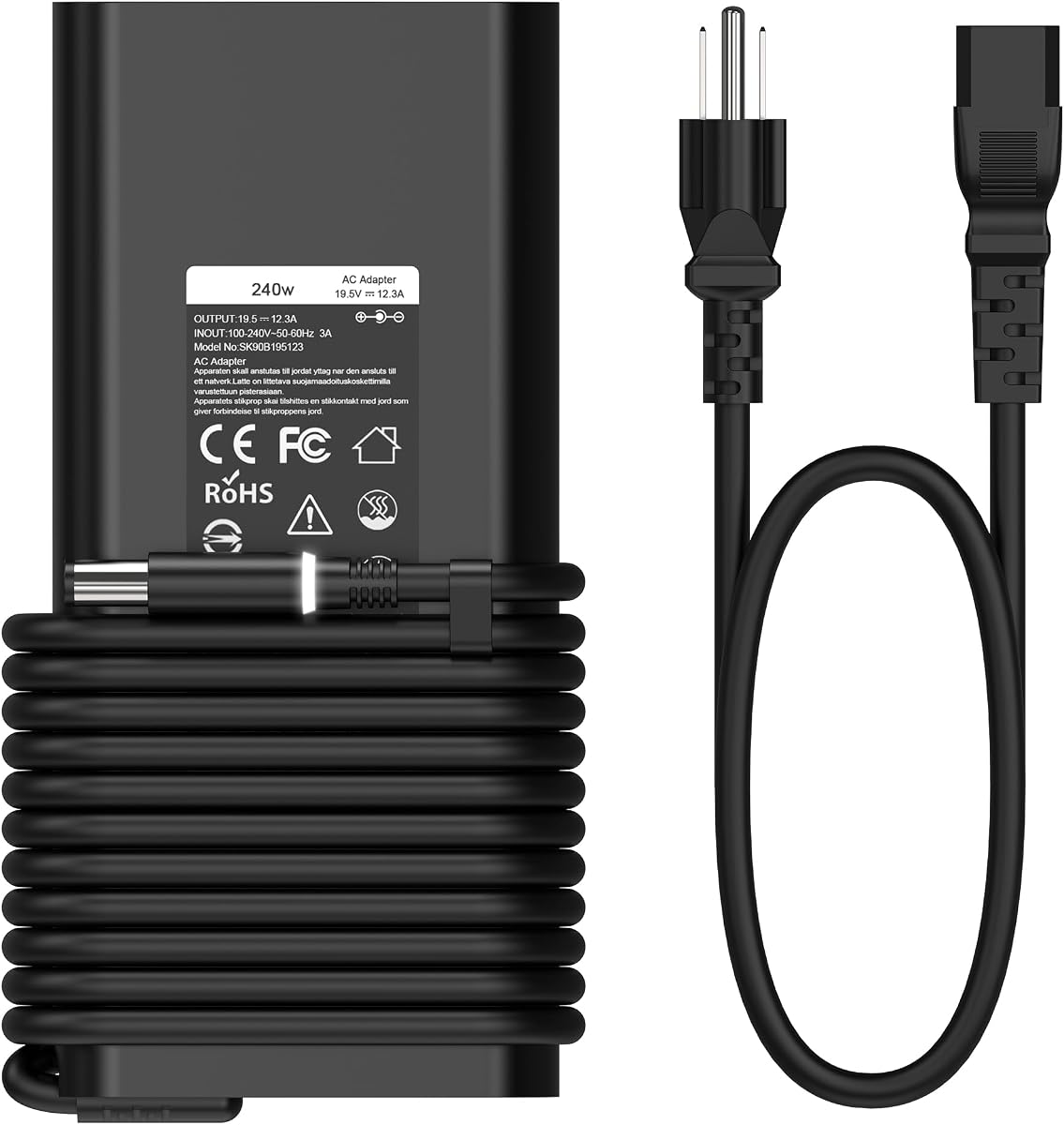
This 240W charger supports high-performance Dell Alienware and Precision laptops. It delivers ample power to run demanding tasks without throttling performance.
We may earn a commission when you buy through this link, at no additional cost to you.
Its slim design is easier to transport than bulkier gaming chargers. This makes it suitable for users who travel with powerful machines regularly.
While it provides significant power it is limited to AC charging and lacks USB options. This means you will need a separate power bank for mobile device charging.
Recommended for gamers and professionals using high-end Dell laptops this charger ensures stable power. It is a reliable option for maintaining full system performance under load.
Supports up to 240W output meeting the power needs of high-performance Alienware laptops.
Compact design reduces bulk making it easier to carry in laptop bags during travel.
We may earn a commission when you buy through this link, at no additional cost to you.
This 330W charger provides maximum power for top-tier Dell Alienware laptops. It ensures stable performance for intensive gaming and rendering tasks.
We may earn a commission when you buy through this link, at no additional cost to you.
With full rated power output it prevents CPU and GPU thermal throttling during heavy use. This maintains frame rates and system stability when you need it most.
Its size and weight are larger than standard chargers but necessary for the high power. The thermal protection keeps the adapter running cooler under load.
Best for users with the most powerful Dell laptops this charger eliminates power bottlenecks. It is a premium solution for professionals and gamers who demand peak performance.
Extra power headroom reduces adapter operating load keeping it cooler and preventing overheating during long sessions.
Delivers consistent power to avoid frame drops and stuttering during intensive gaming or design work.
We may earn a commission when you buy through this link, at no additional cost to you.
This adapter kit converts USB-C PD power to universal DC tips for laptops. It includes 15 different connector sizes covering most laptop brands.
We may earn a commission when you buy through this link, at no additional cost to you.
Ideal for travelers it lets you use a single PD charger for multiple devices. The smart chip adjusts current automatically ensuring safe charging for your laptop.
It requires a 20V PD output source which must be verified before use. Connector fit may vary so check compatibility with your laptop model.
This kit offers flexibility for diverse laptop setups without carrying multiple chargers. It is a practical backup option for users needing adaptable power solutions.
Includes 15 DC connector sizes supporting a wide range of laptops and portable devices.
Built-in E-mark chip adjusts current automatically to match device requirements safely and efficiently.
We may earn a commission when you buy through this link, at no additional cost to you.
Choosing the right battery backup requires understanding your power needs. This guide outlines key factors to consider for selecting the best solution.
Ensure the backup or charger provides sufficient wattage for your Dell laptop. High-performance models may need 180W or more while standard models work with 65W.
Always match or exceed your laptop's power requirements to avoid performance throttling during use.
Verify the connector type matches your Dell laptop port. Some models use USB-C while others require round tips like 4.5mm x 3.0mm or 7.4mm x 5.0mm.
Using the wrong connector can damage your device so check your laptop model specifications carefully.
For portable power banks capacity measured in mAh determines runtime. Look for 20,000mAh or higher to fully recharge laptops multiple times.
Higher capacity means longer backup time but also more weight so balance based on travel needs.
Fast charging support like USB-C PD 3.1 significantly reduces recharge time for both the laptop and the backup.
Prioritize models with high wattage output to ensure quick power replenishment during short breaks.
Look for safety certifications and protection against overvoltage overcurrent and overheating. These features protect your laptop from power surges or malfunctions.
Always choose products from reputable brands that meet recognized safety standards.
For UPS units consider the number of battery backup outlets. You may need to power monitors and peripherals alongside your laptop.
Ensure enough surge-protected outlets to cover all essential devices in your setup.
If you travel frequently choose lightweight and compact options. High-capacity power banks tend to be heavier so weigh portability against runtime.
Slim designs fit better in laptop bags without adding unnecessary bulk.
Check warranty terms for coverage duration and included components like the battery. Longer warranties indicate better build quality and reliability.
Prefer brands offering responsive customer support for troubleshooting or replacement needs.
Always read the manual to understand output limits and connection steps. Proper setup ensures safety and optimal performance.
For power banks recharge them fully before first use and store in a cool dry place. Avoid leaving them in extreme temperatures which can damage the battery.
Regularly check cables and connectors for wear. Replace damaged accessories immediately to prevent potential hazards or charging issues.
Yes many modern Dell laptops with USB-C support can charge from USB-C PD power banks. Ensure the bank outputs at least 65W for standard models and higher for gaming laptops.
Runtime depends on capacity and usage. A 25,000mAh power bank can last 2 to 5 hours depending on screen brightness and workload.
The CyberPower EC850LCD offers excellent features with multiple outlets and surge protection ideal for home office setups.
Third-party chargers with safety certifications are generally safe. Always verify compatibility and look for safety standards like FCC or CE.
Dell laptops typically use round tips or USB-C. If your charger doesn't match you may need a compatible adapter or converter.
Check your laptop model specifications on Dell's website. Most standard models use 4.5mm x 3.0mm connectors while newer ones use USB-C.
Whether you need a portable power bank or a UPS our list covers reliable options for every need. The UGREEN power bank leads for portability while CyberPower excels for home use.
Prioritize compatibility and safety to protect your investment. Choosing the right wattage ensures smooth operation without stressing your laptop.
Prices and availability change so verify current details before buying. Investing in reliable power keeps your work uninterrupted when you need it most.