
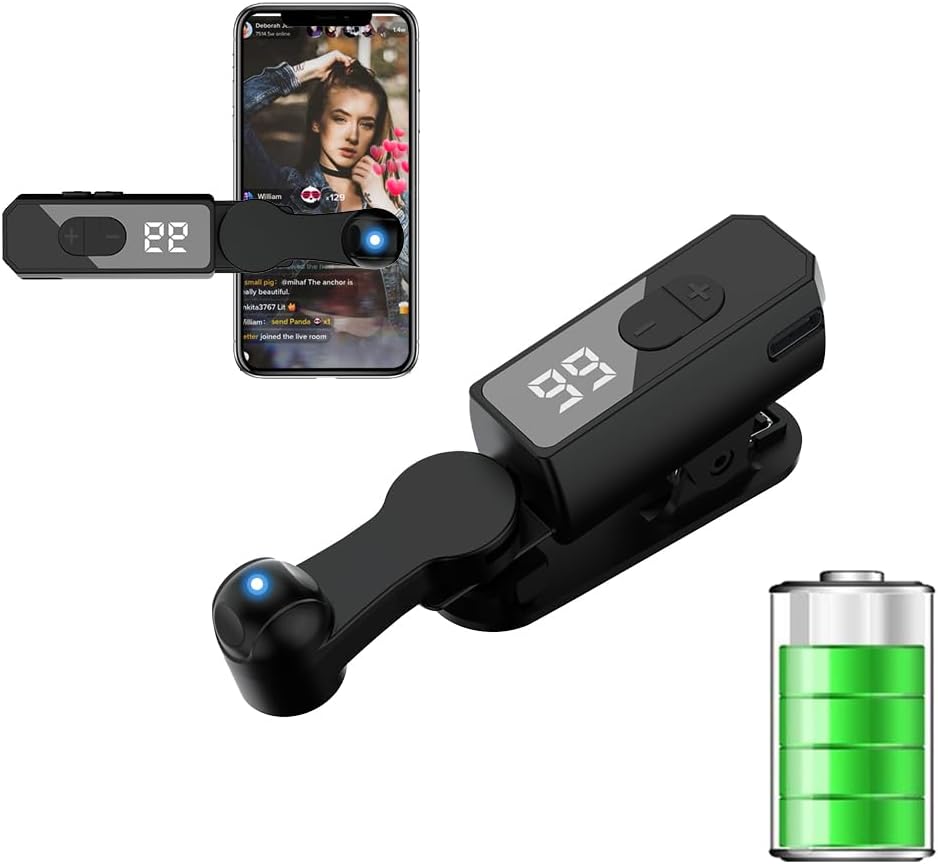
Recharge Auto Clicker Tapper
4.3Editor score
Built-in rechargeable battery
108-speed adjustable gears
LED digital display
This guide compares the best auto clicker for iPhone and iPad devices, evaluating wireless options, speed settings, and compatibility for gaming and social
Finding the right auto clicker for iPhone and iPad can significantly enhance your mobile experience by automating repetitive tasks. Whether you are streaming, gaming, or managing rewards, a reliable tool saves time and effort. We have evaluated top models to help you choose the perfect device.
Our comparison focuses on wireless capabilities, battery life, and compatibility across various iOS applications. We analyzed user feedback, technical specifications, and design features to ensure a comprehensive overview. Each product offers unique advantages tailored to different usage scenarios and preferences.
Each pick highlights key features, pros, and cons to guide your decision-making process effectively. Prices and availability may change, so please check the latest details before purchasing. This guide aims to provide clear, honest insights for informed shopping decisions today.
4.3Editor score

4.3Editor score

4.3Editor score
This side-by-side comparison outlines the key specifications and features of each top auto clicker model. Use this table to quickly identify which device aligns with your specific needs for speed, battery life, and design.



This auto clicker for iPhone and iPad offers robust physical click functionality suitable for various apps. With a rating of 4.3, users appreciate its reliability in gaming and live broadcast scenarios. The design focuses on mimicking human fingers to bypass detection systems.
We may earn a commission when you buy through this link, at no additional cost to you.
Key strengths include the 31-speed gears allowing precise control over click frequency. It supports up to four screens simultaneously, making it ideal for multi-device users. The included screen clip and nano-adhesive provide flexible mounting options without damaging your device.
Trade-offs involve the need for a continuous USB power connection which limits mobility. Additionally, physical contact might be a concern for users who prefer zero-touch solutions. These limitations are acceptable given the anti-cheat benefits it provides.
This device is best for serious gamers or streamers needing reliable automation. If you prioritize avoiding detection over pure wireless convenience, this model fits well. Check current availability for the most up-to-date purchasing options.
Using space mapping click technology instead of traditional mechanical methods helps avoid game updates that detect software automation.
The device can adapt to mobile phones, tablets, and laptops, supporting up to four screens at the same time efficiently.
We may earn a commission when you buy through this link, at no additional cost to you.
This model shares core features with the top pick but emphasizes speed precision. It allows up to 33 clicks per second which is five times faster than a human hand. Users find it effective for tasks requiring rapid repetitive actions.
We may earn a commission when you buy through this link, at no additional cost to you.
The last used gear parameter is memorized after power off, ensuring consistent settings. It supports irregular clicks to avoid robot identification. The screen clip and adhesive options offer versatile attachment methods for different device sizes.
Physical connection via USB remains a limitation for portable use. However, the stability it provides often outweighs this drawback for stationary setups. It balances speed and reliability effectively for targeted applications.
Ideal for users prioritizing raw speed and detection avoidance over portability. This model suits those with fixed setups or access to power. Verify specifications match your specific device needs before purchase.
Achieve up to 33 clicks per second which significantly outpaces manual tapping for time-sensitive tasks.
The device automatically saves your last used gear settings for immediate resumption after power cycles.
We may earn a commission when you buy through this link, at no additional cost to you.
This variant offers consistent performance with a focus on value and durability. It maintains the 31-speed gear system and anti-cheat features seen in higher ranks. Users report long service life due to rigorous testing before shipment.
We may earn a commission when you buy through this link, at no additional cost to you.
The package includes a Type-C charging cable and nano-adhesive sticker for immediate use. Its compatibility with Android and IOS systems makes it versatile. The silent operation ensures it does not disturb quiet environments.
As with other physical models, USB power dependency is the main trade-off. However, the included accessories add significant value compared to competitors. It provides a dependable solution for regular automation needs.
Best for users seeking a reliable and well-equipped auto clicker at a competitive point. If you need multiple units for different rooms, this offers practical utility. Confirm all accessories are present upon receipt.
Each product undergoes rigorous testing before shipment to ensure no technical problems occur during daily use.
The kit includes the auto clicker, click head, cable, adhesive, clip, and user guide for easy start.
We may earn a commission when you buy through this link, at no additional cost to you.
This premium option stands out with its wireless rechargeable design eliminating cable constraints. It offers up to 4 to 8 hours of continuous use on a single charge. The silent motor and soft silicone points protect your device screen from scratches.
We may earn a commission when you buy through this link, at no additional cost to you.
Key advantages include the 2-pack set allowing separate use or sharing. The bracket supports 180-degree rotation for flexible positioning. Clear digital display and simple buttons make speed adjustments intuitive even for beginners.
The main trade-off is a higher price point compared to wired alternatives. Battery duration may vary depending on click frequency and usage intensity. These factors are generally acceptable for users prioritizing freedom and convenience.
Ideal for streamers or frequent travelers needing portable, silent automation. If you value design quality and wireless freedom, this model excels. Ensure you charge fully before first use for best performance.
Enjoy goodbye to wired operation with a built-in rechargeable battery supporting continuous use without plugging in.
Soft silicone contact points and silent motor ensure no scratches or noise during daily tapping tasks.
We may earn a commission when you buy through this link, at no additional cost to you.
This budget-friendly model delivers wireless convenience with a built-in battery solution. It features 108-speed gears allowing granular control from 99 clicks per second to 1 click every 9 seconds. Users value the LED display for real-time monitoring.
We may earn a commission when you buy through this link, at no additional cost to you.
Spatial mapping click technology replaces mechanical methods to prevent screen damage and noise. Instructions guide you through pressing the BOOT button to set frequency via long press. It supports imitation finger-like clicks for seamless experience.
The main downside is a moderate battery life requiring periodic recharging. Beginners may need time to understand the button sequence for best results. Overall, it offers strong value for those seeking wireless features on a budget.
Perfect for casual users needing flexible speed settings without high costs. If you want digital control and rechargeable power, this fits well. Check compatibility with your specific apps before committing to use.
Tailor your tapping speed with 108-speed gears ranging from fast to slow rates easily.
A built-in LED digital display allows you to see the number of clicks and settings clearly.
We may earn a commission when you buy through this link, at no additional cost to you.
This rechargeable model emphasizes battery life with up to 12 hours of extended use. Its ergonomic shape ensures comfortable handling for long sessions. The LED screen provides precise control and monitoring of clicking operations efficiently.
We may earn a commission when you buy through this link, at no additional cost to you.
Designed for smartphones and tablets, it supports various clicking applications. Users appreciate the lightweight design for easy storage and portability. However, high frequencies may not work on all phone models so adjustments might be needed.
The main trade-off involves potential compatibility issues at very high click rates. You may need to lower frequency below 10 clicks per second for some devices. This ensures reliability across different hardware configurations.
Ideal for users needing long sessions without frequent recharging. If portability and battery capacity are priorities, this model suits well. Test on your specific device before extended use to confirm functionality.
A built-in high-capacity battery delivers 12 hours of extended battery life without any need for plug-in power.
The device features an ergonomic shape for comfortable handling and easy storage during travel or home use.
We may earn a commission when you buy through this link, at no additional cost to you.
This wireless tapper features a compact build with 107 adjustable clicking speeds. It operates truly wire-free with no Bluetooth pairing required for immediate use. The optical projection system ensures 100% silent operation preventing screen scratches.
We may earn a commission when you buy through this link, at no additional cost to you.
Key strengths include the integrated LED counter tracking every tap precisely. Standalone speed +/- buttons make adjustments quick and easy. Its portability makes it great for on-the-go tasks like buying tickets or streaming.
Battery life is standard at 8 hours which may limit marathon sessions. Some apps may flag rapid speeds so keeping frequency moderate is advised. These limitations are manageable for most casual to moderate users.
Best for users needing discreet, fast adjustments without cables. If you want a silent and portable solution for TikTok or gaming, this works well. Check battery levels before leaving home to avoid interruptions.
An optical projection system replaces mechanical clicking to ensure zero audible noise even at ear distance.
Monitor operations effortlessly with the smart tapper's real-time digital interface and LED tap counter.
We may earn a commission when you buy through this link, at no additional cost to you.
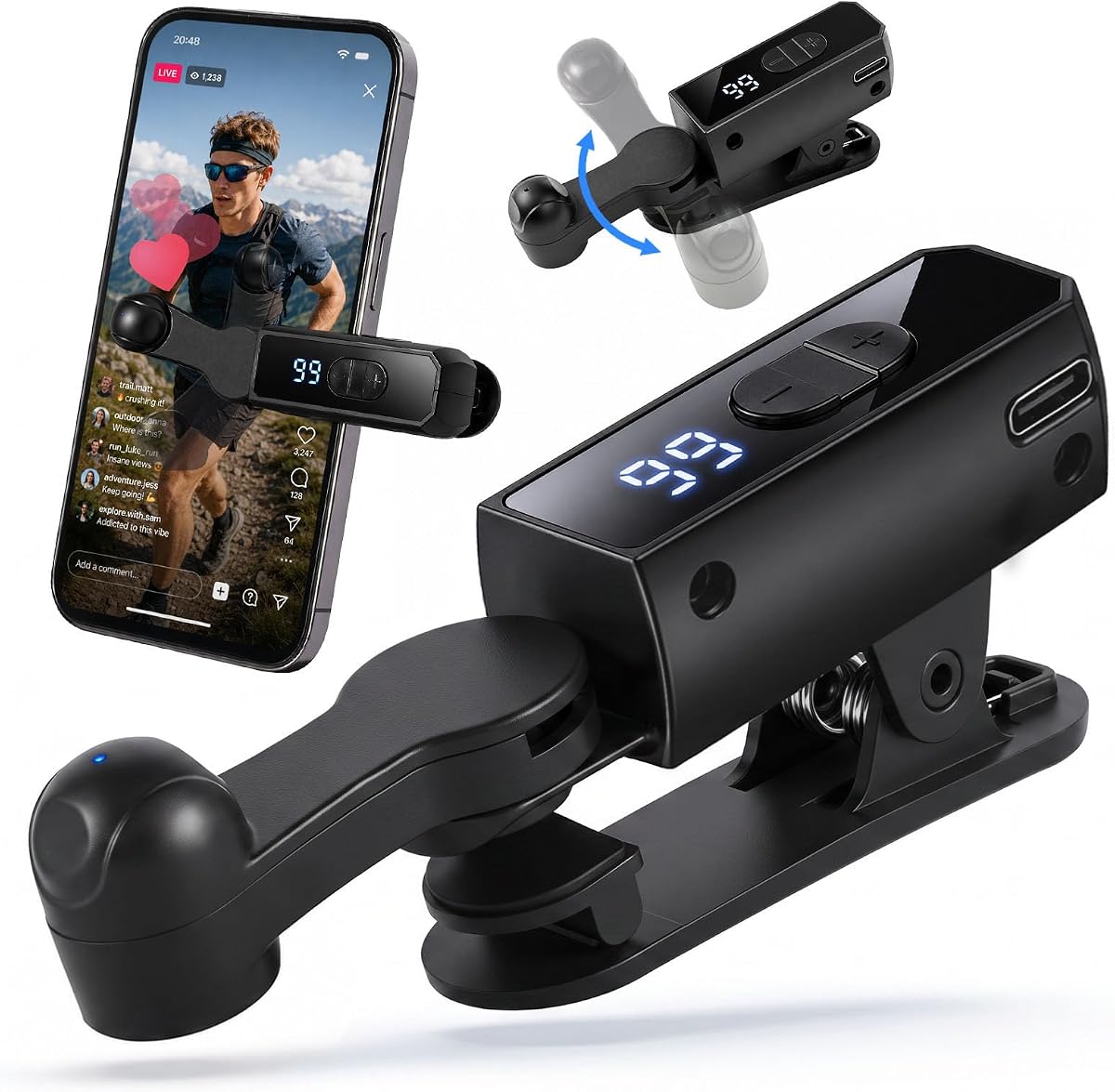
This device mimics human pressure and angle to avoid mechanical click traces. The built-in high-capacity battery supports 5 to 10 hours of continuous use. Users highlight its effectiveness for TikTok live interactions and earning task rewards.
We may earn a commission when you buy through this link, at no additional cost to you.
Integrated stand supports 180-degree up-and-down rotation for flexible positioning. Silent motor and soft silicone contacts ensure no noise or damage to your screen. One-click setup makes it easy to master in about 30 seconds.
Battery life can vary based on usage intensity and frequency settings. Maintaining speed under 25 taps per second helps avoid being flagged as a bot. These factors are typical for wireless tappers in this category.
Ideal for social media users needing reliable engagement tools. If you prioritize safety and design quality, this model fits well. Verify your app's detection rules to ensure safe usage.
This tapper mimics the pressure and angle of real fingers eliminating mechanical click traces effectively.
The integrated stand supports 180-degree rotation for flexible positioning during various usage scenarios.
We may earn a commission when you buy through this link, at no additional cost to you.
This wireless option simulates human finger pressure to avoid mechanical clicks. It supports custom click frequency up to 99 times per second for intense gaming. Users find the silent motor and rubber contacts effective for daily use.
We may earn a commission when you buy through this link, at no additional cost to you.
Stand supports 180-degree rotation and offers flexible positioning on phones or tablets. Clear speed display and one-button control make setup effortless. It works well for apps and games on iPhone and iPad platforms.
Battery life remains moderate at 4 to 8 hours requiring periodic recharge. Avoiding speeds above 20 times per second helps prevent bot identification. These trade-offs are acceptable for users prioritizing silence and convenience.
Best for mobile gamers needing silent and flexible automation tools. If you want reliable performance without cables, this model fits well. Confirm compatibility with your specific game before extended use.
Supports custom click frequency from once every 9 seconds to 99 times per second for flexibility.
Silent motor and soft rubber contacts ensure no disturbance during daily rest or work tasks.
We may earn a commission when you buy through this link, at no additional cost to you.
This 2-pack solution offers true wireless freedom without Bluetooth pairing. Each unit runs 8 to 10 hours on a single charge providing extended use. The touchless screen protection prevents scratches while keeping operation silent.
We may earn a commission when you buy through this link, at no additional cost to you.
Features include smart LED display and 107 adjustable speeds for precise control. One-click start and pause plus rotatable clip suit various tasks like streaming or gaming. Beginners can master setup in under 30 seconds easily.
The lower average rating may suggest variability in individual unit performance. Some users may need to adjust speeds for compatibility with certain devices. Overall value remains strong due to the dual-pack utility and versatility.
Perfect for households or users needing multiple devices for different roles. If you want flexibility and convenience without cables, this set fits well. Check individual quality upon receipt to ensure both units work properly.
Spatial mapping technology means zero physical screen contact with no scratches or wear.
One-touch power and intuitive speed controls allow beginners to master the device in under 30 seconds.
We may earn a commission when you buy through this link, at no additional cost to you.
Selecting the right auto clicker involves evaluating several critical features to ensure compatibility and performance. This guide outlines key factors to consider before making your purchase decision.
Decide between wireless rechargeable models and wired physical clickers based on your mobility needs. Wireless options offer freedom from cables but require battery management. Wired versions provide constant power but limit movement during use.
Choose wireless if you travel often or want a cleaner setup. Opt for wired if you prioritize continuous operation without recharging interruptions.
Look for devices offering a wide range of speed gears to suit various applications. Faster speeds help with quick tasks but may trigger anti-bot systems in some apps. Adjustable ranges allow you to tailor performance to your specific needs.
Ensure the clicker allows both very slow and very fast speeds for maximum versatility. Check if the device memorizes your last settings for convenience.
For wireless models, verify the battery capacity and expected usage time per charge. Longer battery life ensures fewer interruptions during extended streaming or gaming sessions. Consider how often you will recharge based on your usage patterns.
Aim for models with at least 8 hours of continuous use if you plan all-day usage. Check charging time to ensure quick turnaround between sessions.
Physical clickers using space mapping technology often avoid software detection in online games. Software-based auto clickers may be flagged by anti-cheat systems after updates. Choose hardware solutions if you need to prevent account restrictions or bans.
Check if the product specifically mentions anti-cheat prevention in its specifications. This feature is crucial for competitive gaming and live streaming tasks.
Ensure the auto clicker supports your specific iOS version and device model. Some models work better on phones while others are optimized for tablets. Universal compatibility with Android and iOS expands usage options across devices.
Read product descriptions for explicit mentions of iPhone and iPad support. Verify screen sizes supported to ensure proper fit and function.
Evaluate the physical size and weight if you intend to carry the device regularly. Compact designs with clips or stands allow flexible placement without bulk. Look for features like rotatable stands for optimal viewing angles.
Prioritize lightweight and foldable options for travel or commuting. A sturdy build ensures longevity despite daily handling.
Simple button controls and clear displays reduce setup time and operational errors. Models with intuitive interfaces allow quick adjustments without confusing menus. Check if the device supports one-click start or stop for convenience.
Choose options with digital displays to monitor speed and status clearly. Avoid complex setups if you need quick automation during live events.
Accessories like adhesive stickers or screen clips improve attachment security and safety. Packages that include cables and guides offer better value than bare units. These extras protect your screen and simplify the initial setup process.
Verify what is included in the package before purchasing to avoid extra costs. High-quality accessories indicate attention to user needs and protection.
Begin by charging your device fully if it is wireless before first use to ensure maximum battery performance. Connect a physical clicker to a stable power source to avoid interruptions during critical tasks. Proper initial power setup is essential for consistent operation.
Attach the click head or screen clip securely to your device using provided adhesive or clips. Adjust the speed gears using the +/- buttons to match your task requirements. Test the clicking action on a safe application to confirm correct placement and timing.
Maintain your device by cleaning it gently with a dry cloth and storing it in a protective case. Avoid exposing the clicker to moisture or extreme temperatures that could damage internal components. Regular cleaning and careful storage prolong service life significantly.
Using physical auto clickers is generally legal as they do not modify software. However, using them may violate specific terms of service in games or apps. Always check platform policies before automated tapping to avoid account issues.
Most auto clickers work on any touch-enabled app including games and social media. Some apps may restrict input timing or detect repetitive patterns. Testing on your specific app is recommended before relying on it for critical tasks.
Physical clickers that mimic human pressure and irregular clicks reduce detection risk. Keep click speeds moderate and avoid continuous high-frequency tapping patterns. Using anti-cheat prevention features helps evade automated detection systems.
Quality clickers use soft silicone contacts to prevent scratches and damage. Avoid using hard or sharp attachments directly on the glass. Always use protective films or clips designed to distribute pressure safely.
Wireless auto clickers typically offer between 4 to 12 hours of use per charge. Battery life varies based on click frequency and operational duration. Recharge the device fully to ensure consistent performance during long sessions.
Some models support connecting to multiple screens simultaneously for multi-tasking. Check specific product specs for multi-device compatibility limits. You may need separate units for each device if simultaneous use is required.
We reviewed ten top-rated auto clickers offering wireless freedom, speed precision, and durability for iPhone and iPad users. Models like the physical anti-cheat versions suit gaming while rechargeable wireless options offer portability for daily tasks. Each product provides unique benefits tailored to different automation needs.
Prioritize battery life and anti-cheat features based on your specific usage scenarios. Choose wired models for stability and wireless ones for mobility. Consider accessories and speed flexibility to maximize value and convenience in your workflow.
Always verify current pricing and availability as these can change frequently. Check user reviews for recent updates on compatibility with new iOS versions. Make an informed decision based on your requirements to enhance your mobile experience effectively.