
GuileKeys GK-18 Leverless Arcade Stick
4.3Editor score
18 Keys All-Button Layout
Hot-Swappable Switches
RGB Lights and OLED Screen
This guide compares the top 10 Arcade Stick for PS5 options to help you find the best tournament-grade fight controller for your next big gaming session.
Finding the right Arcade Stick for PS5 can transform your fighting game experience completely. A quality stick offers precision, durability, and a comfortable grip for long sessions. It is essential to choose a model that fits your play style and budget.
We compared ten top-rated models based on build quality, compatibility, and features like button layout and joystick type. Our analysis focuses on official licensing, customization options, and user feedback to ensure you get the most reliable gear for serious play.
Each pick shows key specs, pros, and cons to help you decide quickly. Prices and availability change often, so check the latest details before buying. We aim to provide honest insights so you can focus on mastering your next match.
4.3Editor score

4.6Editor score
4.5Editor score
This side-by-side comparison highlights the core differences between the ten selected fightsticks so you can see which model fits your needs best.


This stick is a top choice for serious PS5 gamers. It has a 4.6 rating from users who appreciate its reliability. The official Sony license ensures compatibility without extra adapters.
We may earn a commission when you buy through this link, at no additional cost to you.
The Hayabusa joystick and buttons provide a premium feel that rivals pro setups. The stick opens up for easy maintenance and swaps. This means you can keep it perfect for tournaments or home play.
It is pricier than generic models but worth the investment. You avoid flimsy plastic and poor switches. The build quality justifies the cost for long-term use.
If you want a reliable arcade stick for PS5, this is the safest bet. It works great on PC too. You get a professional tool without needing a pro budget.
The build is sturdy and designed to handle intense matches. It stays put on the table even during rapid combos.
As an officially licensed peripheral, it integrates seamlessly with PS5 systems. You do not need to fiddle with modes or settings.
We may earn a commission when you buy through this link, at no additional cost to you.
The Nacon Daija stick is built with pro collaboration in mind. It holds a 4.2 rating and is great for games like Street Fighter. The Sanwa parts ensure a smooth and precise experience.
We may earn a commission when you buy through this link, at no additional cost to you.
You get two joystick heads to choose your ideal control. The textured palm rest adds comfort during long sessions. The software allows deep customization which is rare in this range.
The weight might feel like a lot for some. It is a tradeoff for the solid feel. You might need to get used to the setup time for mapping.
Buy this if you value comfort and custom mapping. It comes with everything you need to start. The included tools make maintenance easy for anyone.
The software lets you map buttons exactly how you prefer. You can create profiles for different games easily.
Using Sanwa parts means you get industry-standard reliability. The switches feel responsive and durable over time.
We may earn a commission when you buy through this link, at no additional cost to you.
The F700 is a versatile stick for many players. It works on PS5 and Switch with Bluetooth support. A 4.5 rating shows users like the flexibility and price point.
We may earn a commission when you buy through this link, at no additional cost to you.
The wireless options are great for a clean setup. You can also swap parts to match your needs. The hidden spot for the receiver keeps it safe.
It is not officially licensed by Sony which some care about. It only supports fighting games which limits use. These are minor issues for the price.
Pick this for the wireless freedom and great price. It is easy to switch to wired too. You get a lot of value for a small cost.
Connect via Bluetooth or 2.4G receiver without wires. This helps keep your area tidy while playing.
The stick supports Sanwa parts so you can upgrade. It is easy to install better buttons later.
We may earn a commission when you buy through this link, at no additional cost to you.
The Qanba N3 Drone 2 is a classic wired stick. It has a 4.5 rating for its solid feel. The full panel and microphone port make it useful.
We may earn a commission when you buy through this link, at no additional cost to you.
The large panel helps with reach during intense games. The licensed status ensures it works on PS5. The touchpad adds a unique control option.
It is heavy and only works with a cable. This limits portability for some users. However the build quality is very strong.
Choose this if you want a stable and licensed option. The touchpad is a nice bonus. It feels like a real arcade machine.
The large surface area allows for a full layout. You have room to place controls exactly as needed.
As a licensed product it is safe for PS5. You do not need extra steps to use it properly.
We may earn a commission when you buy through this link, at no additional cost to you.
The F700 Elite brings premium parts to a great price. It has a 4.6 rating and uses Sanwa components. The anti-slip mat keeps it secure on any surface.
We may earn a commission when you buy through this link, at no additional cost to you.
The 4-way joystick gives accurate directional input. It works on PS5 and Switch wirelessly. The turbo function helps with special moves.
It does not support Xbox which is a downside. It is mainly for fighting games only. These limits are acceptable for most players.
Get this for the Sanwa quality and rubber mat. It is reliable and easy to set up. You get a strong stick for the money.
The anti-slip mat ensures the stick stays in place. This prevents slips during fast combos and intense moments.
Using Sanwa parts means high reliability. You get smooth switches that feel great to use.
We may earn a commission when you buy through this link, at no additional cost to you.
The F500 supports many consoles including Xbox. It has a 4.0 rating from diverse users. The Magic Boots simplify setup on PS5 quickly.
We may earn a commission when you buy through this link, at no additional cost to you.
You can use XInput on PC easily. The turbo function helps with complex moves. It is a solid option for mixed console households.
On Xbox you need an extra controller for it. The rating is lower than other models. Still it covers many systems well.
Use this if you play on PS5 and Xbox. It offers great flexibility. The turbo feature adds utility for games.
The Magic Boots make it plug-and-play on PS5. You do not need to plug in another controller.
It supports both XInput and DInput for PC. This ensures it works with most game launchers.
We may earn a commission when you buy through this link, at no additional cost to you.
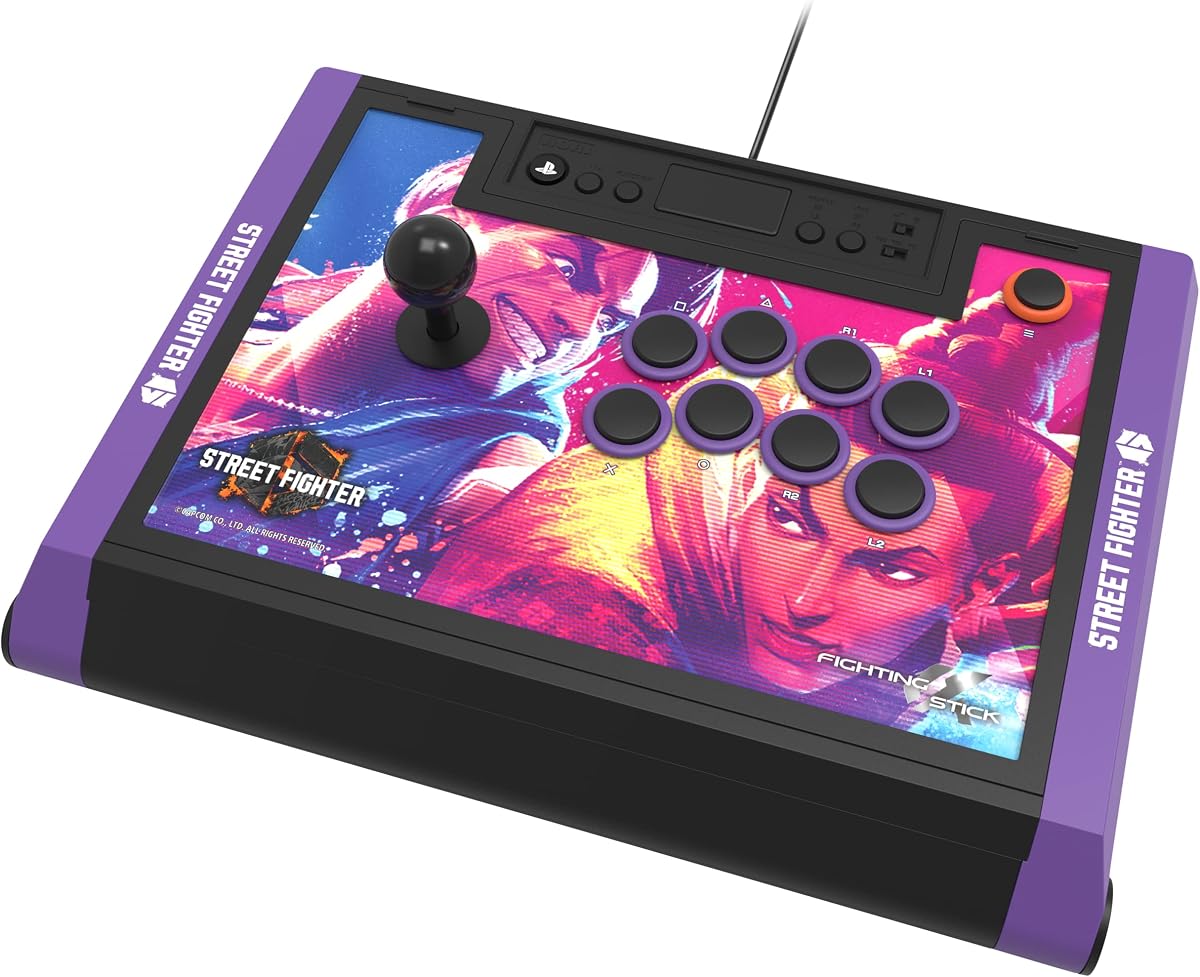
This edition is perfect for Street Fighter 6 players. It has a 4.5 rating for the art and build. The licensed parts make it a safe choice.
We may earn a commission when you buy through this link, at no additional cost to you.
You get downloadable art to print on the panel. It is a nice touch for collectors. The quality is consistent with the main model.
The price is higher due to the art. You might prefer a plain version. But fans will love the special design.
Pick this for the Street Fighter 6 style. It is great for home setups. You get a premium tool with a cool look.
You can download and print hi-res images for the stick. This lets you personalize your setup easily.
The license ensures it works well on PS5. You do not have to worry about compatibility issues.
We may earn a commission when you buy through this link, at no additional cost to you.
The Qanba Q7 lets you swap the joystick tops. It has a 4.3 rating for versatility. The OBSF buttons are responsive for all modes.
We may earn a commission when you buy through this link, at no additional cost to you.
You can switch modes for PS5 or PC easily. It works officially on PlayStation systems. The mic input is useful for streaming.
It costs more than basic models. It is only wired which limits setup. Still it is a solid choice for fans.
Choose this if you want joystick options. The licensed status is good. It feels like a professional tool.
You can swap the tops to fit your style. This allows you to change the feel later.
There is a physical switch for modes. This makes switching between PS5 and PC very quick.
We may earn a commission when you buy through this link, at no additional cost to you.
The Tekken 8 edition is great for fans. It has a 4.6 rating for quality and look. The licensed parts ensure it works well on PS5.
We may earn a commission when you buy through this link, at no additional cost to you.
You get alternate art to print for changes. The build is sturdy and feels professional. It is a good tool for serious play.
It is expensive but worth it for Tekken. You might not use the art often. The quality is what matters most.
Pick this for the Tekken 8 design. It is a strong stick. You get a tool with great support.
You can download and print alternate art. This lets you change the look without buying new gear.
The Hayabusa joystick and buttons are reliable. They are designed for durability and comfort.
We may earn a commission when you buy through this link, at no additional cost to you.
The GK-18 uses a unique all-button layout. It has a 4.3 rating for innovation. The leverless design reduces input errors for some.
We may earn a commission when you buy through this link, at no additional cost to you.
The Kailh switches are fast and quiet. You can swap parts without soldering. The OLED screen shows modes clearly.
It needs an adapter for PS5. This adds cost and setup time. Not everyone will prefer leverless sticks.
Use this if you want a unique setup. The latency is low. It is great for those who like customization.
The all-button layout can improve speed. This style is popular in competitive communities.
The latency is under 1ms in modes. This means fast response for quick inputs.
We may earn a commission when you buy through this link, at no additional cost to you.
Selecting the right fight controller depends on your play style and budget.
Ensure the stick lists PS5 and PS4 support. Some models work on PC but not consoles. Check the licensing details to avoid adapters.
Always confirm PS5 and PS4 support before buying.
Look for sturdy materials like wood or metal. Cheap plastic can break under stress. A solid base prevents sliding during play.
Prioritize sturdy materials to avoid breakage.
Sanwa and Hayabusa are top brands. They offer smooth and reliable inputs. Check if parts are replaceable.
Choose Sanwa or Hayabusa for reliability.
Sticks that open up allow part swaps. This helps you upgrade buttons later. Custom artwork adds personal flair.
Select models that allow part upgrades.
Wired models have lower latency. Wireless options offer clean setups. Decide if you need Bluetooth or 2.4G.
Choose wired for speed or wireless for ease.
Premium sticks cost more but last longer. Budget models may lack durability. Set a limit before shopping.
Balance cost with durability needs.
Standard layouts suit most players. Leverless sticks are for experts. Pick what you can use comfortably.
Pick a layout that feels natural.
Check warranty and manufacturer support. Official licensing often means better service. Read user reviews for feedback.
Ensure warranty and manufacturer support exist.
Connect the stick to your console using the USB cable. Ensure the system recognizes it before launching a game. For wireless models pair the receiver first.
Clean the buttons and joystick regularly with a cloth. Use compressed air to remove dust from switches. Avoid harsh chemicals that can damage plastics.
Store the stick in a safe place when not in use. Cover it to prevent dust buildup. Use the provided cover or a soft cloth.
Most officially licensed sticks work without an adapter. They connect directly via USB. Some models for Switch or Xbox may require a converter. Check the product details to confirm.
Many sticks allow you to swap buttons. Look for models with open chassis designs. You can install new buttons using standard tools. Check if parts are replaceable.
Yes but wired options have lower latency. Wireless is great for reducing clutter. Check for 2.4G or Bluetooth support. Wired is best for tournaments.
Use compressed air to clear dust. Wipe the handle with a soft cloth. Do not apply liquid directly. Regular cleaning keeps it smooth.
Yes they offer better durability and feel. Cheap models may break sooner. If you play often premium is better. It is a long-term investment.
HORI and Nacon are top brands. They have official licensing. These brands are reliable. Check user reviews for specific models.
We found the HORI Fight Stick Alpha to be a great choice. The F700 is good for budget players. The Qanba sticks suit those who like customization.
Prioritize build quality and official licensing. This ensures long-term use and smooth play. Choose a model that fits your hand.
Check current prices before purchasing. Sales can offer better value. We hope this guide helps you find the perfect stick.