
Acer Gadget Auto Face Tracking Tripod for iPhone
4.6Editor score
360 AI Face Tracking
Selfie Stick with Remote
Detachable Ring Light
Compare the top AI gimbal with tripod models for 2026 featuring stable tracking stabilization and hands-free filming tools for content creators and vloggers
Modern content creation demands tools that simplify complex filming tasks while delivering professional results. An AI gimbal with tripod combines intelligent tracking with stable support to help you capture smooth footage effortlessly. These devices adapt to various shooting scenarios ensuring your subject remains perfectly framed without manual adjustments.
We evaluated ten leading models based on stabilization quality AI capabilities ease of use and overall versatility. Each product offers unique features like built-in extension rods lighting and app integration to suit different creator needs. Our analysis focuses on real-world performance to help you find the right stabilizer for your workflow.
Each review highlights key strengths potential limitations and ideal use cases for every model on this list. Whether you are a beginner vlogger or a seasoned filmmaker there is an option tailored to your requirements. Please note that availability and pricing may change so check the latest details before purchasing.
4.6Editor score

4.3Editor score

4.4Editor score
This comparison table provides a side-by-side overview of key specifications for every model to help you quickly identify which device matches your specific filming requirements.




The DJI Osmo Mobile 8 stands out as a top-tier stabilizer for mobile creators seeking professional results. Its high rating reflects reliable performance in tracking and stabilization for vlogs and live streams. The combination of native tracking audio and lighting ensures your content looks polished and professional.
We may earn a commission when you buy through this link, at no additional cost to you.
This gimbal features robust 3-axis stabilization that keeps footage smooth even during dynamic movement. The built-in tripod and selfie stick allow for versatile low-angle shots without wrist strain. Intelligent tracking lets you follow subjects freely while the direct phone connection simplifies setup.
Users should note that the DJI Mimo app is no longer available on Google Play requiring a manual download. This adds a slight step to setup but does not diminish the overall quality of the device. The learning curve is minimal thanks to easy tutorials and one-tap editing tools.
Content creators and vloggers will find this gimbal ideal for events travel and daily recording. Its long battery life supports extended sessions while the charging feature keeps your phone powered. For those wanting a complete solution with audio and lighting built-in this is a strong choice.
Integrated audio reception and lighting keep your shots well-lit and crystal clear without extra gear.
The built-in extension rod and tripod enable group selfies and wide travel shots anywhere.
We may earn a commission when you buy through this link, at no additional cost to you.
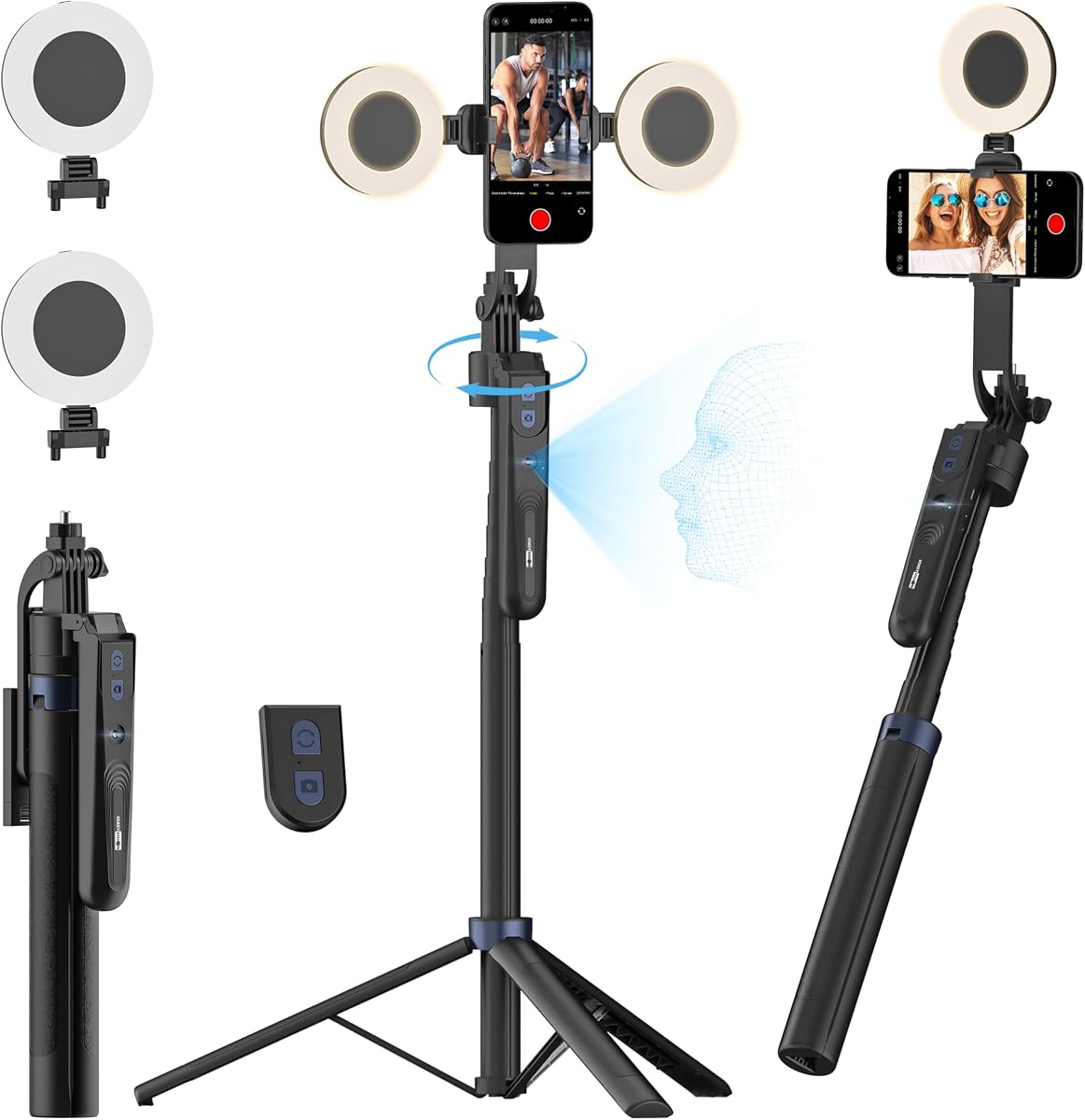
The Acer Gadget Auto Face Tracking Tripod offers an affordable entry point for creators needing smart stabilization. Its impressive rating highlights strong performance in automatic tracking and ease of use. This device simplifies live streaming and vlogging by eliminating the need for complex setups.
We may earn a commission when you buy through this link, at no additional cost to you.
Tracking works without an app using AI camera technology to follow your face or body. The built-in ring light provides three color modes to enhance video quality in low light. The remote allows one-click shooting from a distance making solo filming much easier.
While highly portable the lightweight build may feel less sturdy on windy days. The quad-foot design improves stability but does not match heavier tripods. These trade-offs are acceptable given the low cost and convenience of the all-in-one design.
Beginners and casual users will appreciate the hassle-free operation and compact size. It transforms into a desktop tripod or floor stand for various scenarios. For those seeking an economical solution with reliable tracking this option is highly recommended.
The auto-tracking tripod instantly recognizes and follows your face or body without requiring a mobile app.
Includes a detachable mini ring light with 3 color modes to enhance video quality in low light.
We may earn a commission when you buy through this link, at no additional cost to you.
The Insta360 Flow 2 Pro delivers premium features tailored for advanced mobile filmmakers. Its rating reflects exceptional versatility and tracking precision across various platforms. The inclusion of Apple DockKit sets it apart for users invested in the iOS ecosystem.
We may earn a commission when you buy through this link, at no additional cost to you.
Tracking capabilities are industry-leading with active zoom tracking that follows subjects even at 15x zoom. Multi-person tracking ensures entire groups stay framed making it perfect for gatherings. The 360 infinite pan tracking allows you to move freely while staying in frame.
The price is higher than basic models and some advanced features are limited to specific iPhone Pro models. These limitations are offset by the comprehensive toolkit including a teleprompter and selfie mirror. For professionals needing top-tier performance these constraints are minimal.
Serious content creators and vloggers will benefit from the extensive app compatibility and editing tools. The battery life supports all-day filming while the compact design enhances portability. If you want a complete solution without additional gear this bundle is worth the investment.
The first and only gimbal series with Apple DockKit for seamless integration with 200 plus iOS apps.
Track fast movement precisely even at up to 15x zoom for sports and stage performances.
We may earn a commission when you buy through this link, at no additional cost to you.
The Insta360 Flow 2 Pro Grey version is a robust stabilizer designed for creators on both Android and iPhone. It offers high performance with native tracking across third-party apps for seamless content creation. The rating suggests solid reliability for daily use and streaming.
We may earn a commission when you buy through this link, at no additional cost to you.
Features like intelligent multi-person tracking and active zoom tracking ensure your subjects stay in focus. The integrated professional lighting upgrades mobile filmmaking by providing consistent illumination. The 360 infinite pan tracking enhances flexibility for capturing dynamic scenes.
While it supports more devices than iOS-only models the bundle is quite heavy due to the accessories. The premium price may not fit all budgets but the versatility compensates for many users. Setup is quick allowing you to focus on creativity rather than configuration.
Creators needing a universal solution will find this gimbal highly capable for various scenarios. The essential tools included mean you need no extra gear for full-day filming. For those valuing compatibility and comprehensive features this model is a strong contender.
Designed as a vertical gimbal stabilizer with secure support for a wide range of iPhone and Android models.
Use the Insta360 AI Tracker to get next-level hands-free tracking across 200 plus apps.
We may earn a commission when you buy through this link, at no additional cost to you.
The AOCHUAN Smart V3 Gimbal offers extensive height and remote control options for versatile filming. Its high rating indicates reliable tracking and stability for travel and outdoor activities. The included AI tracking module enhances flexibility for capturing subjects from a distance.
We may earn a commission when you buy through this link, at no additional cost to you.
With a built-in extension rod reaching 70 inches it excels at wide-angle and low shots. The detachable remote allows control from 32 feet making it ideal for group selfies. Intelligent image stabilization ensures smooth footage whether you are walking or running.
Some users may find the build quality less refined compared to top brands but it performs well. The app-free tracking relies on gestures which can be convenient but less precise. These trade-offs are minor considering the functional range and affordable price.
Vloggers and outdoor sports enthusiasts will find the height and remote control particularly useful. The 360 pan rotation provides immersive experiences for viewers. For those seeking maximum reach and convenience this stabilizer is a practical choice.
Let it stand on the ground and control selfies and videos from up to 32.81 feet away.
Built-in 51.2-inch extension rod extending to 70 inches plus a 90 degree foldable top.
We may earn a commission when you buy through this link, at no additional cost to you.
The DJI Osmo Mobile 7P is a capable stabilizer featuring dual-lens tracking for precision. Its rating reflects strong stability and ease of use for iPhone and Android users. This model is excellent for creating cinematic masterpieces with smooth movement and quick setup.
We may earn a commission when you buy through this link, at no additional cost to you.
Pairing with the multifunctional module adds tracking and audio reception capabilities. The magnetic design allows for instant mounting and automatic app popping for fast filming. 3-axis stabilization ensures lossless stability even during creative bursts or movement.
Lack of a built-in extension rod may limit wide-angle shots compared to newer models. The app dependency is common for DJI products and slightly complicates initial setup. These issues are manageable and do not detract from the overall high-quality output.
Creators needing reliable stabilization and quick workflows will enjoy this gimbal. The long runtime supports extended shooting sessions while the module adds professional features. For those prioritizing simplicity and stability this is a dependable option.
The two lenses on your phone team up for smarter steadier tracking with sharp focus on action.
Pair the Multifunctional Module with your phone gimbal for ideal shots every time.
We may earn a commission when you buy through this link, at no additional cost to you.
The USKEYVISION 70.9 tripod delivers significant height and smart tracking for varied filming needs. Its rating points to solid stability and convenience for social media content creators. This device acts as a desktop tripod or floor stand with powerful AI capabilities.
We may earn a commission when you buy through this link, at no additional cost to you.
Highly sensitive design allows the tripod to follow 360 degrees without limits. The dual detachable ring lights offer 3 color temperatures and adjustable brightness for clarity. The rocker handle improves stability and smoothness for video recording.
It is not compatible with tablets or foldable phones which may limit some users. At maximum height stability can decrease slightly requiring careful placement. These limitations are outweighed by the extensive height and versatile lighting features.
Users needing extreme height for overhead shots will find this tripod indispensable. The remote control makes it easy to operate from a distance. For live streaming and travel this option offers a balance of cost and performance.
The cell phone tripod for smartphones features AI camera technology allowing 360 degree rotation with movement.
Equipped with dual detachable ring lights offering 3 adjustable brightness levels and color temperatures.
We may earn a commission when you buy through this link, at no additional cost to you.
The DJI Osmo Mobile 8 with Mic Mini Transmitter enhances audio quality for professional streams. Its high rating reflects excellent integration of tracking and audio for crisp content. This bundle ensures your voice is clear while the stabilizer keeps footage smooth.
We may earn a commission when you buy through this link, at no additional cost to you.
Native tracking with audio reception and lighting keeps your shots well-lit and in focus. The Mic Mini Transmitter pairs seamlessly with the gimbal for reliable wireless audio. Robust 3-axis stabilization ensures professional footage even during dynamic scenes.
The Mic Mini must be paired externally as there is no built-in microphone on the unit. This adds a step but allows for better audio flexibility. The convenience of the bundle is high for those prioritizing sound.
Podcasters and live streamers will benefit from the improved audio and video stability. The 10-hour battery life supports long recording sessions. If audio quality is a priority this bundle is a top choice for creators.
Combine tracking audio reception and lighting to stay sharply in focus well-lit and crystal clear.
Includes the gimbal Mic Mini Transmitter and Multifunctional Module for premium daily recording.
We may earn a commission when you buy through this link, at no additional cost to you.
The Insta360 Flow 2 Plus offers versatile tracking including support for pets and animals. Its rating highlights strong performance for creators capturing dynamic subjects and group activities. This gimbal is ideal for travelers and families seeking reliable stabilization.
We may earn a commission when you buy through this link, at no additional cost to you.
AI tracker delivers precise tracking even in challenging environments with a built-in spotlight. Active zoom tracking allows you to follow fast movement at up to 15x zoom. Animal tracking captures playful leaps and heartwarming gestures with precision.
Active zoom is limited to Pro models of certain iPhone versions which restricts some users. The editing tools are great but rely on the app which may be extra work. These constraints do not affect the core stability and tracking capabilities.
Pet owners and adventure seekers will appreciate the specialized animal tracking feature. The remote control allows second-screen preview and shooting ease. For versatile content creation with unique tracking capabilities this is a great choice.
Let the camera follow your pets wherever they go with AI tracking for dogs cats and even horses.
Flow 2 can track fast movement precisely even at up to 15x zoom.
We may earn a commission when you buy through this link, at no additional cost to you.
The Insta360 Flow 2 Grey is a compact stabilizer perfect for on-the-go creators. Its rating reflects reliable performance for travel and daily vlogging. This model simplifies setup with gesture control and foldable design for easy transport.
We may earn a commission when you buy through this link, at no additional cost to you.
Gesture control allows you to start and stop tracking without touching the shutter. Multi-person tracking ensures entire groups stay framed for family gatherings and meetups. The 3-axis stabilization keeps every shot smooth and professional.
Lighting is standard without extra features found in premium bundles. The zoom range is limited compared to Pro models which may affect sports shooting. These compromises are acceptable for casual users valuing portability.
Travelers and beginners will find this gimbal intuitive and easy to carry. The all-in-one tools mean no extra gear is needed for full-day filming. For those needing a reliable portable solution this is a top option.
Simply raise your hand to start single or multi-person tracking and recording then raise it again to stop.
With Flow 2 you are all set for a full day's filming with no other gear needed.
We may earn a commission when you buy through this link, at no additional cost to you.
Selecting the right AI gimbal with tripod depends on your filming needs device compatibility and budget. Understanding key factors will help you find a model that delivers consistent results.
Most modern gimbals use 3-axis stabilization to eliminate shake and keep footage smooth. Look for models with high torque motors if you plan to shoot with heavier smartphones or accessories. Proper stabilization ensures professional-quality video even when you are moving quickly.
Always check the motor strength and stabilization specs to match your typical usage scenarios.
AI tracking should be accurate and responsive to follow subjects smoothly. Some models support multiple people or pets while others focus on single-face tracking. Advanced tracking also works across many apps for live streaming and social media.
Prioritize models with multi-person or active zoom tracking if you need more flexibility.
A built-in tripod or selfie stick adds convenience by reducing the need for extra gear. Models with extension rods allow for low-angle or wide shots without a separate stand. Stability at full extension is critical to avoid wobble.
Choose a gimbal with a sturdy tripod and sufficient extension for your shooting style.
Ensure the gimbal fits your smartphone size and weight securely. Some are optimized for iPhones while others support both iOS and Android. Check for magnetic mounts or clamps that hold your device firmly during movement.
Verify the compatibility list before purchasing to avoid setup issues.
Long battery life is essential for recording events or vlogging without interruptions. Aim for at least 10 hours of operation to match a full day of filming. Some models also offer charging features for your phone to keep you powered.
Look for high battery capacity and fast charging options for best performance.
Apps provide extra tools for editing tracking and creative controls. Native tracking that works without an app adds flexibility but may limit features. Ensure the app is supported on your operating system for smooth use.
Consider if you need app-based editing or if standalone tracking suits you.
Materials like aluminum alloy ensure durability while keeping the weight manageable for travel. Foldable designs are easier to store in bags and take on trips. A good grip design reduces hand fatigue during long shoots.
Prioritize lightweight yet sturdy models that fit comfortably in your bag.
Accessories like lighting audio modules or teleprompters enhance versatility. Bundles that include these tools save money and reduce the need for separate purchases. Check if the accessory supports your specific needs and integrates well.
Opt for kits that match your content style whether streaming or filming outdoors.
Start by balancing your phone on the clamp or magnetic mount to prevent strain on the motors. Align the device so the center of gravity matches the gimbal axis for smooth movement. Turn on the gimbal and wait for the motors to stabilize before starting to shoot.
Use the app or buttons to select tracking modes and creative presets for your scene. Gesture control allows you to start recording without touching the phone. Adjust lighting and angle settings to fit your environment and subject.
After use clean the gimbal with a soft cloth to remove dust and sweat. Store it in a dry place and fold the extension rods to protect them. Regularly update the app and firmware to ensure optimal performance and new features.
A standard tripod provides static stability while an AI gimbal adds dynamic stabilization and automatic tracking. The gimbal keeps your subject centered and smooth during motion whereas a tripod is best for fixed shots.
Most models support a wide range of iPhone and Android devices within specific weight and width limits. Always check the product specs to confirm compatibility with your particular phone model.
Loosen the clamp or mount and adjust the phone until it stays level without tilting. Then tighten the clamp and power on the gimbal so the motors can compensate. Proper balance prevents motor strain and improves stabilization.
Yes most gimbals work with standard cases but bulky or heavy cases may affect balance. Remove the case if it is too thick to ensure smooth motor movement.
Active zoom tracking lets the gimbal follow subjects even at high digital zoom levels. This ensures your subject remains centered and focused as you zoom in on moving action.
Most modern gimbals offer around 10 hours of continuous use on a single charge. Battery life can vary based on usage patterns and features like lighting or tracking intensity.
Some models work without an app using built-in AI tracking while others rely on the manufacturer app for full features. Check the product details to see if app usage is required for your needs.
No most consumer gimbals are not waterproof. Use them in dry conditions to avoid moisture damage to the electronic components.
We reviewed ten leading AI gimbals with tripods offering features from basic tracking to premium bundles. Each model brings unique strengths in stabilization and smart tools for different creators.
Consider what matters most whether it is tracking precision build quality or accessory bundles before you decide. Matching the device to your workflow ensures you get the most value from your purchase.
Always check the latest product details and availability to confirm it fits your current needs and budget.